
Technical SEO: Scope, Analysis, Issues, Implementation, Skills & Services
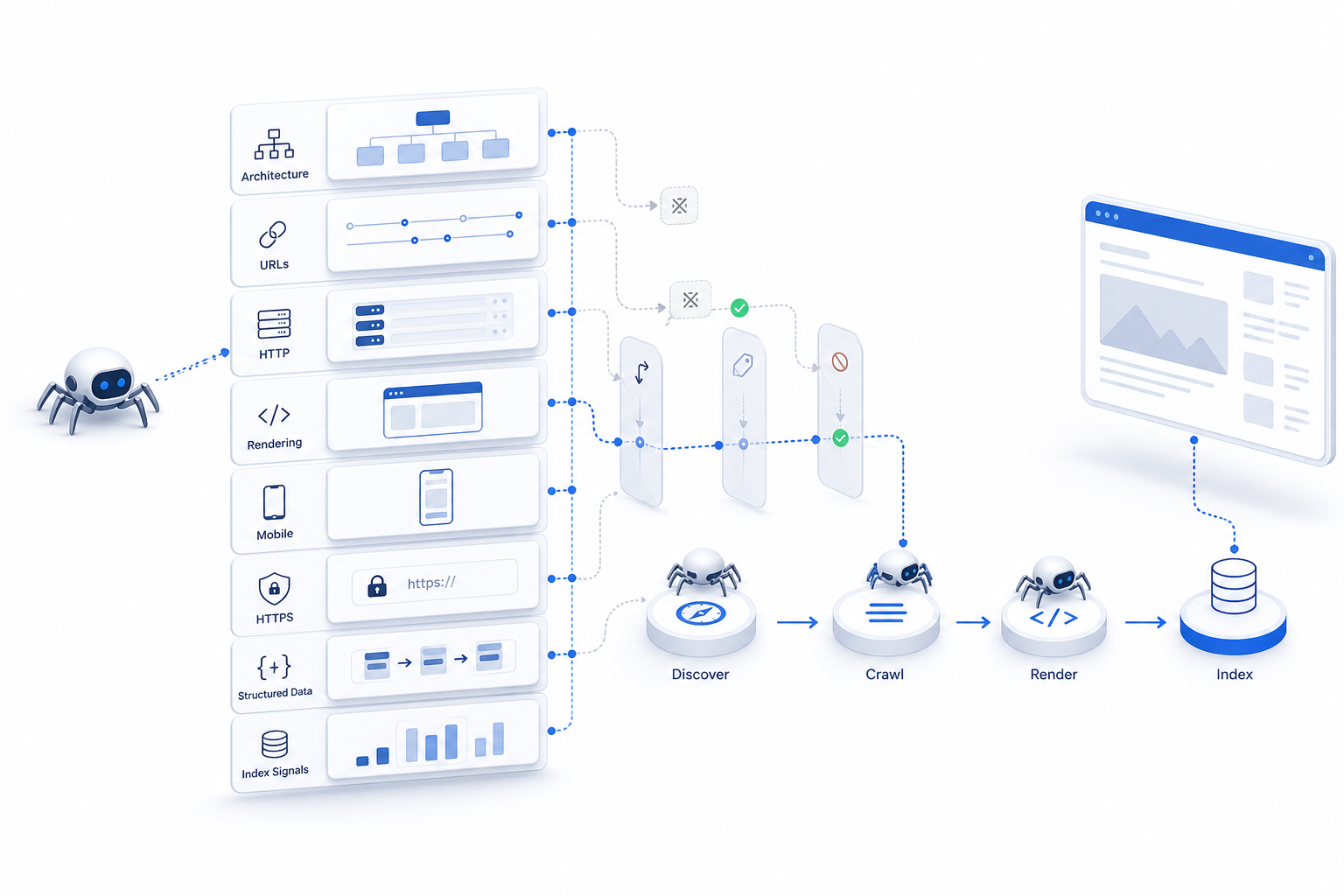
Technical SEO is the practice of optimizing a website’s technical infrastructure and configuration so search engines can reliably discover, crawl, render, interpret, and index its important pages. It focuses on the technical conditions that enable search access and processing rather than on the topical relevance, wording, or informational quality of the page itself.
The discipline covers areas such as crawlability, indexability, rendering, website architecture, URL handling, HTTP status behavior, page performance, mobile accessibility, HTTPS, structured data, and technical consistency. These systems influence whether search engines can reach important URLs, process their content correctly, understand preferred page versions, and maintain reliable access to the website.
Technical SEO differs from on-page SEO in the primary problem each discipline addresses. Technical SEO determines whether search systems can access and process a page correctly, while on-page SEO determines whether that accessible page clearly communicates its topic, search intent, relevance, and usefulness. Some elements, including internal links, structured data, canonical signals, and page performance, can overlap depending on whether they are evaluated at page level or managed systematically across the website.
This technical foundation also affects the value businesses can receive from their wider digital marketing investments. Search-focused content, landing pages, product pages, digital PR assets, and other website resources cannot achieve their full organic-search potential when important URLs are blocked, incorrectly indexed, poorly rendered, unstable, or difficult for search systems to process. Technical SEO therefore supports the discoverability, accessibility, usability, and reliability of those assets without guaranteeing rankings by itself.
A complete technical SEO system includes controls for crawling and indexation, site architecture, XML sitemaps, redirects, canonicalization, duplicate URLs, rendering, page performance, mobile delivery, HTTPS, structured data, international configurations where relevant, and server reliability. Practical technical SEO work can include correcting blocked pages, cleaning XML sitemaps, fixing broken redirects, resolving duplicate URL patterns, improving JavaScript rendering, or correcting invalid structured data.
Determining which technical changes matter requires analysis of how the website actually behaves. Search-engine data, website crawlers, performance systems, server logs, and specialist validators provide evidence about whether important pages can be accessed, rendered, indexed, consolidated, and delivered as intended. These tools identify technical conditions, but their warnings still require validation before they become SEO tasks.
Not every technical imperfection requires remediation. A meaningful technical SEO issue is one that materially interferes with an important page or website section through problems involving discovery, crawling, rendering, indexation, URL consolidation, or page delivery. The importance of an issue depends on the search process affected, the number and value of affected URLs, business significance, recurrence, severity, implementation effort, and technical dependencies.
Once a genuine problem is identified, the technical requirement must address the underlying cause rather than only the visible symptom. Changes can occur within server configuration, CMS settings, templates, routing systems, JavaScript, HTML output, sitemap generation, performance configuration, or other infrastructure. Technical changes also require testing and live validation because an implementation can solve one problem while unintentionally creating another.
The exact implementation varies by website environment. WordPress introduces technical considerations involving CMS settings, themes, plugins, archives, permalinks, sitemaps, and plugin-generated signals. Ecommerce websites add challenges involving category and product architecture, variants, faceted navigation, URL parameters, pagination, availability states, structured data, and large URL inventories. JavaScript applications, publishing platforms, marketplaces, and other website types create their own technical constraints.
Managing these systems requires more than running an automated audit. Technical SEO specialists combine knowledge of search-engine crawling and indexing with website architecture, HTML, JavaScript rendering, HTTP behavior, performance, structured data, technical analysis, data interpretation, prioritization, and developer collaboration.
Businesses can develop this expertise internally or use technical SEO specialists, consultants, and agencies for diagnosis, prioritization, implementation support, migrations, architecture and indexation work, performance improvements, validation, and ongoing monitoring.
Technical SEO is therefore best understood as a connected website infrastructure system that enables reliable search access and processing, not as a collection of crawler warnings, health scores, or isolated ranking factors. A crawlable page is not automatically indexed, an indexed page is not automatically ranked, and a technically healthy website still requires relevant and useful pages to compete effectively in organic search.
The distinction becomes clearer by examining how technical SEO differs from the page-level relevance work handled through on-page SEO.
How Is Technical SEO Different From On-Page SEO?
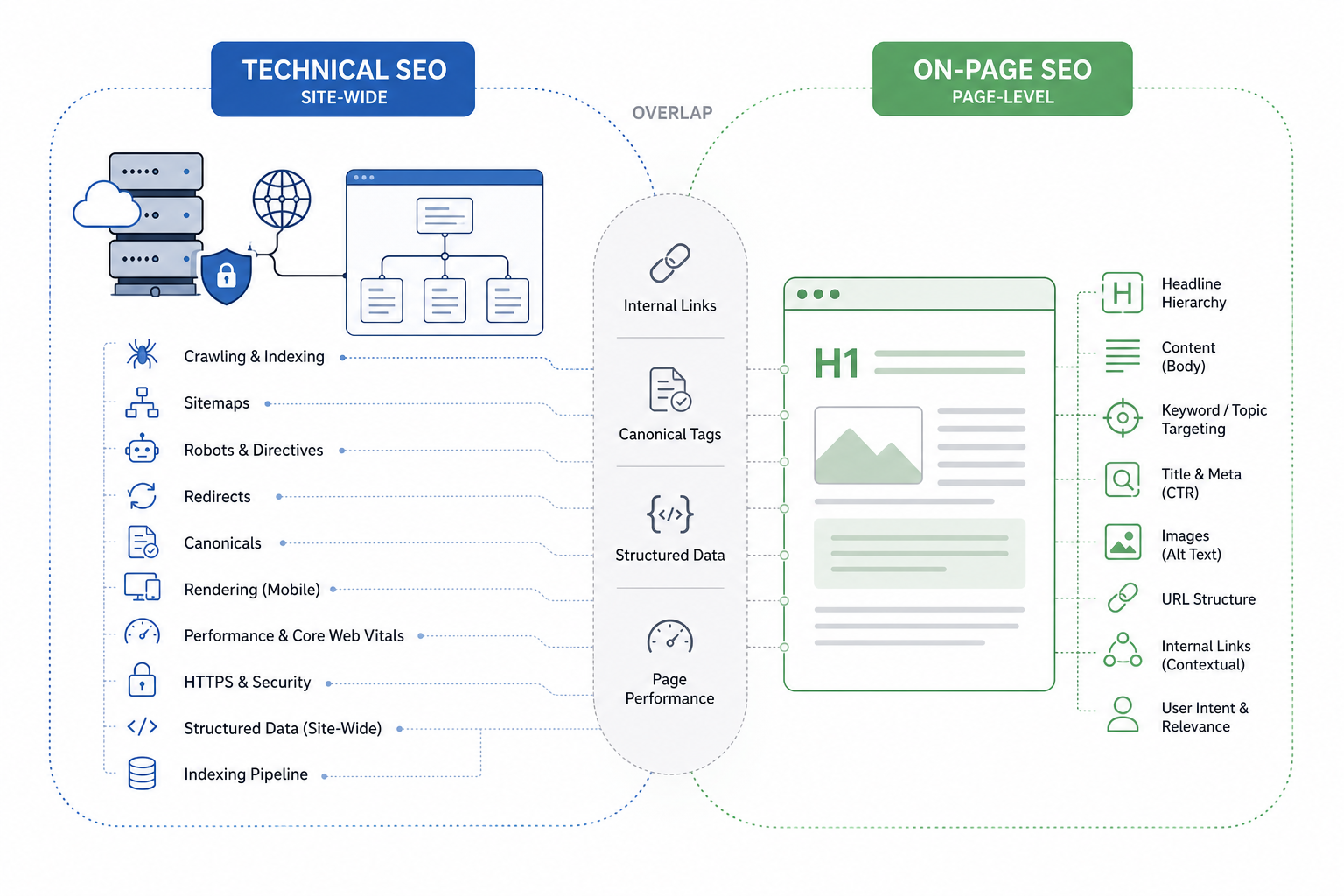
Technical SEO focuses on the website infrastructure that enables crawling, rendering, indexing, and reliable page delivery, while on-page SEO focuses on the content and page-level signals that communicate relevance and satisfy search intent.
| SEO Type | Primary Scope | Main Objective | Typical Elements | Main Diagnostic Question |
|---|---|---|---|---|
| Technical SEO | Website infrastructure and search accessibility | Help search engines access, process, and index important URLs reliably | Crawlability, robots directives, XML sitemaps, redirects, canonicals, rendering, performance, HTTPS, structured data | Can search engines reliably access, process, and index the website? |
| On-Page SEO | Individual webpages | Make the page topic, intent, structure, and usefulness clear | Content, keyword targeting, titles, descriptions, headings, URLs, images, contextual links | Does the page clearly satisfy its intended search need? |
Some areas overlap.
Canonical tags, structured data, internal links, and page performance can be reviewed on an individual URL. Technical SEO becomes the stronger classification when those elements are controlled systematically across templates, directories, or the wider website.
Internal linking also crosses both disciplines. A contextual link inside an article belongs naturally to page-level optimization, while crawl paths and large-scale internal architecture involve broader technical or on-site SEO.
Technical SEO is not simply “backend SEO.” Rendering, mobile behavior, performance, resource delivery, and page accessibility directly influence the user-facing website as well.
Strong organic search performance generally requires both technical accessibility and page-level relevance.
Why Is Technical SEO Important in Digital Marketing?
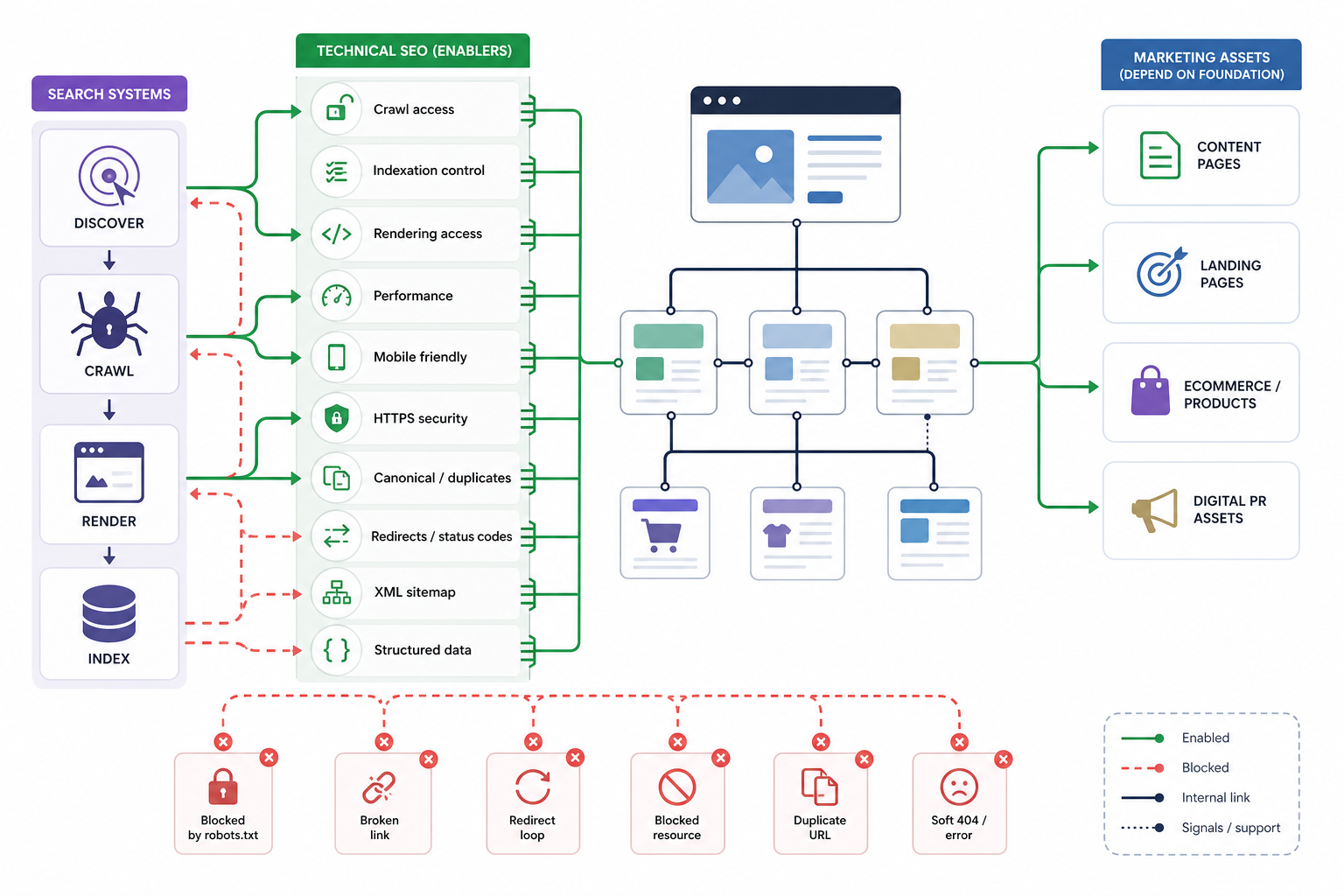
Technical SEO is important because it creates the website foundation search engines require to discover, crawl, render, and index content correctly. Content marketing, landing pages, ecommerce pages, digital PR assets, and other marketing investments cannot generate their full organic-search value when the website prevents those resources from being processed reliably.
Its main benefits include:
- Enable crawling
- Search engines require accessible links and crawl paths to discover important pages.
- Robots directives and server configurations must not unintentionally block important resources.
- XML sitemaps can support discovery by identifying important URLs, although sitemap inclusion does not guarantee crawling or indexing.
- Support indexing
- Technical signals help search engines understand which URLs are eligible for indexing.
- Canonicals, robots directives, HTTP responses, and duplicate handling influence how URL versions are processed.
- Crawlability and indexability remain separate conditions.
- Improve rendering and content accessibility
- Search systems require access to the actual content, links, and navigation produced by the page.
- JavaScript-heavy websites require particular attention when important information depends on client-side execution.
- Improve website performance
- Faster and more stable pages improve how users access and interact with content.
- Technical performance includes loading speed, responsiveness, resource delivery, and Core Web Vitals.
- Performance improvements do not automatically produce ranking gains, but poor delivery can reduce the usability and reliability of important pages.
- Support mobile accessibility
- Important content, navigation, links, structured information, and functionality need to remain available on mobile devices.
- Google uses mobile-first indexing, making the mobile version particularly important for search processing.
- Maintain secure delivery
- HTTPS protects data transferred between the user and the website.
- Valid certificates and consistent secure delivery represent standard technical requirements for modern websites.
- Prevent technical visibility loss
- Broken URLs, blocked resources, incorrect redirects, conflicting indexation directives, duplicate URLs, and rendering failures can prevent useful pages from appearing or functioning correctly in search.
- Support sitewide discovery
- Clear architecture and crawlable internal paths help search systems find important sections and understand relationships between website areas.
- Protect other marketing investments
- Search-focused content, product pages, campaign assets, landing pages, and digital PR resources all depend on a technically functional website.
- Technical failures can reduce the organic value of work created by other teams.
- Support machine-readable accessibility
- Clear HTML, valid structured data, reliable rendering, and accessible page structures make website information easier for search systems and other automated retrieval systems to process.
- Technical optimization does not guarantee inclusion in AI-generated search results or other emerging search surfaces.
Technical SEO acts as the infrastructure layer that allows content, on-page SEO, and broader digital marketing work to be discovered and processed effectively.
What Does Technical SEO Include?
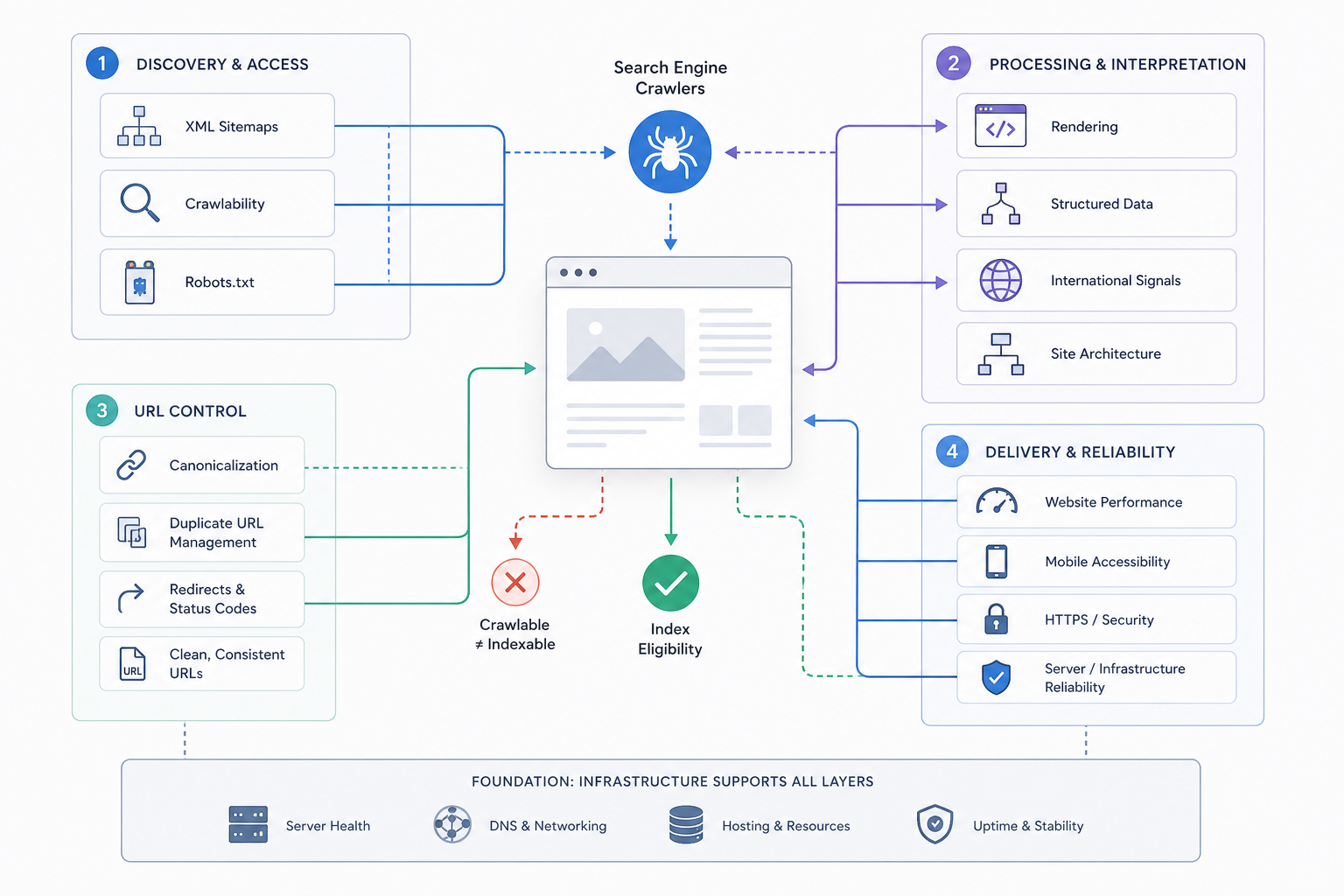
Technical SEO includes the website and server-level elements that affect how search engines discover, crawl, render, interpret, and index webpages. It focuses on accessibility, processing, infrastructure, URL consistency, and reliable page delivery rather than on the informational quality of the page itself.
The main technical SEO elements include:
- Crawlability
- Ensure search engines can reach important URLs.
- Review robots.txt, crawl paths, blocked resources, server responses, and crawlable internal links.
- Identify technical conditions that prevent important pages from being discovered.
- Indexability
- Control which URLs remain eligible to appear in search.
- Review robots meta directives, indexation states, canonical relationships, and duplicate URL patterns.
- A crawlable page is not automatically indexable.
- Rendering
- Ensure meaningful text, links, navigation, and page functionality remain available after rendering.
- Review JavaScript-dependent content where client-side execution affects what search systems can access.
- Site architecture
- Organize directories, navigation, URLs, and internal crawl paths so important pages remain easy to discover.
- Review excessive crawl depth and disconnected website sections.
- XML sitemaps
- Maintain structured sitemap files containing important canonical and indexable URLs.
- Remove inappropriate broken, redirected, duplicate, or intentionally excluded URLs.
- Sitemap inclusion supports discovery but does not guarantee indexing.
- Website performance
- Improve loading, responsiveness, and visual stability where technical implementation creates poor page experience.
- Review server response, resource delivery, scripts, CSS, fonts, images, and Core Web Vitals.
- Mobile accessibility
- Ensure important information and functionality remain available on mobile devices.
- Review mobile navigation, rendering, content parity, and interactive functionality.
- HTTPS and security
- Deliver pages through valid HTTPS connections.
- Resolve certificate problems, mixed content, insecure assets, and inconsistent protocol behavior.
- Canonicalization
- Use consistent canonical signals when duplicate or near-duplicate URLs exist.
- Treat canonical tags as consolidation signals rather than universal fixes for poor URL architecture.
- Duplicate URL management
- Identify parameters, hostname variations, protocol versions, trailing-slash differences, faceted URLs, and other technical patterns generating duplicates.
- Redirects and status codes
- Use appropriate HTTP responses for active, moved, removed, broken, and unavailable URLs.
- Review redirect chains, loops, soft 404s, and server errors.
- Structured data
- Add valid schema markup where it accurately represents visible content and relevant entities.
- Structured data supports machine-readable interpretation but does not guarantee rankings or rich results.
- International signals
- Use hreflang and related signals when a website serves different languages or regional versions.
- Maintain consistent relationships between alternate pages and canonical URLs.
- Server and infrastructure reliability
- Review uptime, hosting behavior, response times, server errors, and infrastructure conditions that interfere with crawling or page delivery.
Technical SEO creates the conditions search systems require to access, process, and interpret a website consistently.
What Are Examples of Technical SEO?
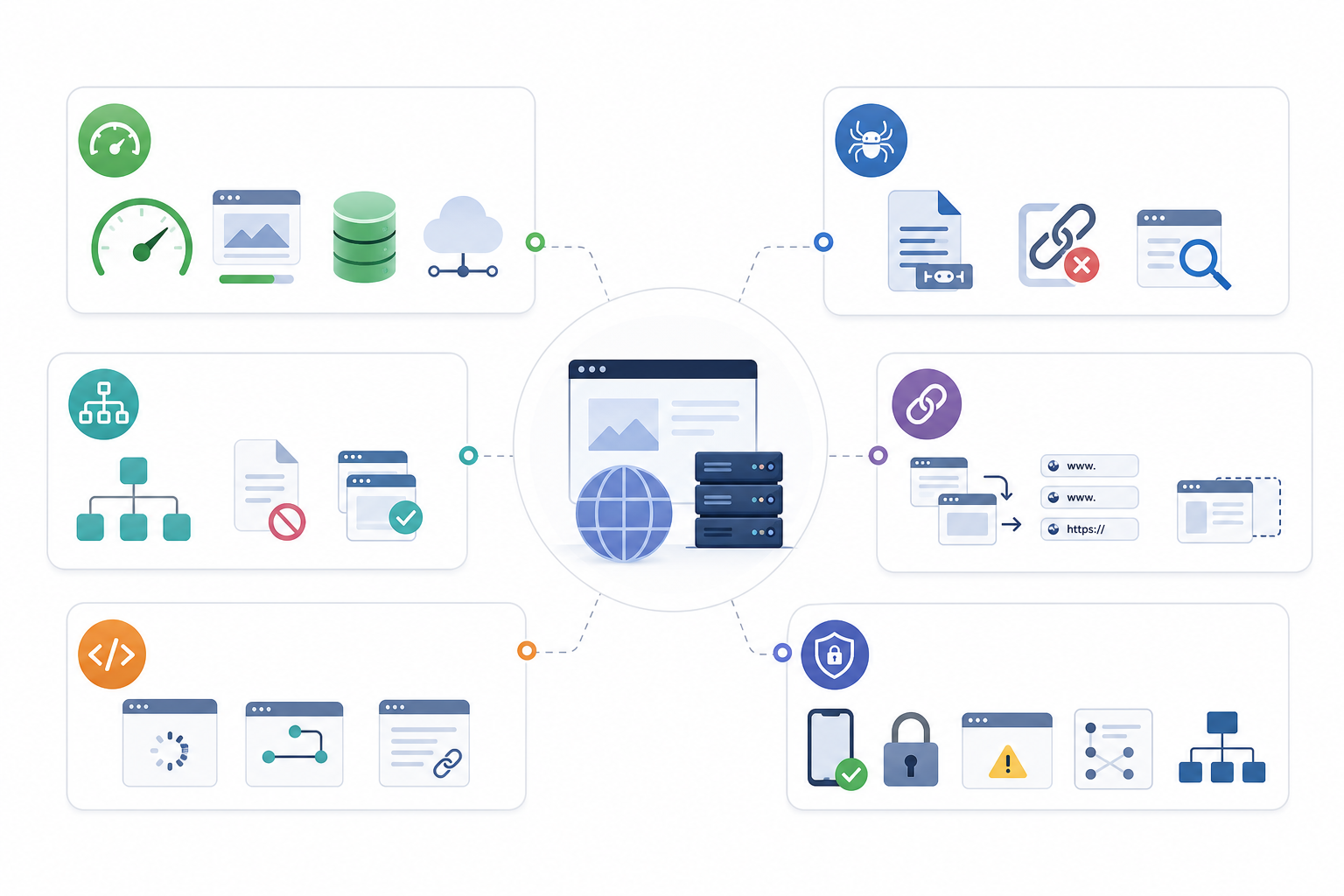
Examples of technical SEO are specific website changes that improve search access, crawling, rendering, indexation, URL handling, or page delivery.
Common examples include:
- Improve site speed
- Compress oversized images.
- Reduce unnecessary CSS and JavaScript.
- Improve caching.
- Optimize resource delivery.
- Use a CDN where it provides a genuine delivery benefit.
- Improve Core Web Vitals
- Reduce slow rendering of major content.
- Improve interaction responsiveness.
- Prevent unexpected layout shifts.
- Review LCP, INP, and CLS as diagnostic performance metrics.
- Create and maintain XML sitemaps
- Include important canonical URLs.
- Keep sitemaps accessible.
- Remove redirected, broken, duplicate, or non-indexable URLs.
- Configure robots.txt correctly
- Allow crawling of important resources.
- Restrict areas that genuinely provide no crawl value.
- Do not use robots.txt as the primary method for removing an already indexed URL from search.
- Fix crawl errors
- Repair important broken internal links.
- Resolve inappropriate 4xx responses.
- Investigate repeated 5xx server errors.
- Restore inaccessible important pages.
- Implement redirects correctly
- Redirect moved URLs to appropriate replacements.
- Remove unnecessary redirect chains.
- Resolve redirect loops.
- Use canonical tags consistently
- Identify preferred URLs where duplicate versions exist.
- Keep canonicals aligned with internal links, sitemaps, and other URL signals.
- Control indexation
- Apply appropriate robots meta directives.
- Remove unintended noindex conditions from important pages.
- Exclude pages from indexing only when that aligns with website strategy.
- Improve mobile accessibility
- Preserve important content and navigation.
- Maintain mobile functionality.
- Resolve mobile rendering differences that hide important information.
- Implement HTTPS consistently
- Maintain valid SSL/TLS certificates.
- Redirect HTTP URLs consistently.
- Fix mixed-content problems.
- Add valid structured data
- Mark up relevant entities and page types.
- Keep structured data consistent with visible content.
- Remove conflicting or invalid implementations.
- Improve JavaScript rendering
- Ensure important links and text remain available to search systems.
- Review client-side routing and dynamically generated content where accessibility problems exist.
- Improve site architecture
- Create clearer paths to important pages.
- Reduce unnecessary crawl depth.
- Connect important sections through crawlable navigation.
- Resolve duplicate URL variations
- Consolidate parameter URLs.
- Standardize protocol and hostname versions.
- Resolve unnecessary trailing-slash or alternate-path inconsistencies.
Not every website requires every technical change. Technical SEO actions respond to actual diagnosed problems rather than a universal checklist.
How Do You Analyze Technical SEO?
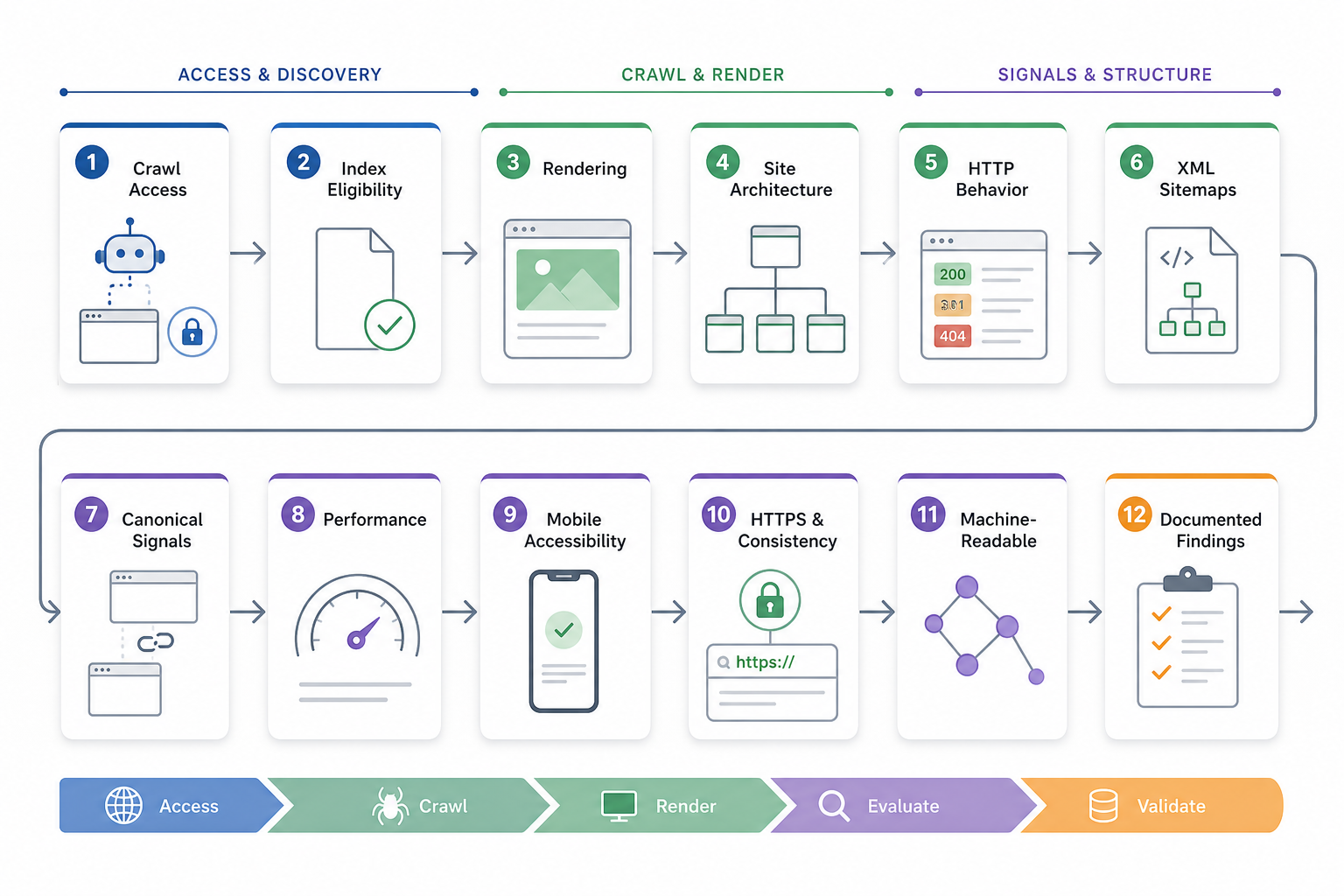
Technical SEO analysis examines how search engines access, crawl, render, interpret, and index a website in order to identify validated technical conditions that restrict search processing or performance.
1. Check Crawl Accessibility
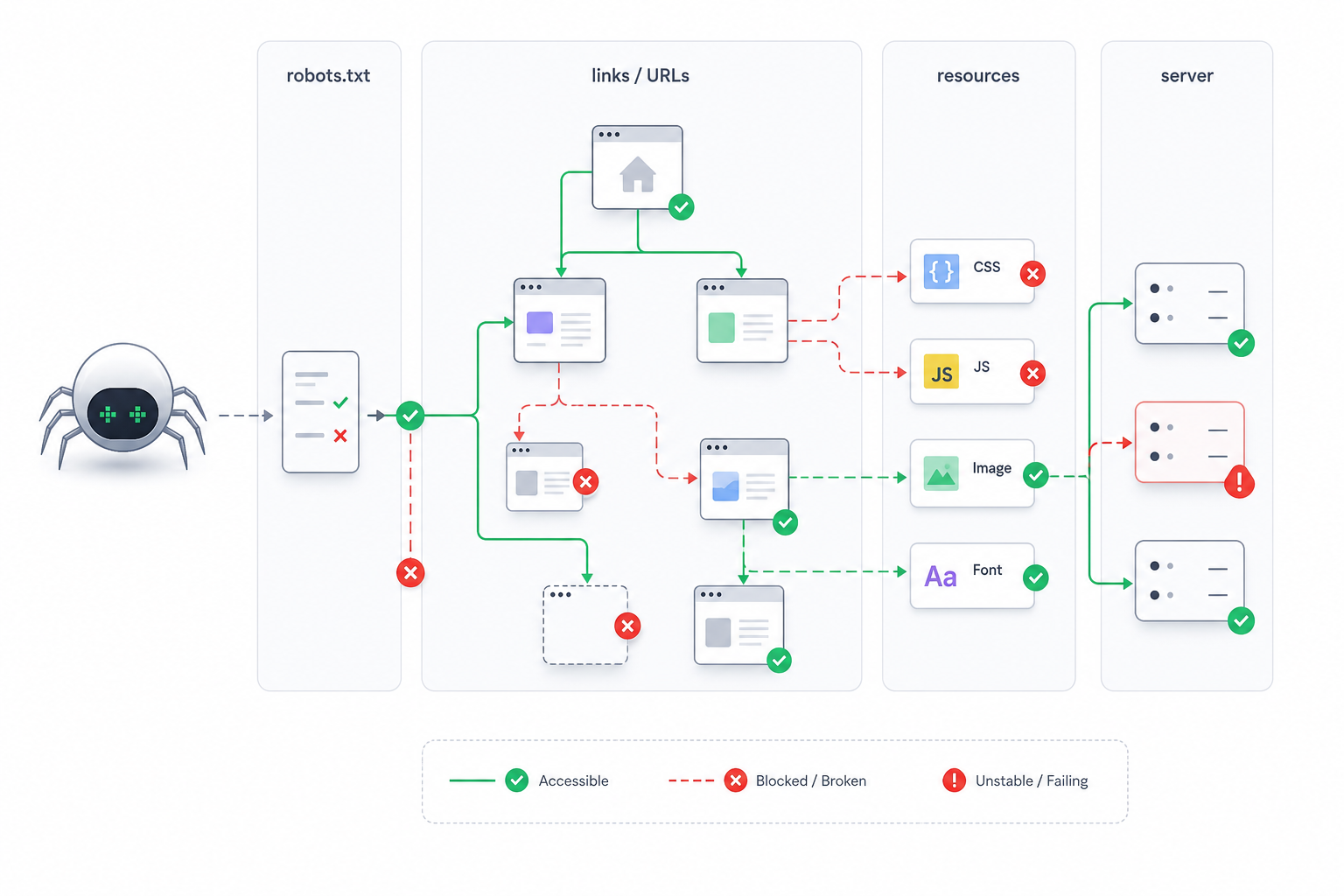
Review:
- Robots.txt
- Crawl restrictions
- Internal crawl paths
- Blocked resources
- Server accessibility
- Important linked URLs
Identify pages or resources that search systems cannot reach reliably.
2. Check Index Eligibility
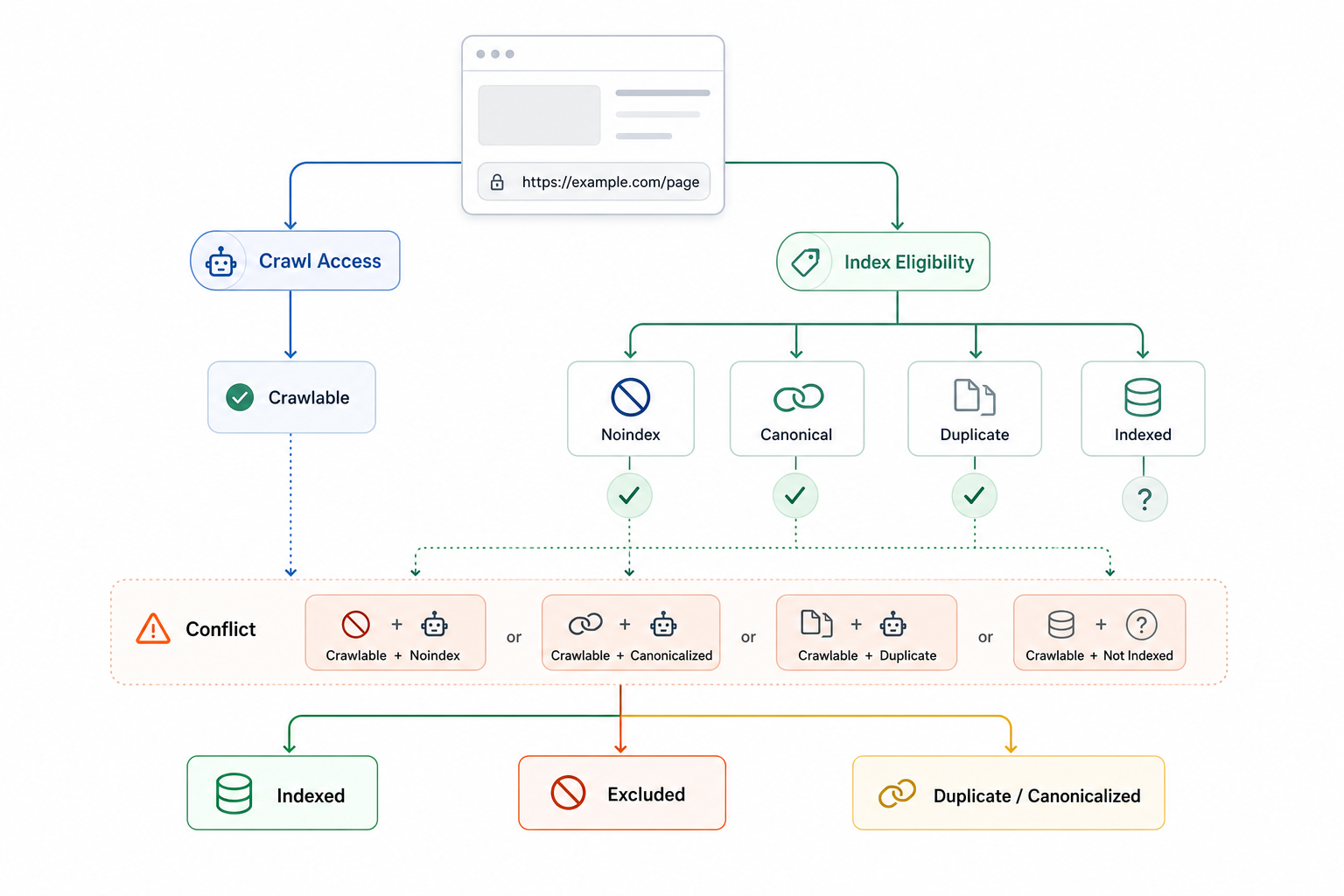
Review:
- Noindex directives
- Current indexation states
- Canonical relationships
- Duplicate URL patterns
- Conflicting signals
Keep crawl access and index eligibility separate. An accessible URL can still remain excluded from indexing.
3. Check Rendering
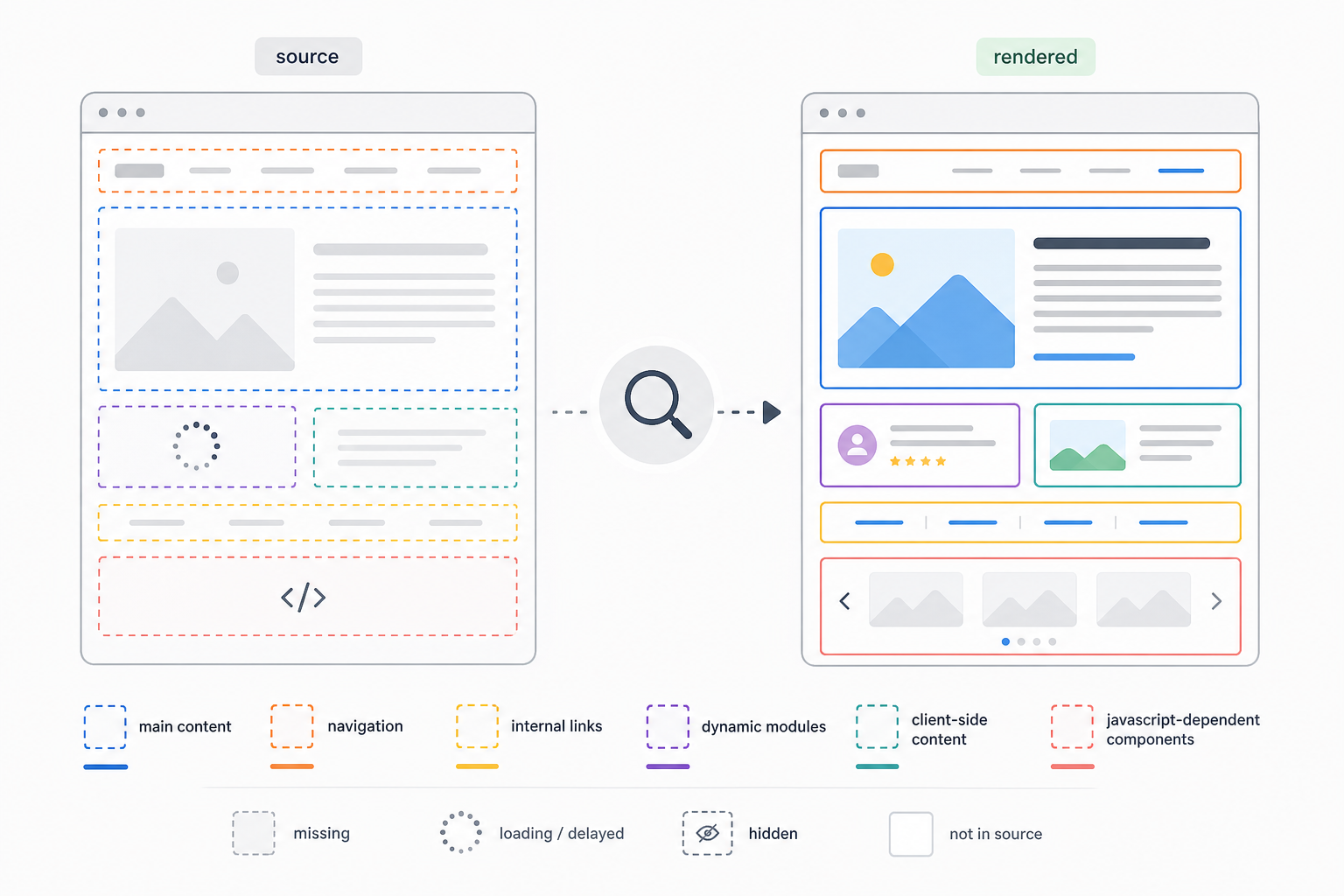
Determine whether important content remains available after rendering.
Review:
- Main text
- Navigation
- Internal links
- Dynamic elements
- Client-side content
- JavaScript-dependent components
Pay particular attention to applications where important information depends heavily on browser execution.
4. Evaluate Architecture and Crawl Paths
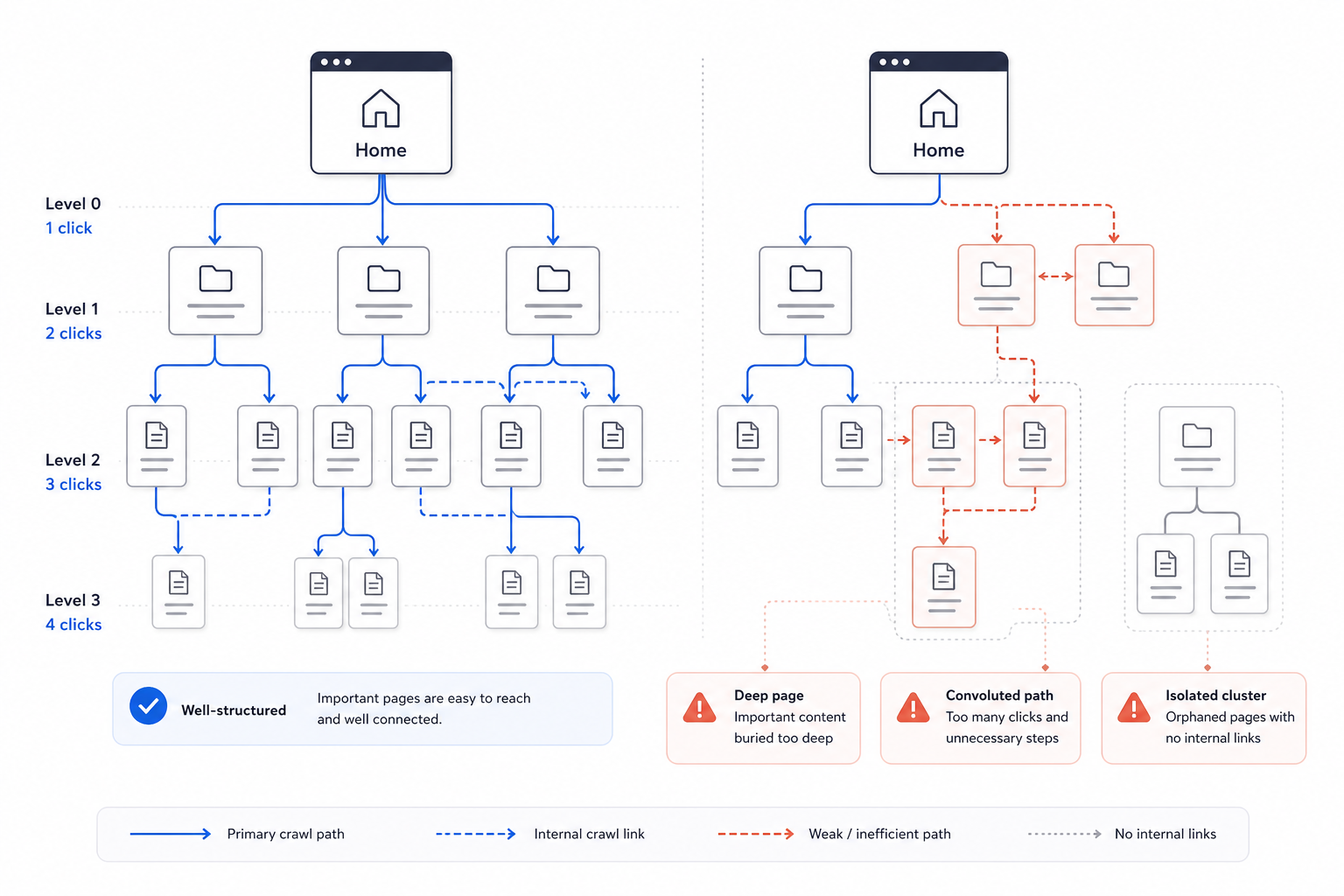
Review:
- Directory structure
- Navigation
- Internal crawl relationships
- Click depth
- Important website sections
- Disconnected page groups
Identify architecture that unnecessarily complicates discovery or isolates important content.
5. Inspect HTTP Behavior
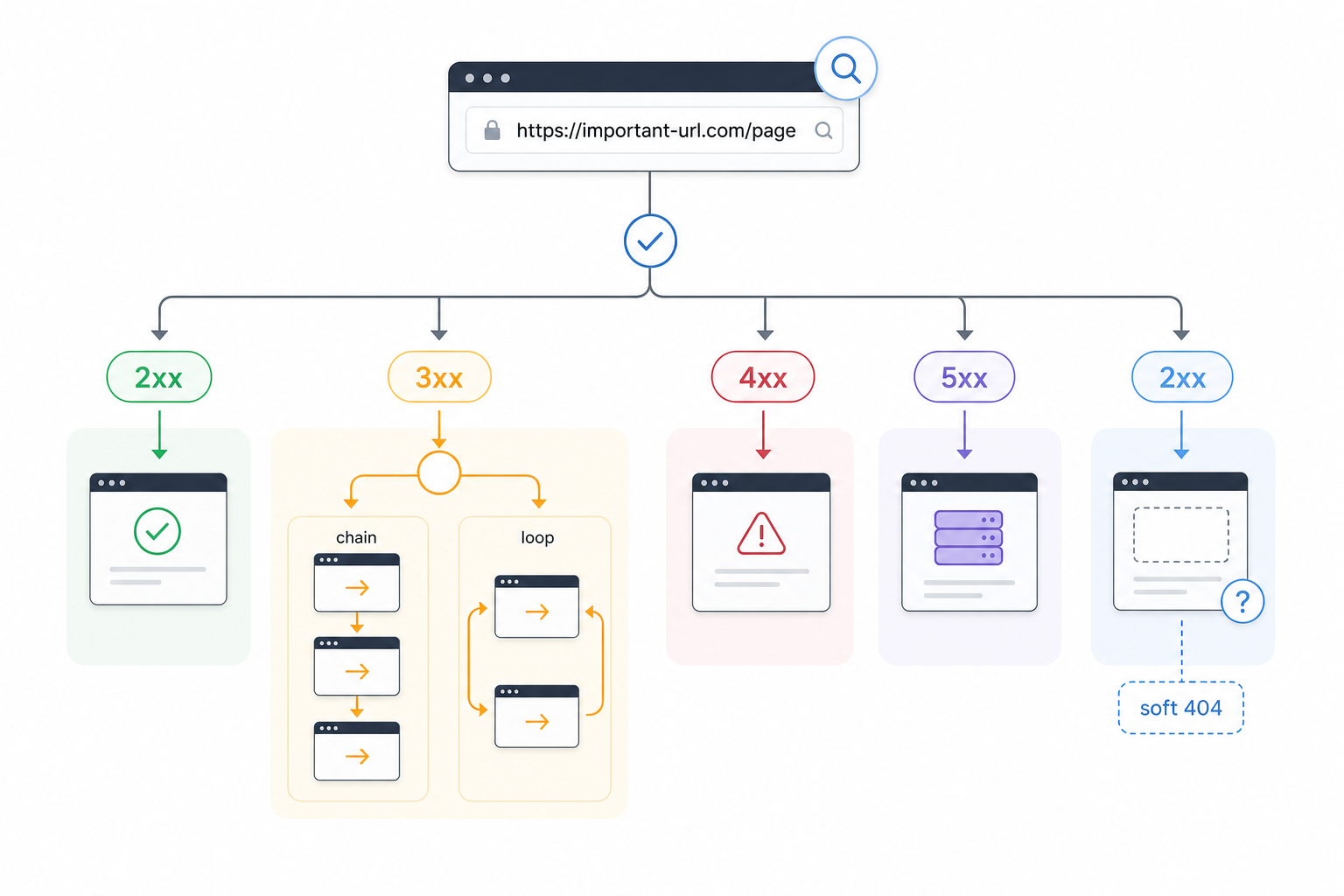
Review:
- 2xx responses
- 3xx redirects
- 4xx errors
- 5xx server errors
- Soft 404s
- Redirect chains
- Redirect loops
Determine whether important URLs communicate the correct state.
6. Review XML Sitemaps
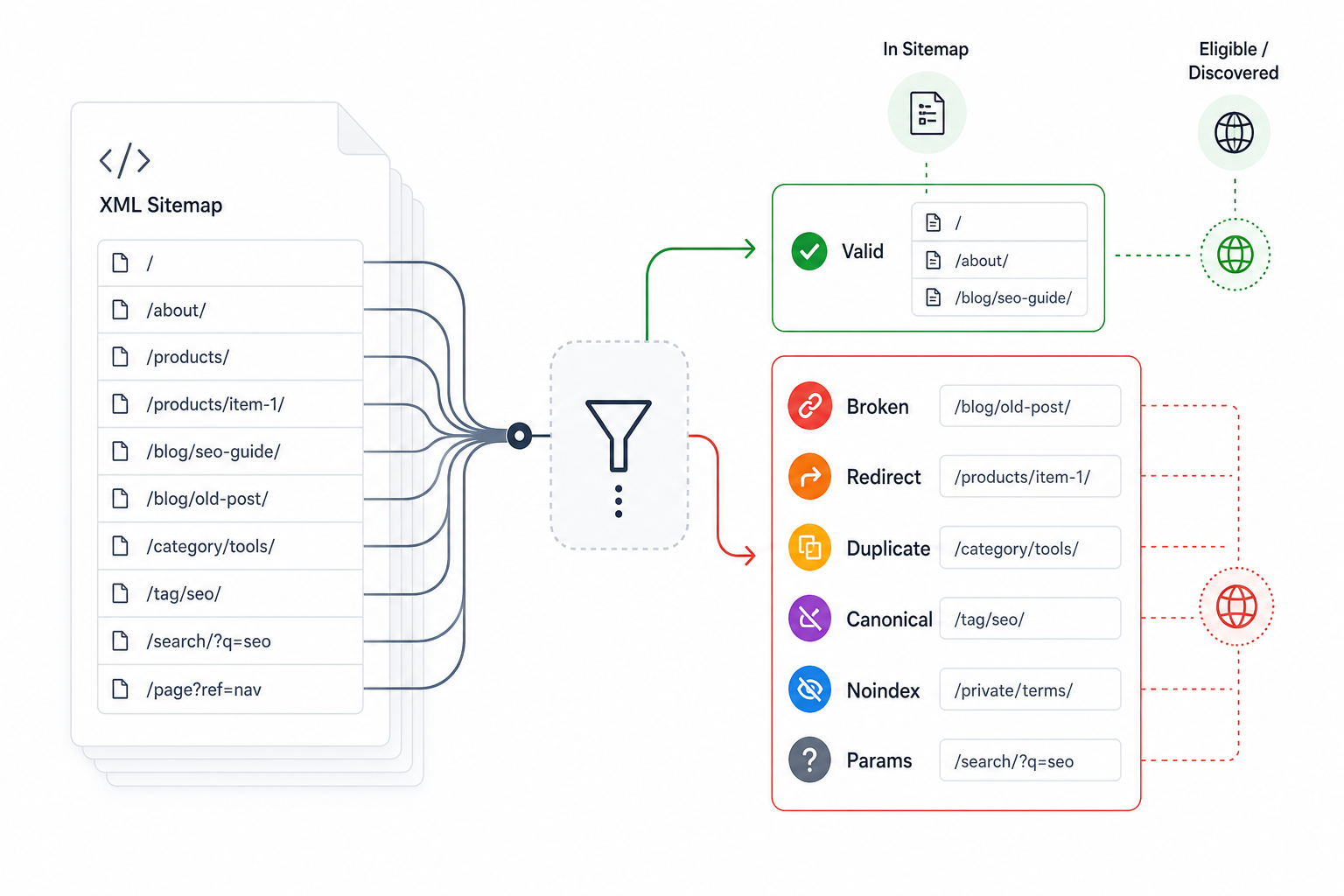
Confirm that sitemaps contain the URLs intended for discovery.
Identify:
- Broken URLs
- Redirected URLs
- Duplicate URLs
- Non-canonical URLs
- Noindexed URLs
- Inappropriate parameter URLs
Sitemap presence does not prove that a page is indexed.
7. Examine Duplicate URLs and Canonical Signals
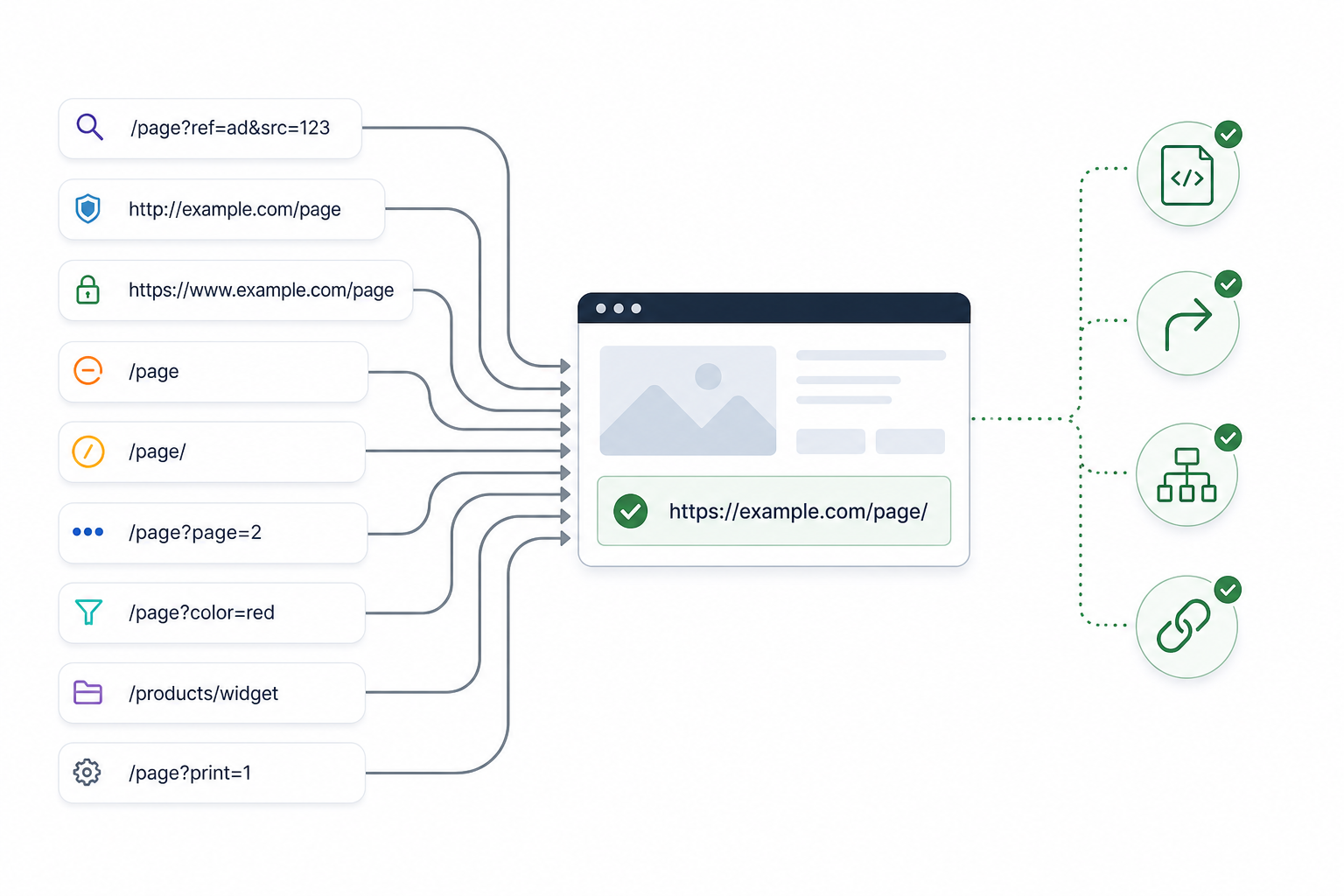
Review technical duplication created by:
- Parameters
- Hostname versions
- HTTP and HTTPS
- Trailing-slash variations
- Pagination
- Faceted navigation
- Alternate paths
- Generated URLs
Confirm that preferred-URL signals remain consistent.
8. Evaluate Website Performance
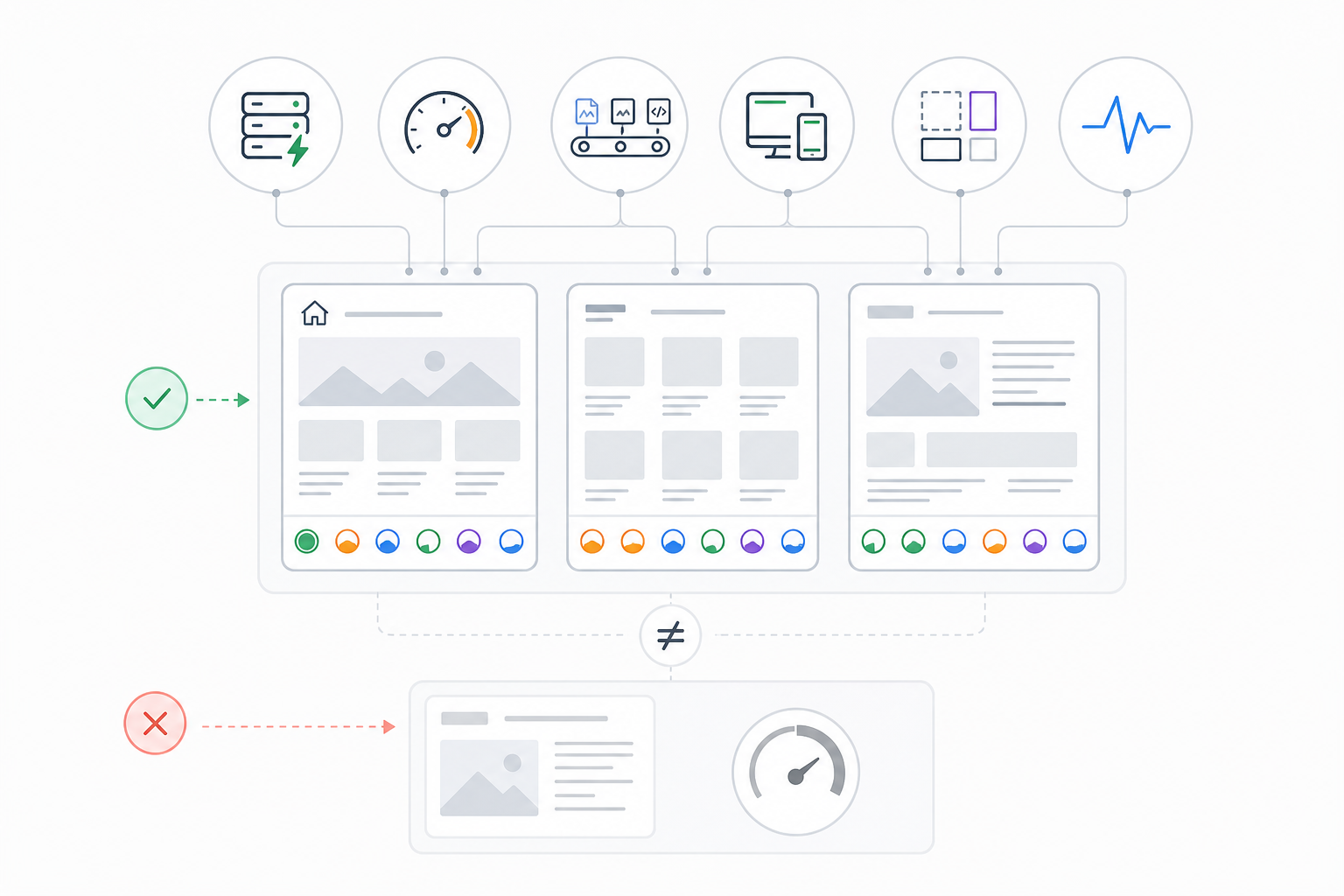
Review:
- Server response
- Loading performance
- Resource delivery
- Responsiveness
- Visual stability
- Core Web Vitals
- Template-level patterns
Analyze performance according to the affected page type rather than relying on one sitewide score.
9. Verify Mobile Accessibility
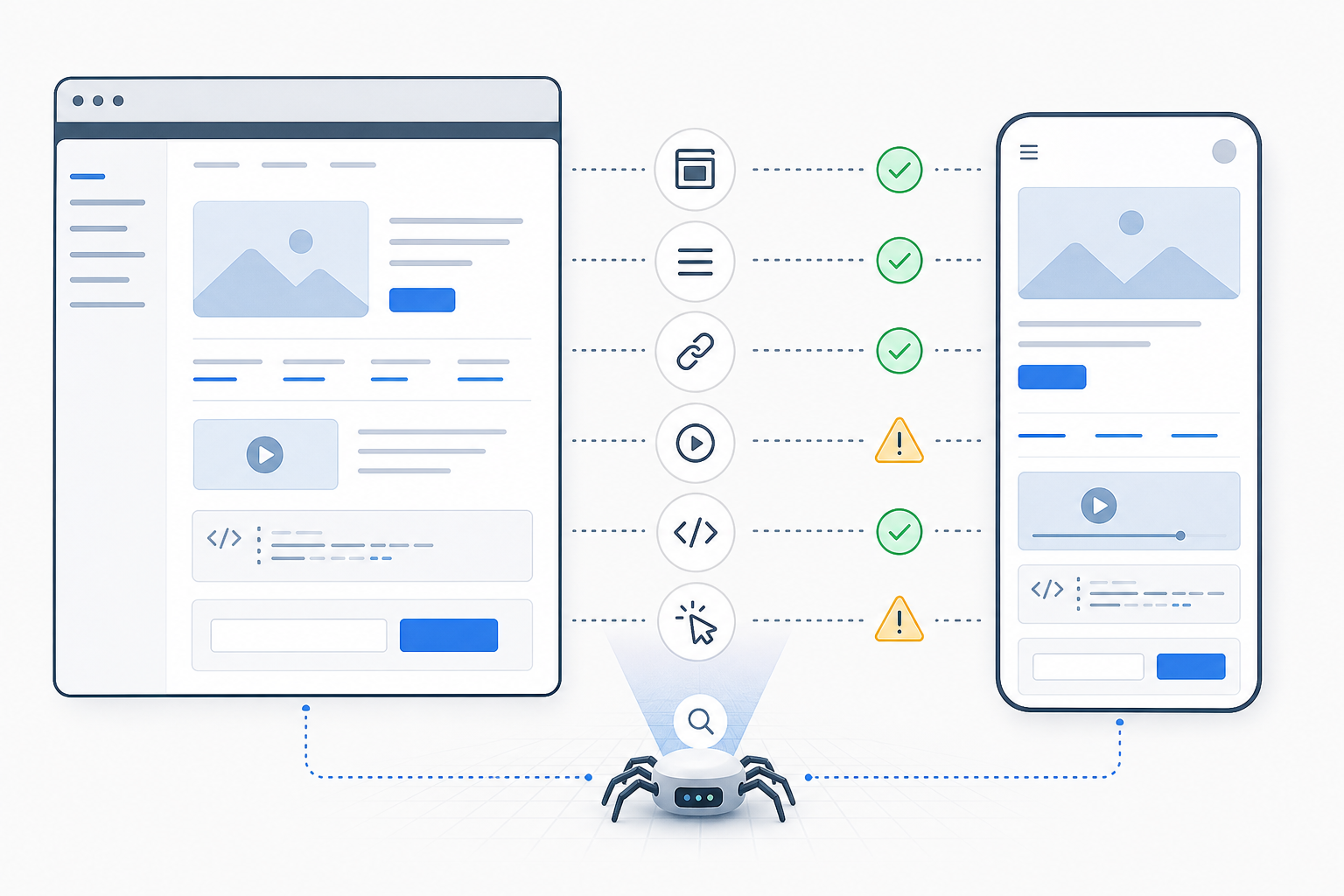
Confirm that mobile users and search systems can access:
- Important content
- Navigation
- Links
- Media
- Structured information
- Functionality
Identify differences that prevent mobile pages from representing the intended content accurately.
10. Verify HTTPS and Delivery Consistency
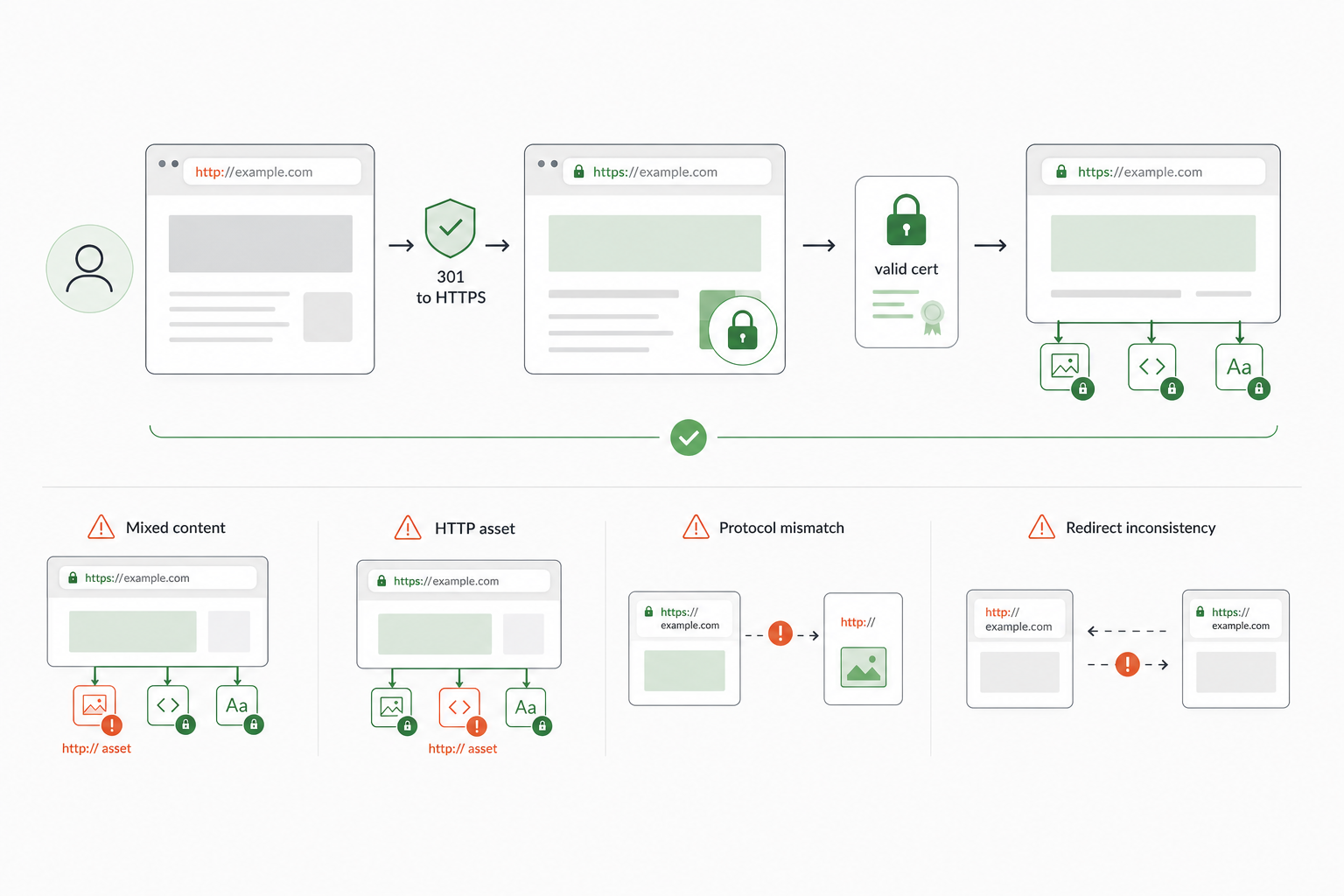
Review:
- Certificate validity
- HTTP redirects
- Mixed content
- Insecure resources
- Protocol inconsistencies
11. Validate Machine-Readable Signals
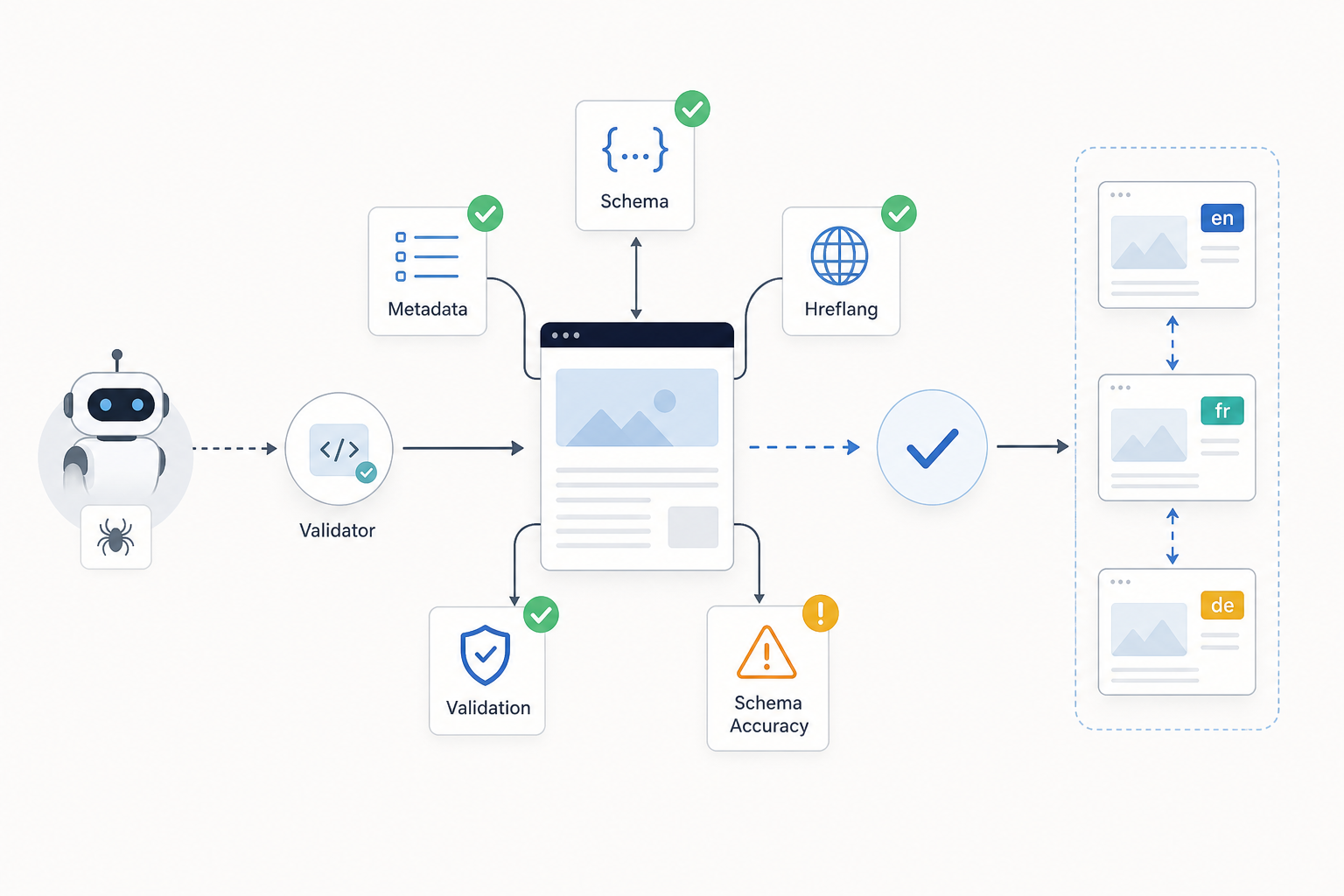
Review:
- Structured data
- Schema accuracy
- Hreflang where relevant
- Alternate-language relationships
- Other machine-readable technical signals
12. Document the Findings
Record:
- Technical area
- Finding
- Affected URLs or templates
- Supporting evidence
- Search process affected
- Additional investigation required
Do not treat every crawler warning as a genuine technical SEO issue until it has been validated against the website. This validation is what connects technical diagnostics with broader SEO analysis, where evidence is interpreted to identify the constraint actually affecting search performance.
What Technical SEO Tools Can You Use?
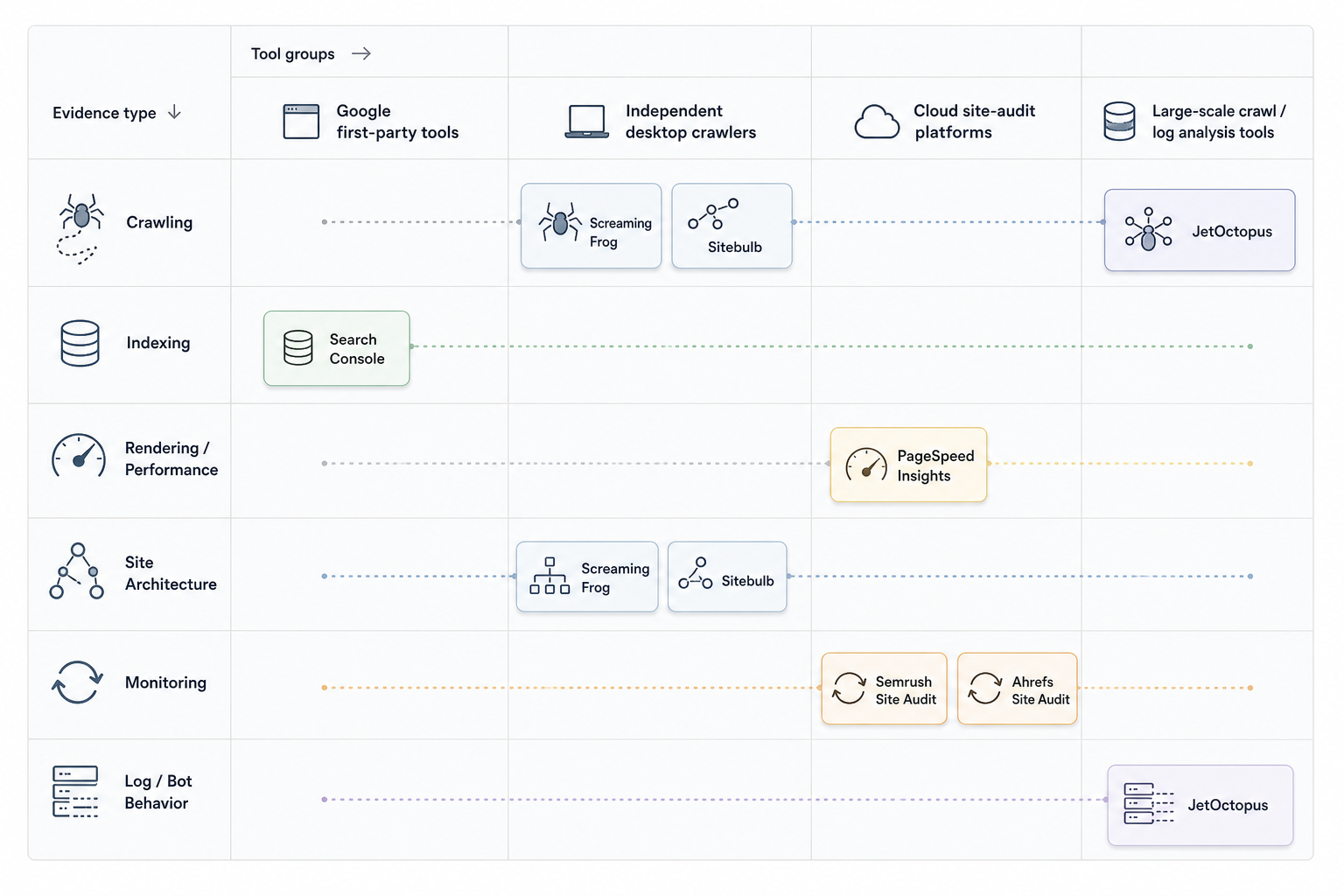
Technical SEO tools provide different forms of evidence about crawling, indexing, rendering, architecture, performance, and other technical website conditions.
| Tool | Best For | Evidence Provided | Data / Crawl Type | When to Use It |
|---|---|---|---|---|
| Google Search Console | Google indexing and search evidence | URL inspection, indexing information, sitemaps, Core Web Vitals, search performance | Google first-party data | Validate Google-side website behavior |
| Screaming Frog SEO Spider | Technical crawling | Status codes, redirects, canonicals, directives, links, HTML, structured data | Independent crawler | Analyze URL-level technical patterns |
| Google PageSpeed Insights | Performance analysis | Core Web Vitals, field data, lab diagnostics | Performance data | Investigate page delivery and experience |
| Semrush Site Audit | Cloud technical monitoring | Crawl issues, technical patterns, recurring audit data | Third-party cloud crawl | Ongoing technical monitoring |
| Ahrefs Site Audit | Technical site analysis | Crawl issues, internal links, indexability patterns, site structure | Third-party cloud crawl | Website health and architecture analysis |
| Sitebulb | Crawling and visualization | Crawl relationships, architecture, technical diagnostics | Independent crawler | Deeper technical interpretation |
| JetOctopus | Large-scale crawling and logs | High-volume URL data and bot behavior | Crawl and server-log data | Large or complex websites |
Google Search Console
Use Search Console for:
- URL inspection
- Indexing information
- Sitemap processing
- Search performance
- Core Web Vitals reporting
- Google-specific page evidence
It provides information from Google’s systems but does not replace an independent crawler.
Screaming Frog SEO Spider
Use Screaming Frog for:
- Status codes
- Redirects
- Canonicals
- Robots directives
- Internal links
- Structured data
- Metadata
- Indexability signals
- Large URL inventories
It shows what a crawler finds from the website itself.
Google PageSpeed Insights
Use PageSpeed Insights for performance evidence.
It can provide:
- Core Web Vitals
- Field data where available
- Laboratory diagnostics
- Resource-level performance recommendations
Performance tools explain delivery conditions, not overall page relevance.
Semrush Site Audit
Semrush Site Audit provides recurring cloud-based technical crawling.
It is useful for:
- Monitoring common technical issues
- Comparing audit periods
- Tracking recurring site-health patterns
Its site-health scores remain proprietary metrics rather than Google ranking scores.
Ahrefs Site Audit
Ahrefs Site Audit supports:
- Technical crawling
- Internal-link analysis
- Indexability analysis
- Technical URL checks
- Ongoing site monitoring
Sitebulb
Sitebulb combines crawling with visualizations and technical explanations.
It becomes useful when investigating:
- Architecture
- Crawl relationships
- Internal linking
- Technical patterns across page groups
JetOctopus
JetOctopus and similar systems support large websites requiring:
- High-volume crawling
- Segmented URL analysis
- Server-log analysis
- Search-bot behavior investigation
Log files reveal how real search-engine bots request website URLs rather than simulating crawler behavior.
No single technical SEO tool replaces human validation. Tools collect evidence; technical analysis determines whether the finding matters. The wider set of SEO tools extends beyond technical diagnostics to keyword research, content analysis, rankings, backlinks, analytics, and reporting.
What Technical SEO Issues Should You Fix?
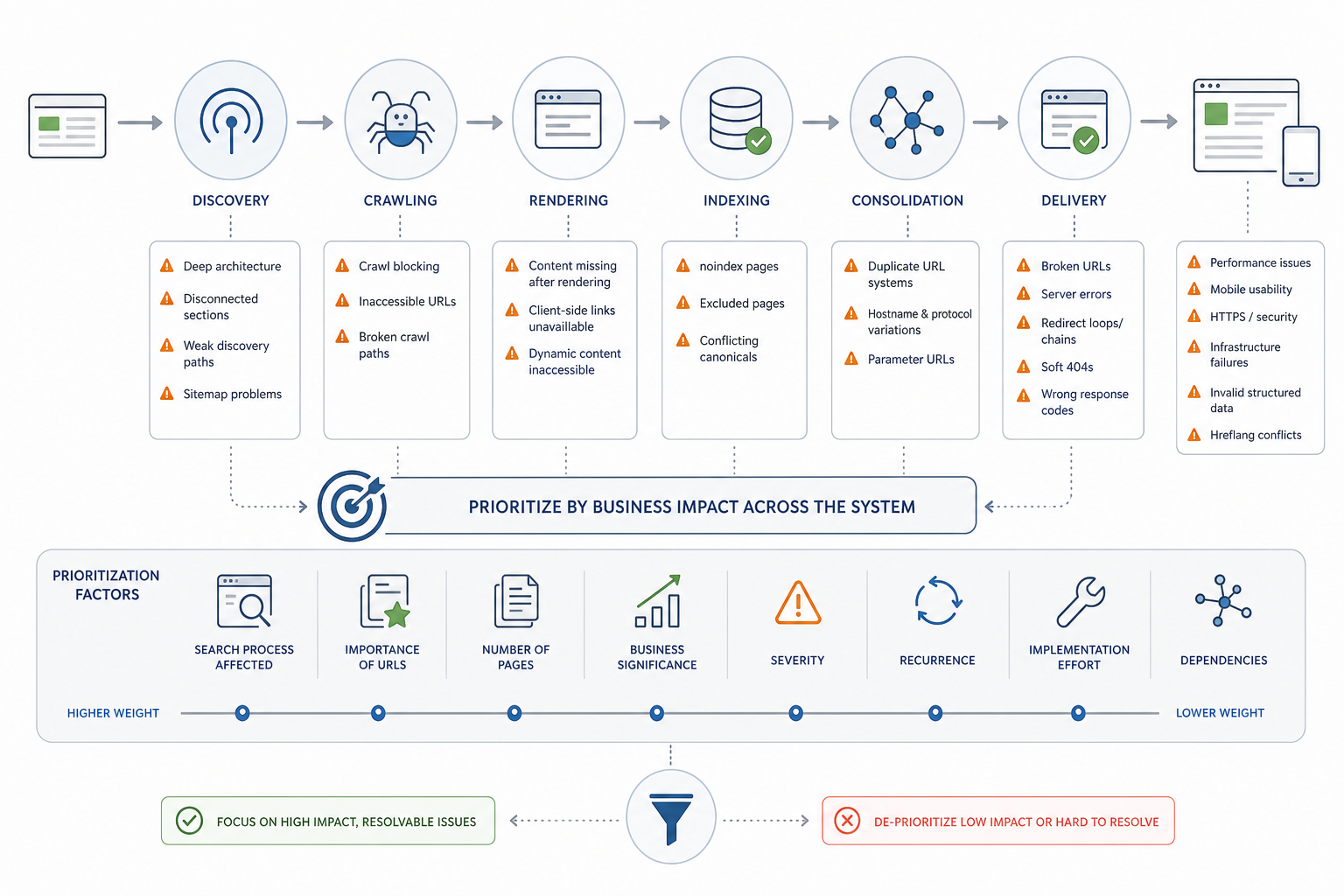
Technical SEO issues deserve remediation when validated evidence shows that they materially interfere with important URLs being discovered, crawled, rendered, indexed, consolidated, or delivered reliably.
Not every crawler warning requires action.
Prioritize issues such as:
- Critical access problems
- Unintended crawl blocking
- Server restrictions
- Inaccessible important URLs
- Broken crawl paths
- Incorrect indexation states
- Unintended noindex directives
- Important pages excluded from indexing
- Conflicting indexation and canonical signals
- URL and HTTP problems
- Broken important URLs
- Repeated server errors
- Redirect loops
- Excessive redirect chains
- Soft 404s
- Incorrect response codes
- URL consolidation problems
- Conflicting canonicals
- Duplicate URL systems
- Hostname inconsistencies
- Protocol variations
- Uncontrolled parameter URLs
- Rendering failures
- Important content missing after rendering
- Links unavailable to search systems
- Broken client-side navigation
- Dynamic content not reliably accessible
- Architecture and crawl-path constraints
- Important pages buried too deeply
- Disconnected sections
- Excessive crawl complexity
- Weak discovery paths
- Sitemap inconsistencies
- Broken URLs
- Redirects
- Duplicates
- Non-canonical URLs
- Intentionally excluded URLs inside active sitemaps
- Meaningful performance problems
- Slow important templates
- Poor interaction responsiveness
- Major layout instability
- Excessive technical resource overhead
- Mobile accessibility problems
- Missing mobile content
- Broken functionality
- Unusable navigation
- Material rendering differences
- HTTPS and infrastructure problems
- Invalid certificates
- Mixed content
- Protocol conflicts
- Unstable hosting
- Recurring server failures
- Invalid machine-readable signals
- Structured data that misrepresents visible content
- Conflicting hreflang implementations
- Invalid technical markup where it affects interpretation
Prioritization depends on:
- Search process affected
- Importance of affected URLs
- Number of affected pages
- Business significance
- Severity
- Recurrence
- Implementation effort
- Dependencies
A technical issue affecting one low-value URL can rank below a smaller-looking issue affecting an entire revenue-driving category.
Technical SEO priorities therefore require business and search context rather than tool severity labels alone.
How Do You Do Technical SEO?
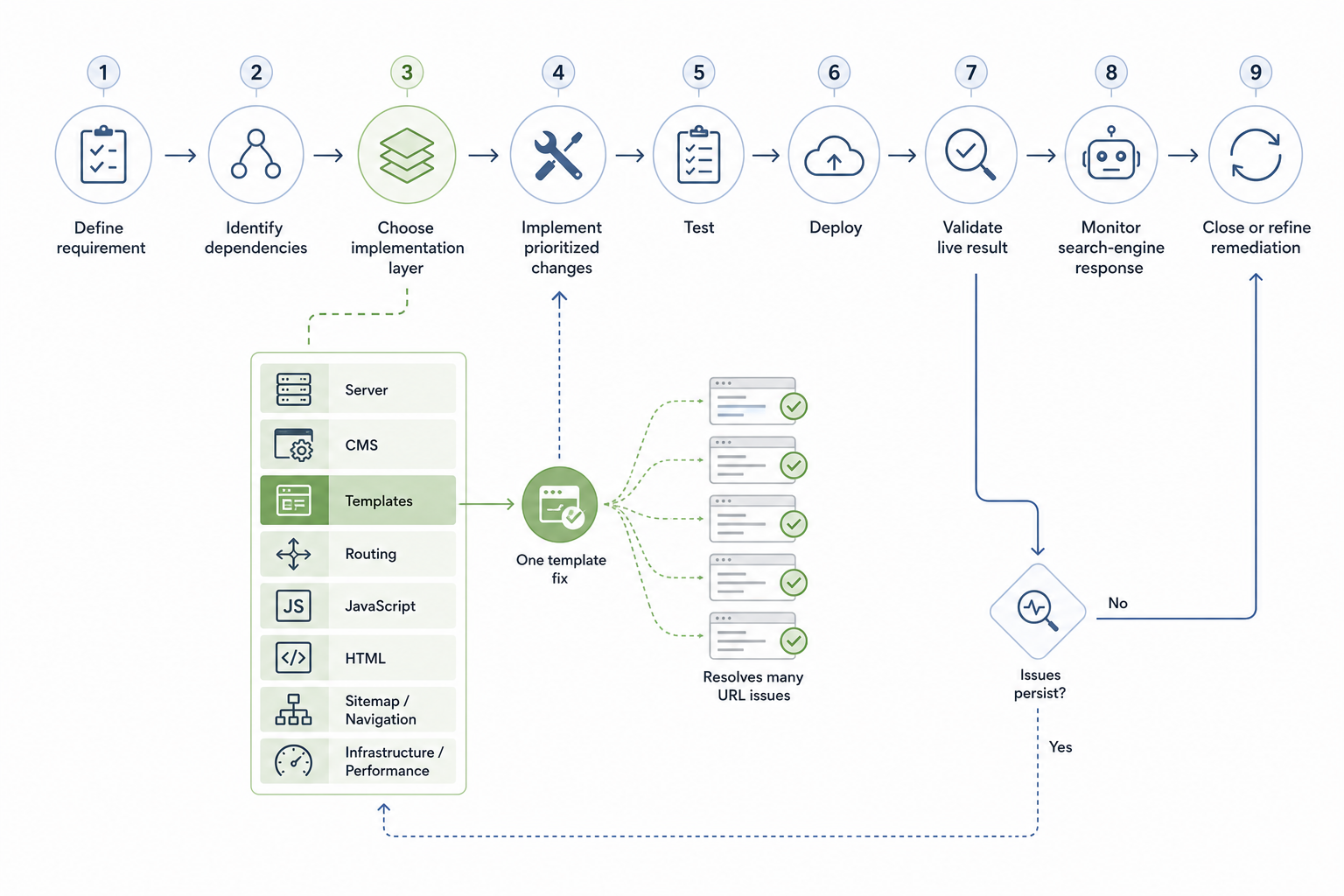
Technical SEO is implemented by turning validated technical findings into controlled website changes, testing those changes, deploying them, validating the live output, and monitoring whether the original problem has been resolved.
1. Define the Technical Requirement
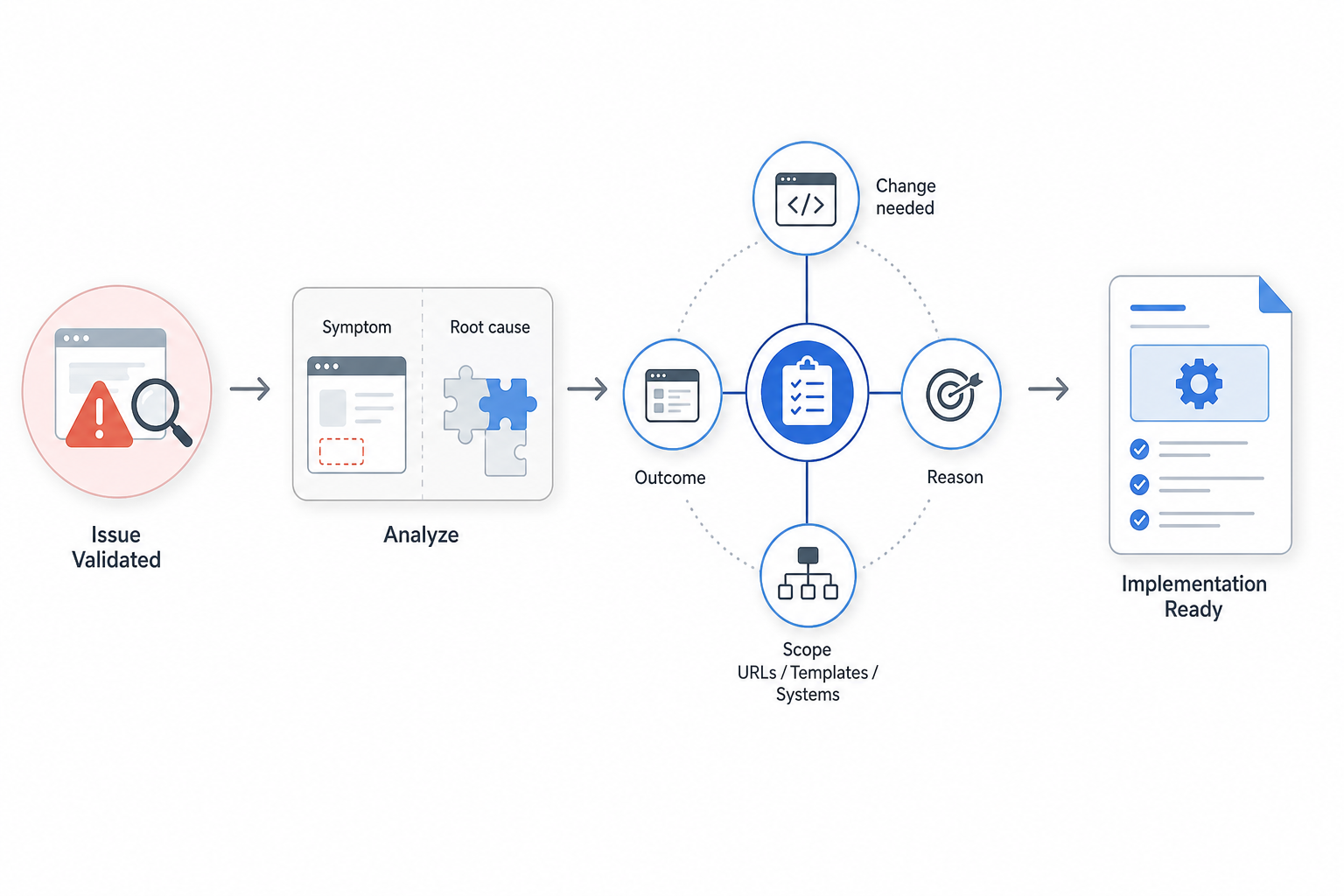
Translate the validated issue into a precise requirement.
Document:
- What needs to change
- Why it needs to change
- Which URLs, templates, or systems are affected
- What the intended technical outcome is
Address the underlying cause rather than only the visible symptom.
2. Identify Dependencies
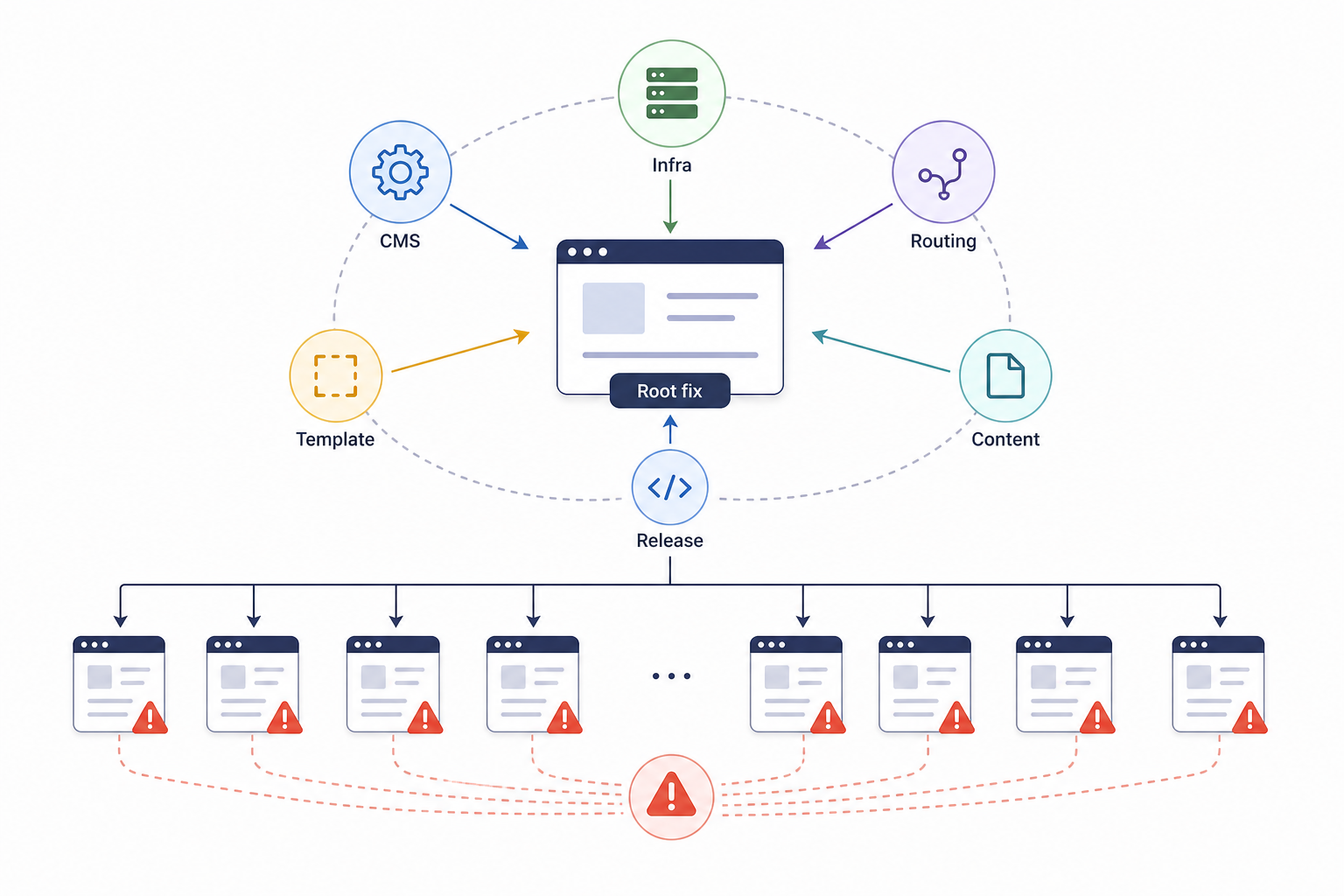
Determine whether implementation depends on:
- Another technical fix
- CMS settings
- Template changes
- Developer releases
- Infrastructure updates
- Routing changes
- Content-system decisions
Resolve prerequisites before dependent work.
Several crawler warnings can originate from one template problem, making one root fix more efficient than hundreds of individual URL changes.
3. Choose the Appropriate Implementation Layer
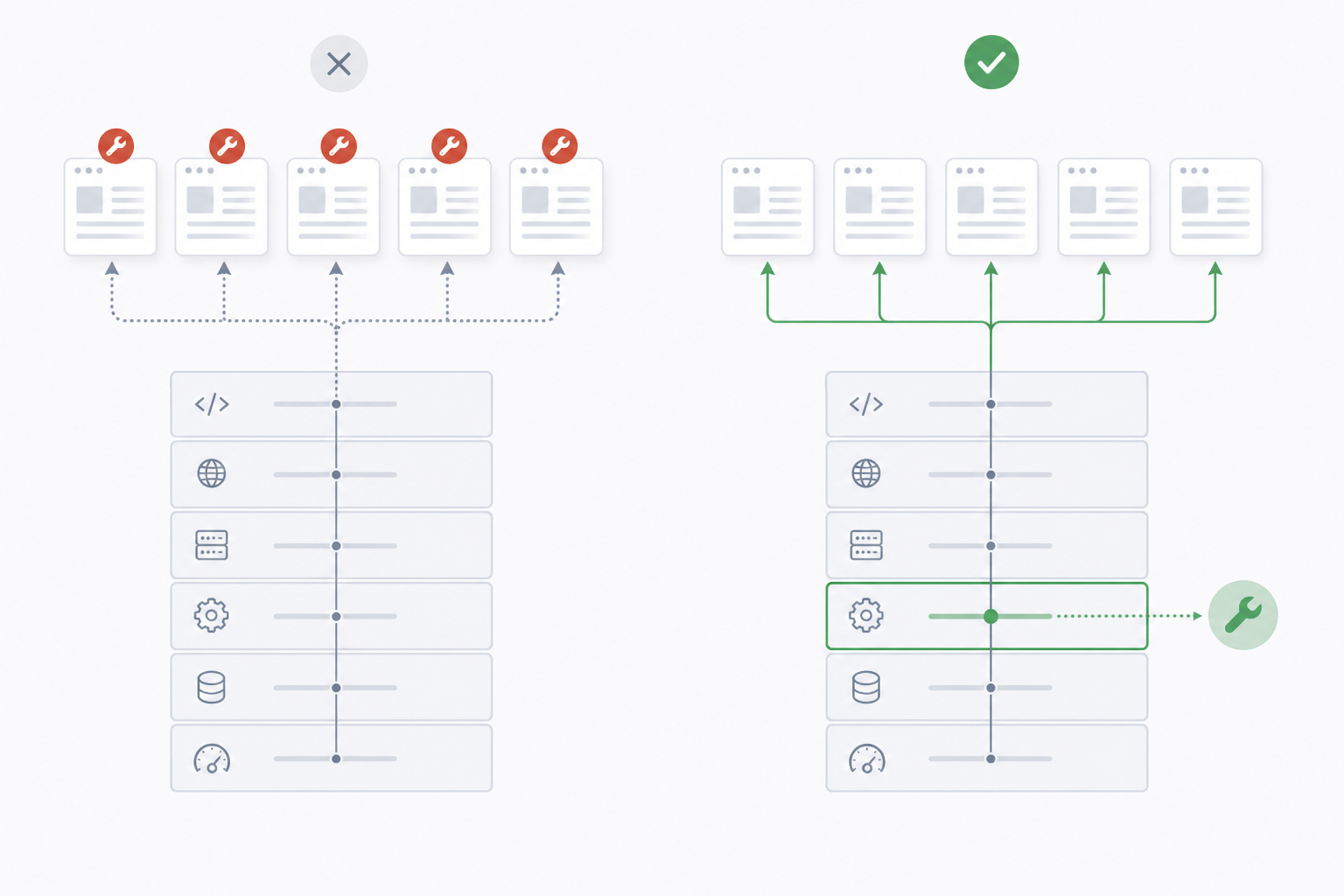
Apply the fix where the problem is actually controlled.
Possible layers include:
- Server configuration
- CMS settings
- Website templates
- Routing
- JavaScript
- HTML output
- Sitemap generation
- Navigation
- Infrastructure
- Performance configuration
Fixing the controlling system prevents the same issue from returning across additional URLs.
4. Implement the Prioritized Changes
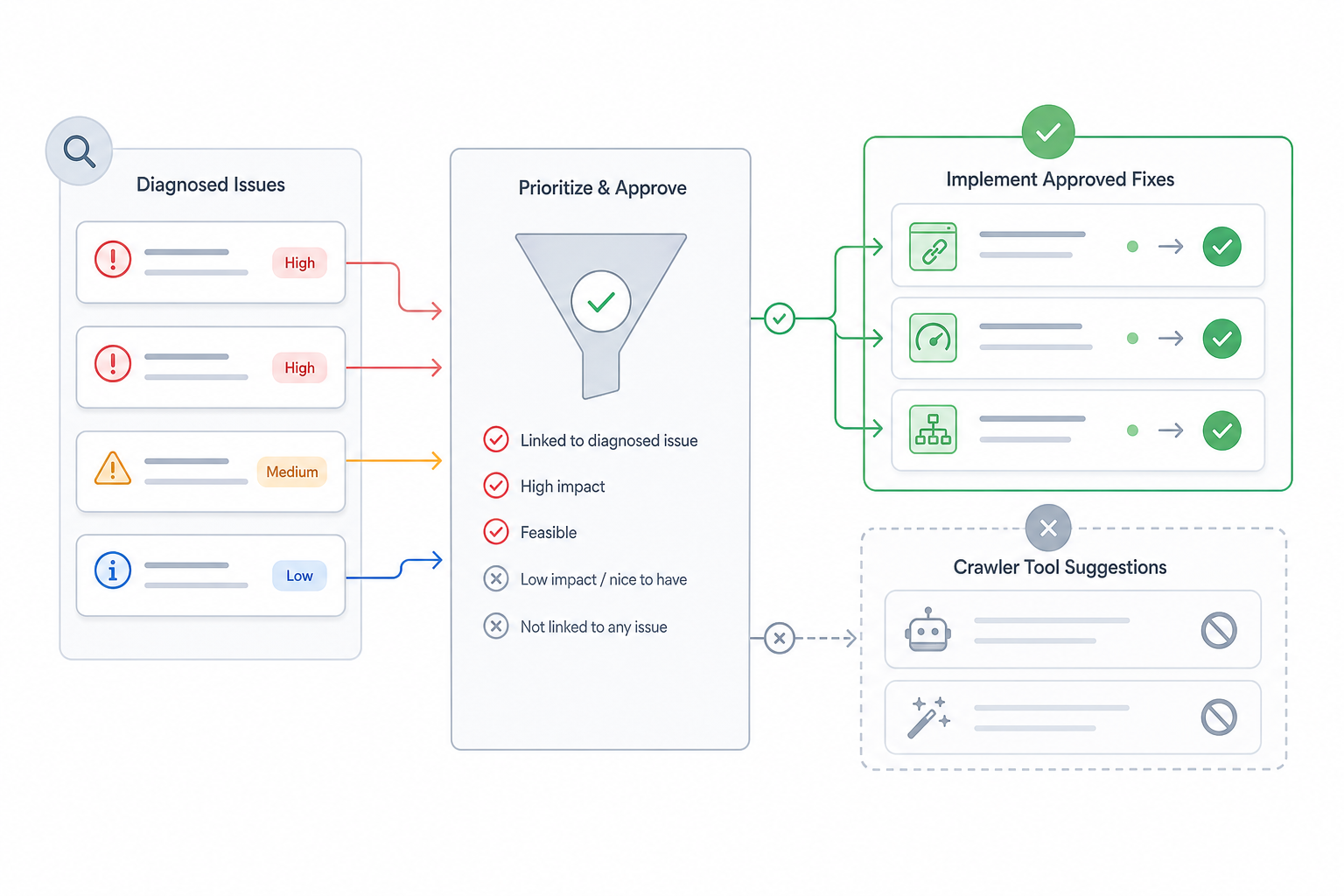
Apply the approved technical changes according to business and SEO priority.
Keep each change connected with the diagnosed problem.
Avoid implementing unrelated crawler recommendations simply because a tool reports them.
5. Test the Implementation
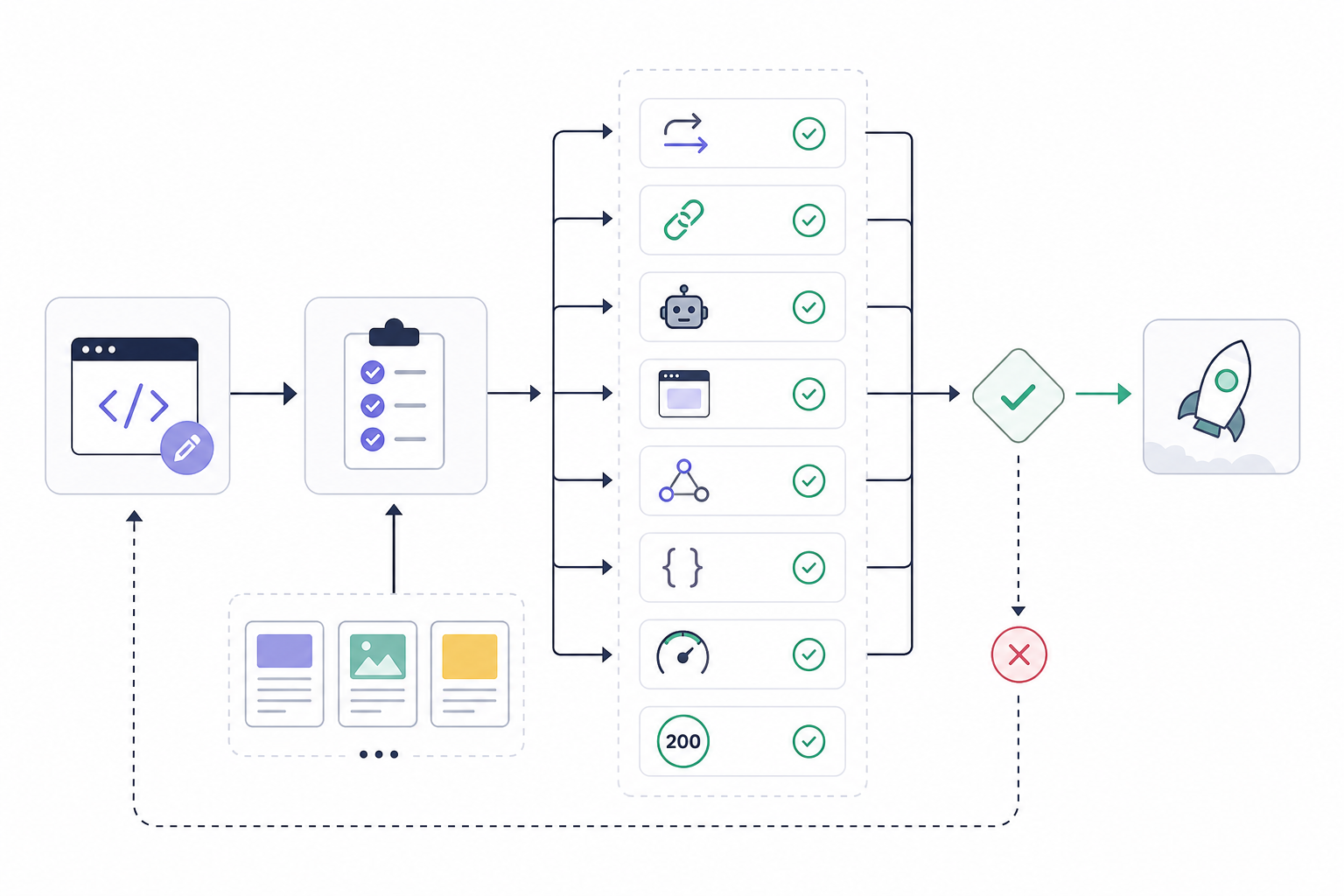
Validate important changes before broad deployment where practical.
Review:
- Redirect behavior
- Canonical output
- Robots directives
- Rendered content
- Internal links
- Structured data
- Performance
- Status codes
Test representative templates when one change affects many URLs.
6. Deploy the Changes
Release validated changes through the appropriate development or CMS workflow.
Document:
- Deployment scope
- Affected areas
- Ownership
- Dependencies
- Rollback requirements where relevant
Avoid combining many unrelated technical changes into one release when that makes later diagnosis difficult.
7. Validate the Live Result
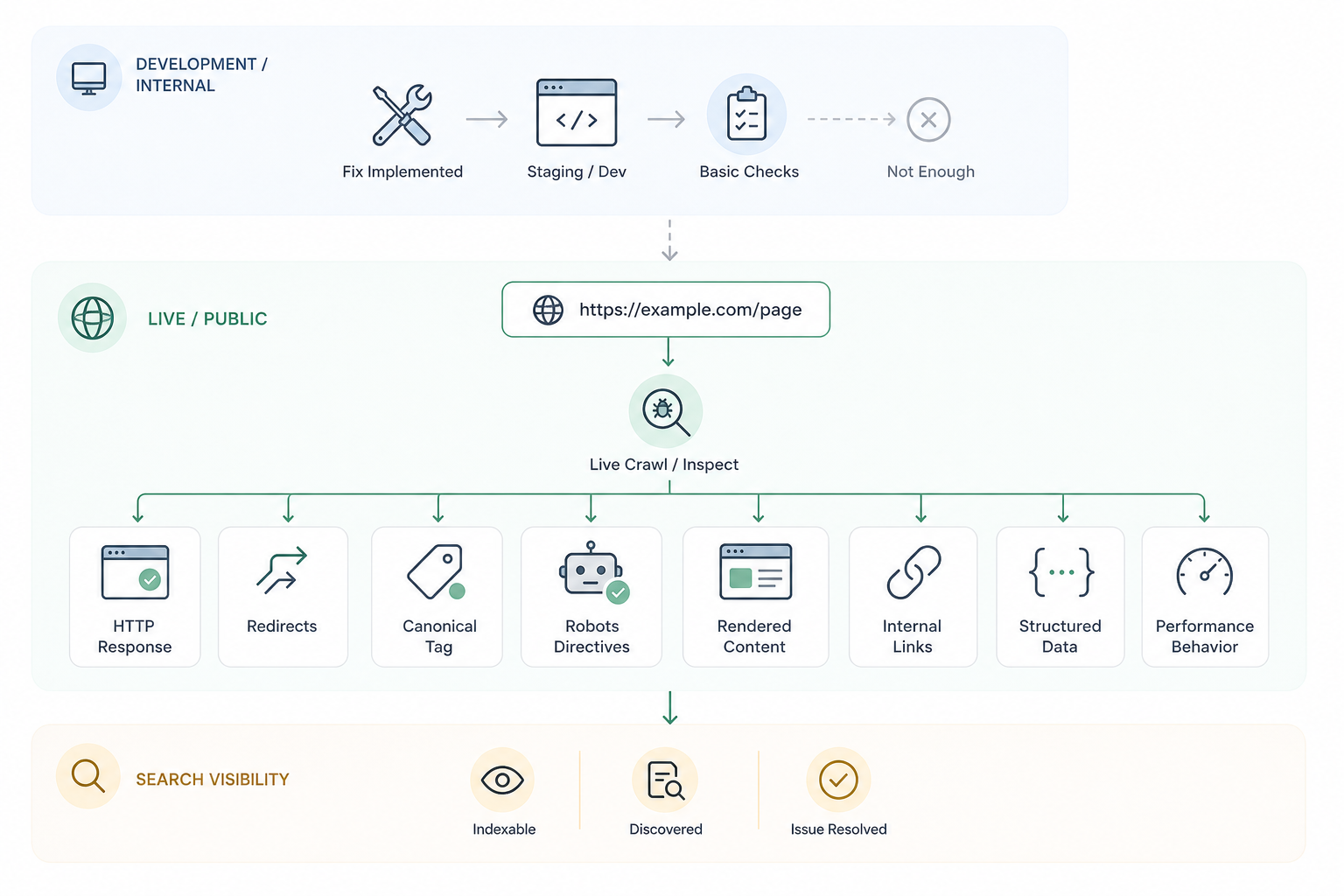
Re-crawl or inspect the affected URLs.
Confirm that the live website now produces the intended:
- HTTP responses
- Redirects
- Canonicals
- Robots directives
- Rendered content
- Internal links
- Structured data
- Performance behavior
Use search-engine data when relevant to confirm that the new condition is visible outside the internal development environment.
8. Monitor Search-Engine Response
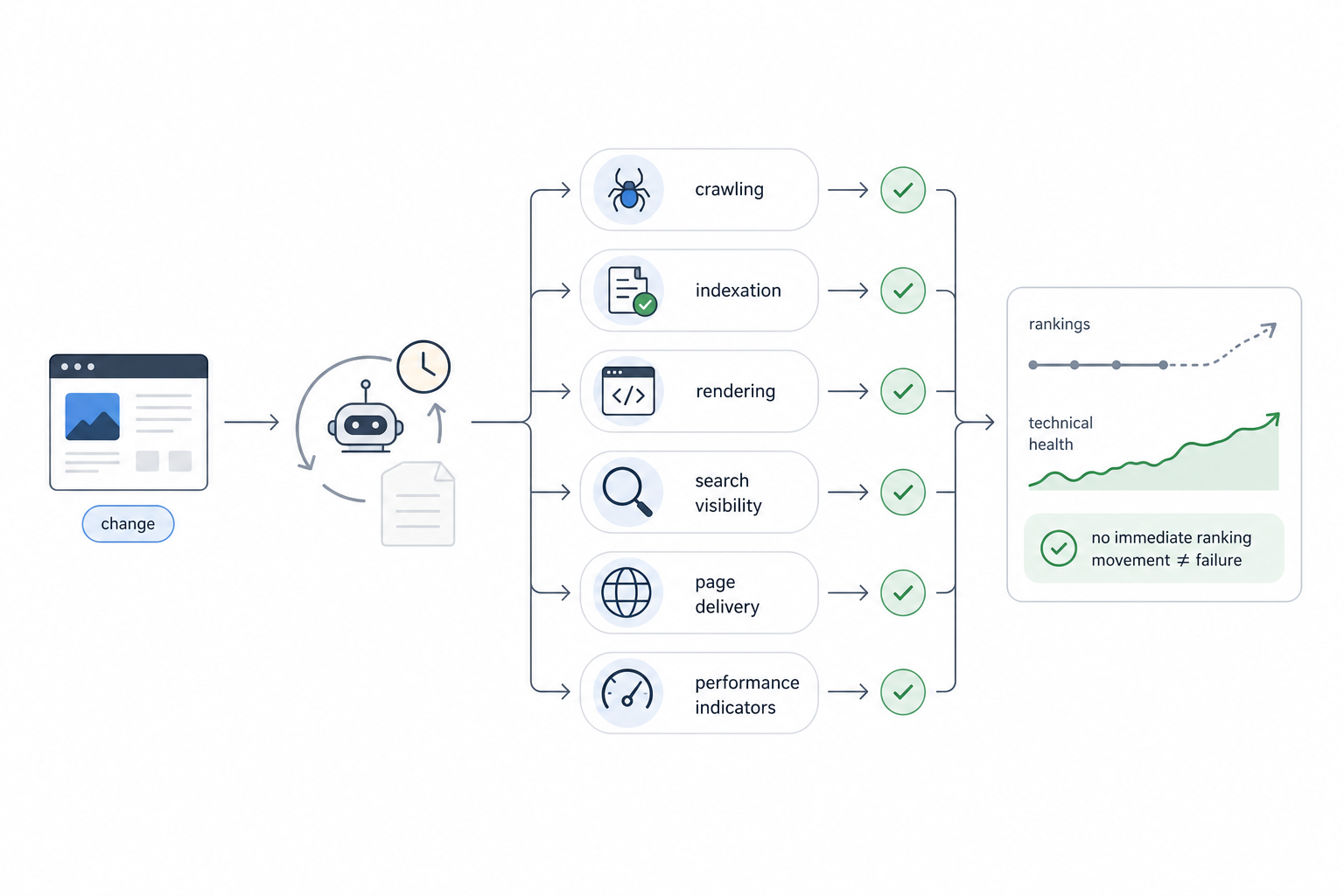
Track whether the affected technical behavior changes.
Monitor:
- Crawling
- Indexation
- Rendering
- Search visibility
- Page delivery
- Relevant performance indicators
Search engines require time to recrawl and reprocess changed URLs.
The absence of immediate ranking movement does not prove that the technical implementation failed.
9. Close or Refine the Remediation
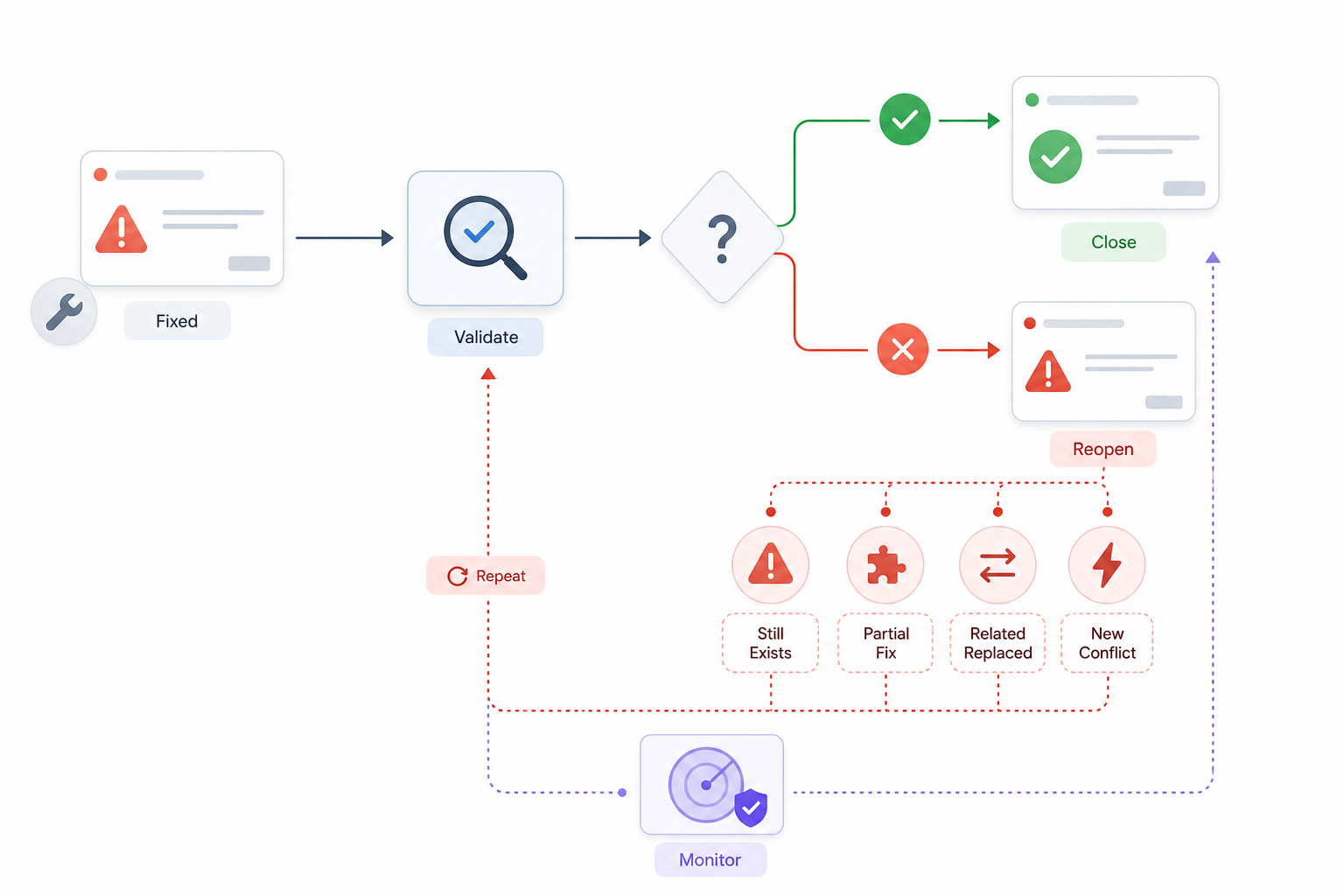
Confirm that the original problem no longer exists.
Reopen the issue when evidence shows that:
- The technical condition remains
- Only part of the affected system changed
- A related issue replaced the original problem
- The implementation created a new conflict
Recurring technical problems can justify automated monitoring.
Technical SEO becomes effective when diagnosed problems turn into validated website changes rather than remaining as unresolved audit warnings.
How Do You Apply Technical SEO to Different Website Types?
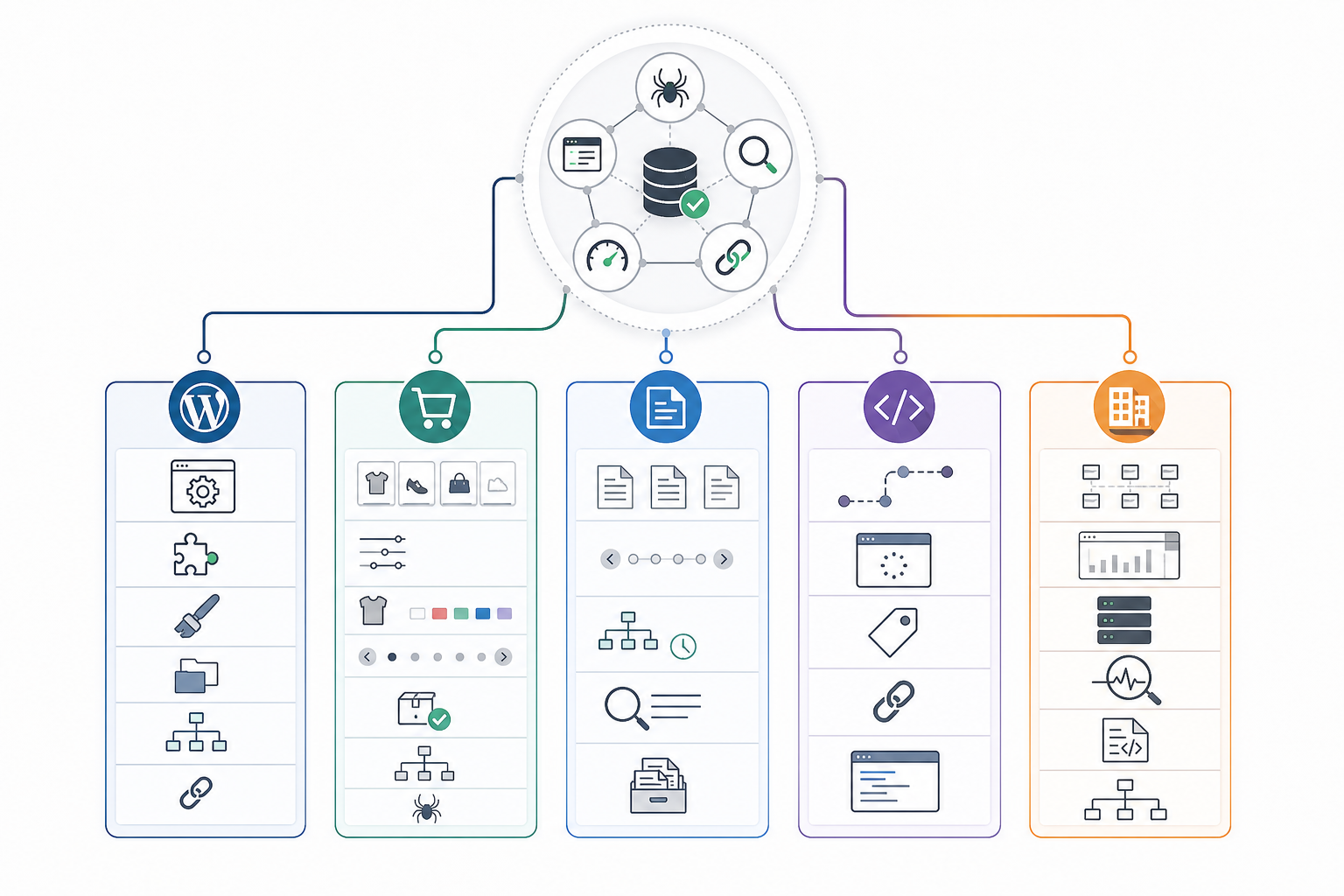
Technical SEO principles remain consistent across websites, but implementation changes according to CMS, architecture, URL-generation systems, rendering model, website scale, and functionality.
Every website still requires reliable crawling, rendering, indexing, URL consistency, and page delivery. Different website types simply create different technical risks.
WordPress websites commonly rely on CMS settings, themes, plugins, archive systems, sitemap generators, and template behavior.
Ecommerce sites introduce larger URL inventories, filters, variants, pagination, stock changes, product-category relationships, and more complex crawl management.
Publishing websites often require stronger controls around archives, pagination, content discovery, sitemap freshness, and large content inventories.
JavaScript-heavy applications require closer review of routing, rendering, stable URLs, metadata delivery, and dynamically loaded content.
Large websites also require greater diagnostic scale. Enterprise ecommerce, publishing, marketplaces, and applications can require segmented crawling, server-log analysis, automated monitoring, and template-level investigation.
Technical SEO implementation therefore adapts to how each website creates, connects, renders, and serves URLs.
How Do You Do Technical SEO for WordPress?
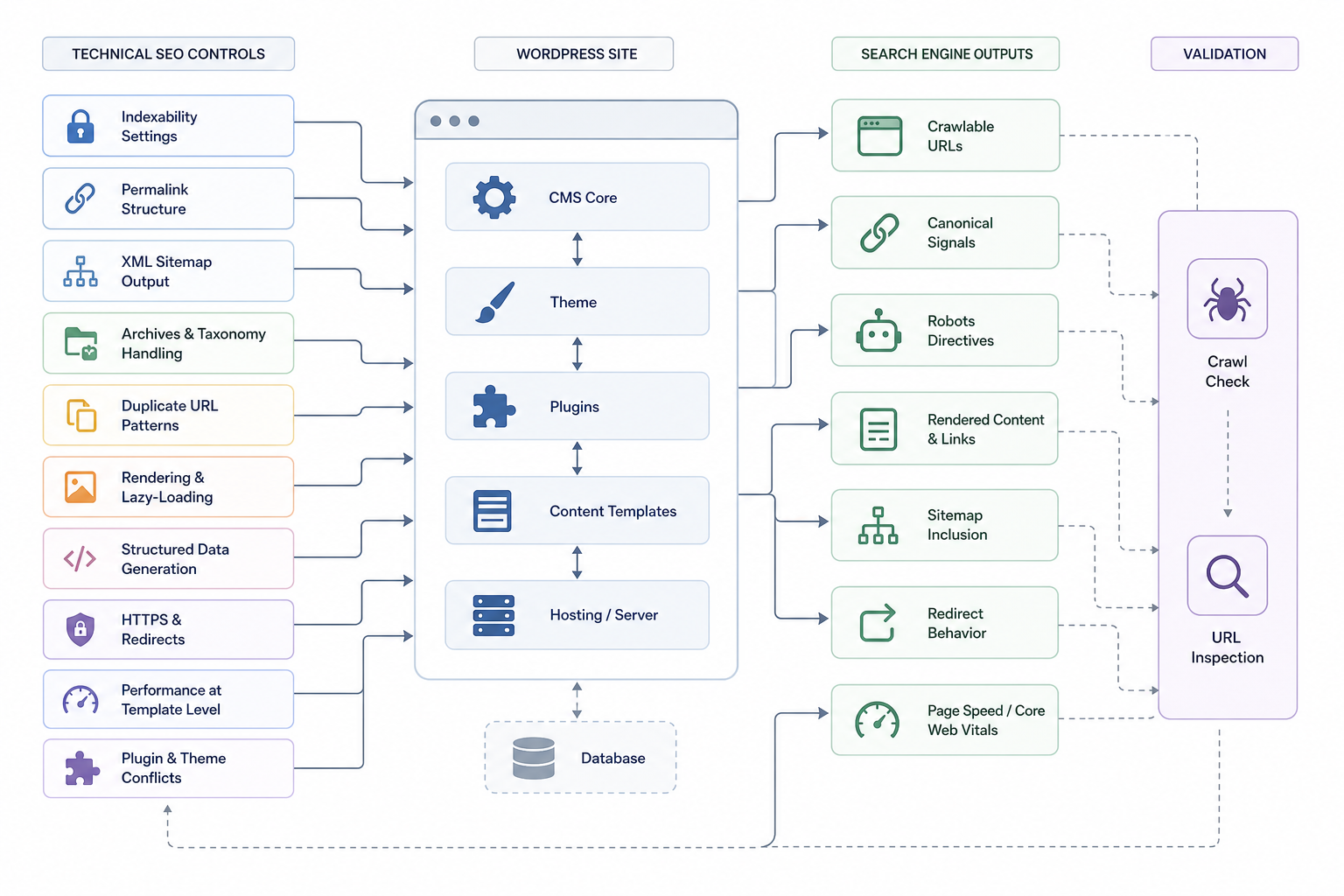
Technical SEO for WordPress means applying technical SEO principles through WordPress-specific controls such as CMS settings, themes, plugins, permalinks, XML sitemaps, archives, indexation settings, and performance configuration.
Important WordPress checks include:
- Check indexability settings
- Confirm that important pages are not unintentionally blocked from indexing through WordPress settings or plugin-generated directives.
- Configure stable permalinks
- Maintain readable and consistent URLs.
- Avoid changing established URLs without a structural reason and appropriate redirect handling.
- Configure technical SEO plugin controls
- Use an appropriate system for sitemaps, robots directives, canonicals, and structured data.
- Avoid multiple plugins generating competing technical signals.
- Installing a plugin does not improve rankings by itself.
- Review XML sitemap output
- Confirm that the sitemap includes the intended canonical and indexable URLs.
- Exclude inappropriate archives, redirects, attachment pages, or other low-value URLs where relevant.
- Review archive and taxonomy behavior
- Evaluate:
- Categories
- Tags
- Author archives
- Date archives
- Media pages
- Keep only URL groups that serve a useful search or navigation purpose.
- Evaluate:
- Review duplicate URL patterns
- Identify:
- Attachment pages
- Feeds
- Pagination
- Parameters
- Plugin-generated URLs
- Alternate versions
- Identify:
- Review theme and plugin rendering
- Confirm that themes, builders, lazy-loading systems, and JavaScript components do not hide important content or links from search systems.
- Review performance at template level
- Investigate:
- Caching
- Images
- CSS
- JavaScript
- Fonts
- Database overhead
- Hosting response
- Plugin weight
- Investigate:
- Review HTTPS and redirects
- Check protocol consistency.
- Review changed slugs.
- Fix redirect chains.
- Resolve mixed-content problems.
- Validate structured data
- Review schema generated by themes and plugins.
- Identify duplicate or conflicting markup.
- Check plugin and theme conflicts
- Identify competing systems generating:
- Canonicals
- XML sitemaps
- Schema
- Robots directives
- Redirects
- Identify competing systems generating:
- Validate the finished configuration
- Crawl representative pages.
- Inspect important URLs.
- Confirm that WordPress produces the intended technical signals.
WordPress changes the implementation environment, not the underlying technical SEO principles.
How Do You Do Technical SEO for Ecommerce Websites?
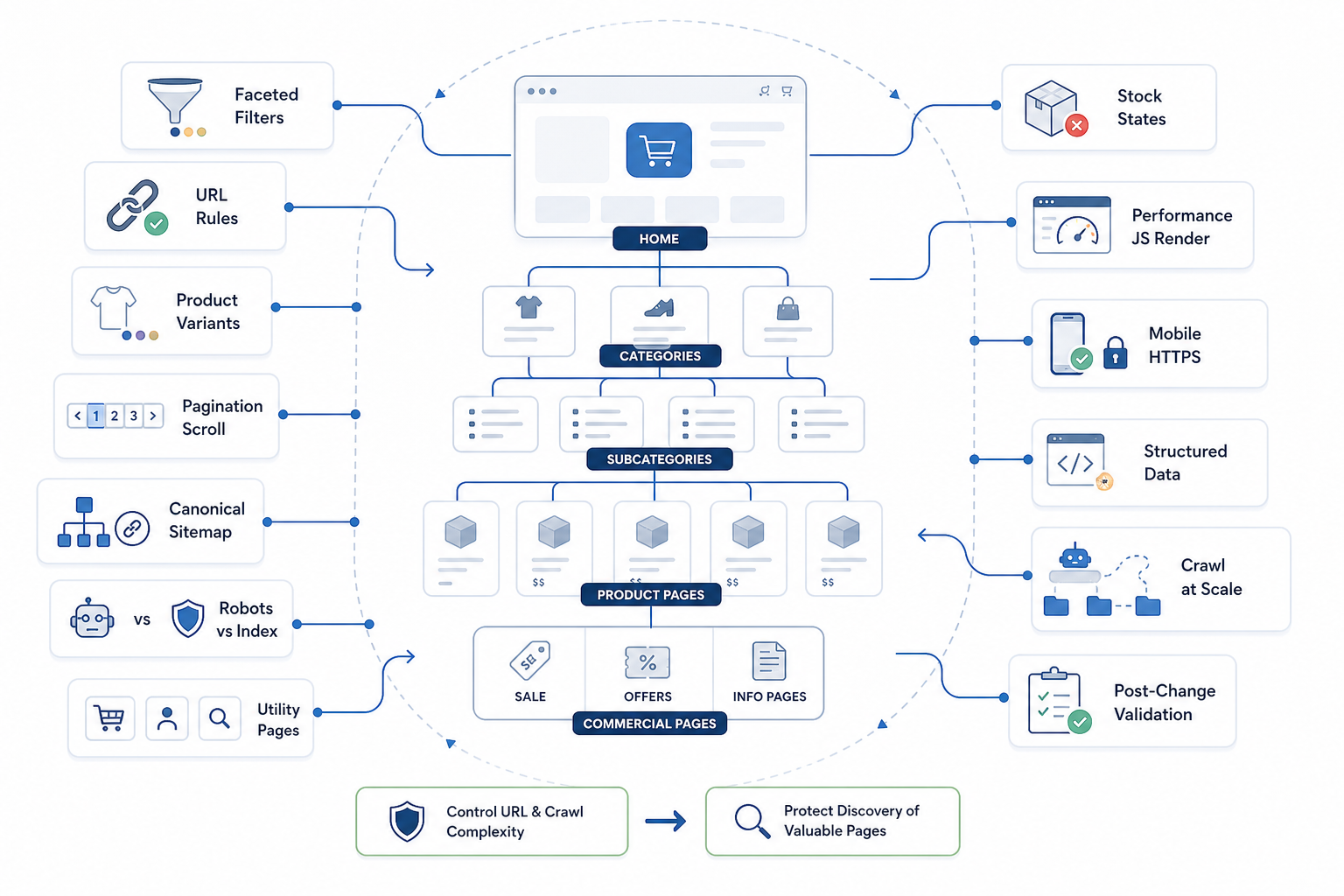
Technical SEO for ecommerce websites adapts technical SEO principles to large product and category systems where catalogs, variants, filters, parameters, pagination, stock states, and commercial templates generate complex URL behavior.
Important ecommerce-specific areas include:
- Product and category architecture
- Maintain clear relationships between categories, subcategories, products, and supporting commercial pages.
- Keep important products accessible through crawlable navigation.
- Stable URL generation
- Use predictable URLs.
- Avoid generating unnecessary alternate paths to the same product or category.
- Maintain consistency when products move between categories.
- Faceted navigation
- Control filter-generated URLs.
- Separate combinations with meaningful search demand from low-value crawl variations.
- Avoid one universal indexation rule for every faceted system.
- Duplicate and near-duplicate URLs
- Review parameters, sorting states, tracking values, alternate routes, and platform-generated duplicates.
- Keep canonical, internal-link, and sitemap signals consistent.
- Product variants
- Decide whether variants require separate URLs according to user demand, distinct content, inventory, and product structure.
- Avoid automatically indexing every variant.
- Pagination and infinite scroll
- Ensure products remain accessible through crawlable URLs and links.
- Do not rely solely on user-triggered scrolling when important product discovery depends on it.
- Utility URL indexation
- Review carts, internal search pages, account pages, filtered states, session URLs, and other utility URLs.
- Keep search visibility focused on pages with genuine user and search value.
- XML sitemap management
- Include important canonical products and categories.
- Remove deleted, redirected, non-indexable, or inappropriate URL variations.
- Keep sitemap states aligned with inventory changes.
- Robots controls
- Prevent unnecessary crawl waste where appropriate.
- Avoid blocking resources search systems require for rendering.
- Keep robots controls distinct from indexation controls.
- Out-of-stock products
- Keep temporarily unavailable products accessible when they retain user and search value.
- Update availability information clearly.
- Discontinued products
- Decide whether to retain, redirect, or remove discontinued URLs according to replacement availability, backlinks, search demand, user value, and business context.
- No single strategy fits every discontinued product.
- Broken product and category URLs
- Resolve removed products, expired categories, broken internal links, and incorrect server responses.
- Template performance
- Review product images, scripts, tracking tags, personalization, recommendation widgets, and other ecommerce functionality that increases page weight.
- Mobile accessibility
- Ensure filtering, navigation, product information, checkout pathways, and important commercial functionality remain usable on mobile devices.
- HTTPS
- Maintain secure delivery across browsing, account, and transaction-related pages.
- Product and breadcrumb structured data
- Implement valid markup representing visible product and navigation information accurately.
- Structured data does not guarantee rich results.
- JavaScript rendering
- Confirm that product details, links, category relationships, pagination, and availability information remain accessible when dynamic frameworks are used.
- Crawl behavior at scale
- Segment large URL inventories.
- Analyze templates and directories separately.
- Use server logs where useful to understand real bot behavior.
- Post-change validation
- Re-crawl representative product and category groups after technical changes.
- Confirm intended URL, canonical, indexation, sitemap, and rendering behavior.
Technical SEO for ecommerce focuses on controlling complexity without restricting valuable product and category discovery. This technical control supports the wider ecommerce SEO system, where product discovery, category visibility, commercial search intent, and store architecture work together.
What Skills Does a Technical SEO Specialist Need?
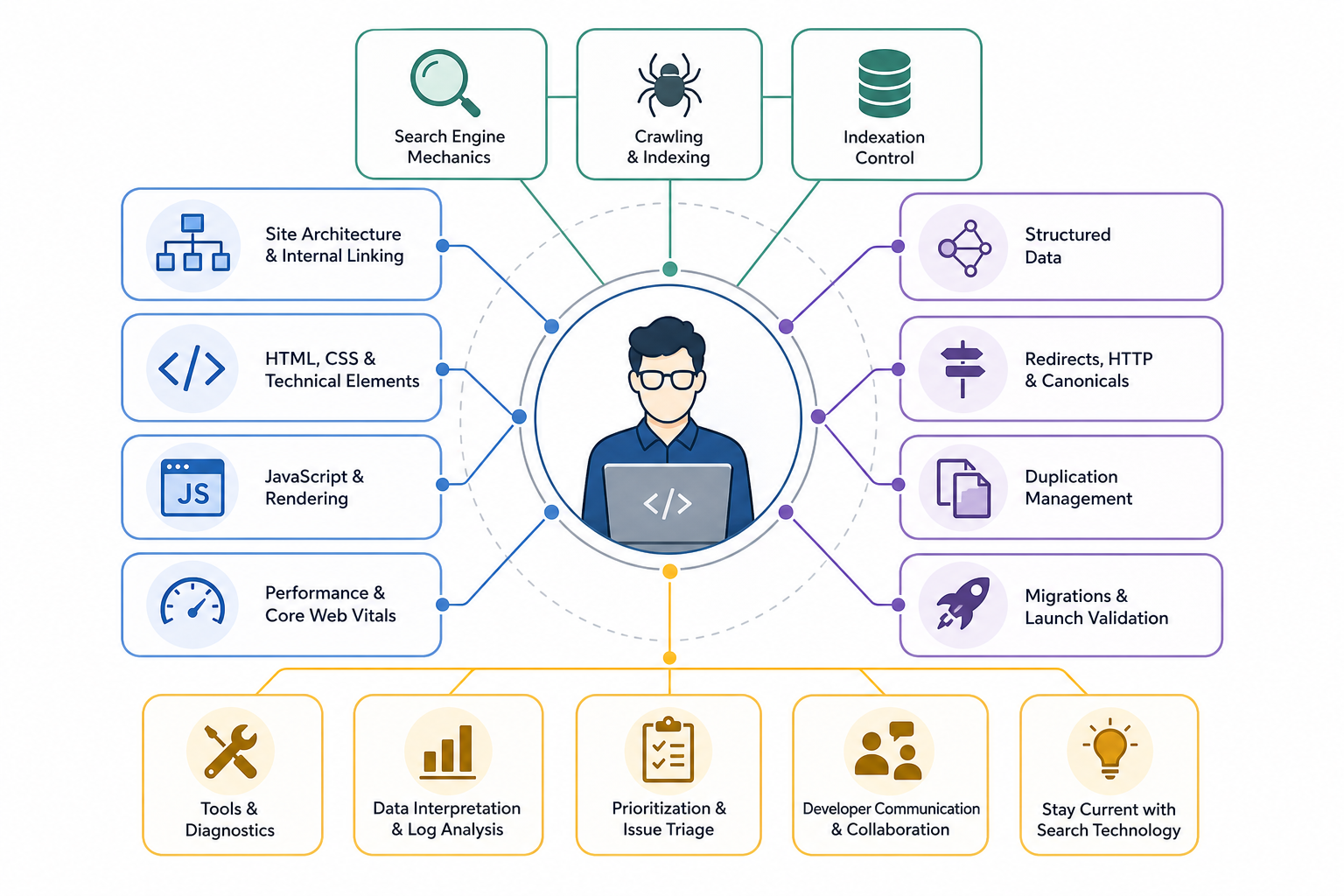
A technical SEO specialist needs a strong understanding of how websites are built, crawled, rendered, indexed, and measured, together with the ability to diagnose technical problems and translate them into actionable fixes.
The role does not require full-stack development expertise, but it requires enough technical fluency to inspect website behavior and communicate effectively with engineering teams.
Important technical SEO skills include:
- Understand crawling and indexation
- Know how search engines discover, crawl, render, canonicalize, and index URLs.
- Understand robots.txt, XML sitemaps, robots directives, canonicals, status codes, and Search Console indexation data.
- Understand website architecture
- Evaluate URL structures.
- Review navigation.
- Understand crawl depth.
- Analyze pagination and faceted navigation.
- Identify disconnected or inefficient site sections.
- Read HTML and CSS
- Understand headings, links, metadata, canonicals, structured data, hidden content, and responsive behavior.
- Diagnostic literacy matters more than the ability to build an entire website.
- Understand JavaScript and rendering
- Understand client-side rendering, server-side rendering, hydration, routing, and dynamically generated content.
- Identify when important text or links depend on JavaScript execution.
- Analyze website performance
- Understand server response, caching, scripts, CSS, images, fonts, resource loading, and Core Web Vitals.
- Distinguish the measured performance problem from its technical cause.
- Work with structured data
- Understand schema markup and JSON-LD.
- Validate implementations.
- Understand entity and page relationships.
- Avoid treating schema as a guaranteed ranking mechanism.
- Manage redirects and HTTP behavior
- Understand 2xx, 3xx, 4xx, and 5xx responses.
- Diagnose redirect chains, loops, soft 404s, and server errors.
- Handle canonicalization and duplication
- Diagnose URL parameters.
- Review alternate versions.
- Identify hostname and protocol conflicts.
- Resolve inconsistent canonical signals.
- Support website migrations
- Understand redirect mapping.
- Review staging controls.
- Validate canonicals.
- Update sitemaps.
- Check internal links.
- Monitor indexation after launch.
- Use technical SEO tools
- Work confidently with Search Console, Screaming Frog, Sitebulb, performance tools, SEO platforms, and other diagnostic systems.
- Understand what evidence each tool provides.
- Interpret technical SEO data
- Analyze crawl exports.
- Review indexing reports.
- Interpret performance datasets.
- Work with Search Console data.
- Process large URL datasets.
- Use spreadsheets or basic data-processing techniques when required.
- Understand log-file analysis
- Analyze bot behavior on larger or more complex sites.
- Use logs to understand which URLs search engines actually request.
- Treat log analysis as an advanced capability rather than a requirement for every website.
- Prioritize technical issues
- Separate critical access and indexing problems from lower-impact observations.
- Evaluate scale, business importance, SEO impact, and implementation effort.
- Communicate with developers
- Translate findings into:
- Technical requirements
- Tickets
- Acceptance criteria
- Validation steps
- Avoid vague recommendations such as “fix technical SEO.”
- Translate findings into:
- Collaborate across teams
- Work with developers, designers, product managers, analytics specialists, content teams, and other website stakeholders.
- Stay current with search technology
- Follow meaningful changes in crawling, rendering, indexing, structured data, browser behavior, web performance, and emerging search interfaces.
A strong technical SEO specialist combines search-engine knowledge, web-technology literacy, diagnostic ability, data interpretation, prioritization, and clear technical communication.
What Do Technical SEO Services Include?
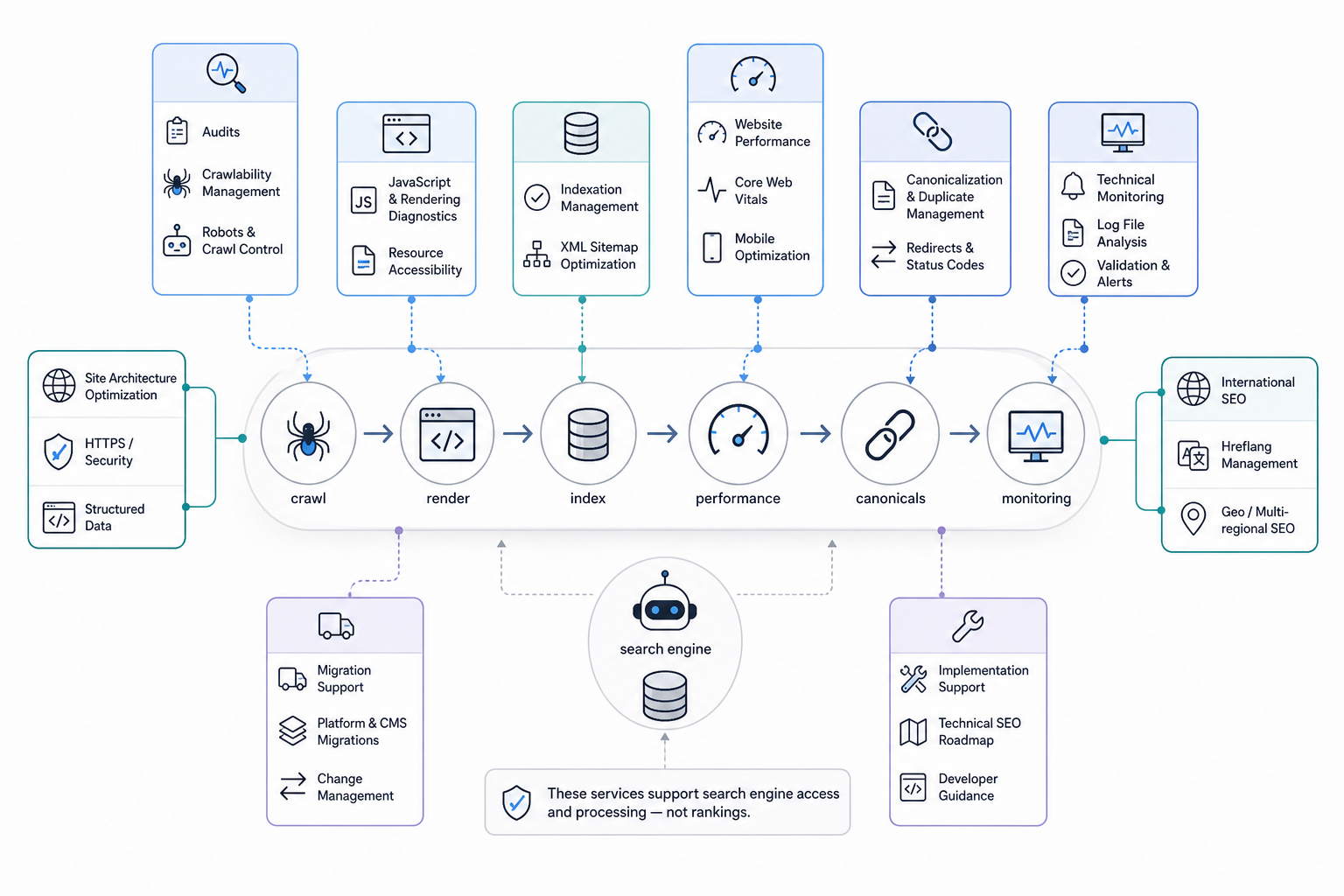
Technical SEO services improve the website infrastructure and technical signals that affect how search engines discover, crawl, render, index, and process important pages.
The exact scope depends on website size, platform, architecture, business priorities, and diagnosed issues.
Common technical SEO services include:
- Technical SEO audits
- Crawl and evaluate the website.
- Diagnose problems involving accessibility, indexation, rendering, architecture, URLs, performance, and technical signals.
- Deliver prioritized findings rather than only a site-health score.
- Crawlability management
- Review robots.txt.
- Analyze crawl paths.
- Check server responses.
- Investigate blocked resources.
- Resolve accessibility problems affecting important URLs.
- Indexation management
- Review noindex directives.
- Analyze canonical relationships.
- Investigate duplicate URLs.
- Review indexation states.
- Align sitemap inclusion with intended search eligibility.
- XML sitemap optimization
- Create, clean, or restructure sitemaps.
- Maintain important canonical and indexable URLs.
- Monitor sitemap processing in search-engine platforms.
- Site architecture optimization
- Improve navigation.
- Strengthen internal crawl paths.
- Review hierarchy.
- Resolve disconnected pages.
- Reduce unnecessary crawl complexity.
- Redirect and status-code management
- Fix broken URLs.
- Resolve redirect chains and loops.
- Correct soft 404s.
- Investigate server errors.
- Maintain appropriate HTTP behavior.
- Canonicalization and duplicate management
- Identify duplicate and near-duplicate URLs.
- Align canonicals, redirects, internal links, and other preferred-URL signals.
- Avoid relying on canonical tags as the only duplication solution.
- Website performance optimization
- Diagnose:
- Server response
- Scripts
- CSS
- Images
- Caching
- Resource loading
- Third-party overhead
- Improve significant delivery constraints.
- Diagnose:
- Core Web Vitals improvement
- Analyze LCP, INP, and CLS.
- Identify template-level causes.
- Treat performance thresholds as diagnostic benchmarks rather than guaranteed ranking cutoffs.
- Mobile technical optimization
- Verify mobile content availability.
- Review navigation.
- Validate functionality.
- Investigate mobile rendering differences.
- HTTPS and security configuration
- Resolve certificate problems.
- Fix mixed content.
- Remove insecure resources.
- Standardize HTTP and HTTPS behavior.
- Structured-data implementation
- Add, correct, or validate schema markup.
- Keep markup aligned with visible content.
- Avoid treating valid schema as a guarantee of enhanced search features.
- Rendering and JavaScript diagnostics
- Determine whether important content and links remain available to search engines.
- Review client-side routing and dynamically generated information.
- International technical SEO
- Review hreflang.
- Validate regional and language URLs.
- Maintain canonical and alternate relationships where relevant.
- Migration support
- Plan redirects.
- Validate staging controls.
- Review URL changes.
- Update XML sitemaps.
- Maintain internal links.
- Monitor indexation and technical behavior after launch.
- Technical monitoring and validation
- Re-crawl websites after changes.
- Review search-engine data.
- Confirm intended technical outputs.
- Monitor recurring issues on frequently changing websites.
- Implementation support
- Translate technical findings into developer requirements.
- Create actionable tickets.
- Define priorities.
- Set validation criteria.
- Support QA after deployment.
Technical SEO services do not guarantee rankings. Their purpose is to improve the technical conditions required for reliable search access, processing, page delivery, consolidation, and indexability.
Need links on real SaaS and business websites?
Links are placed after your approval, on sites with guaranteed DR and traffic, with a 1-year replacement guarantee.

