
Search Intent in SEO: Interpretation, Types, Identification, Content Optimization & Tracking
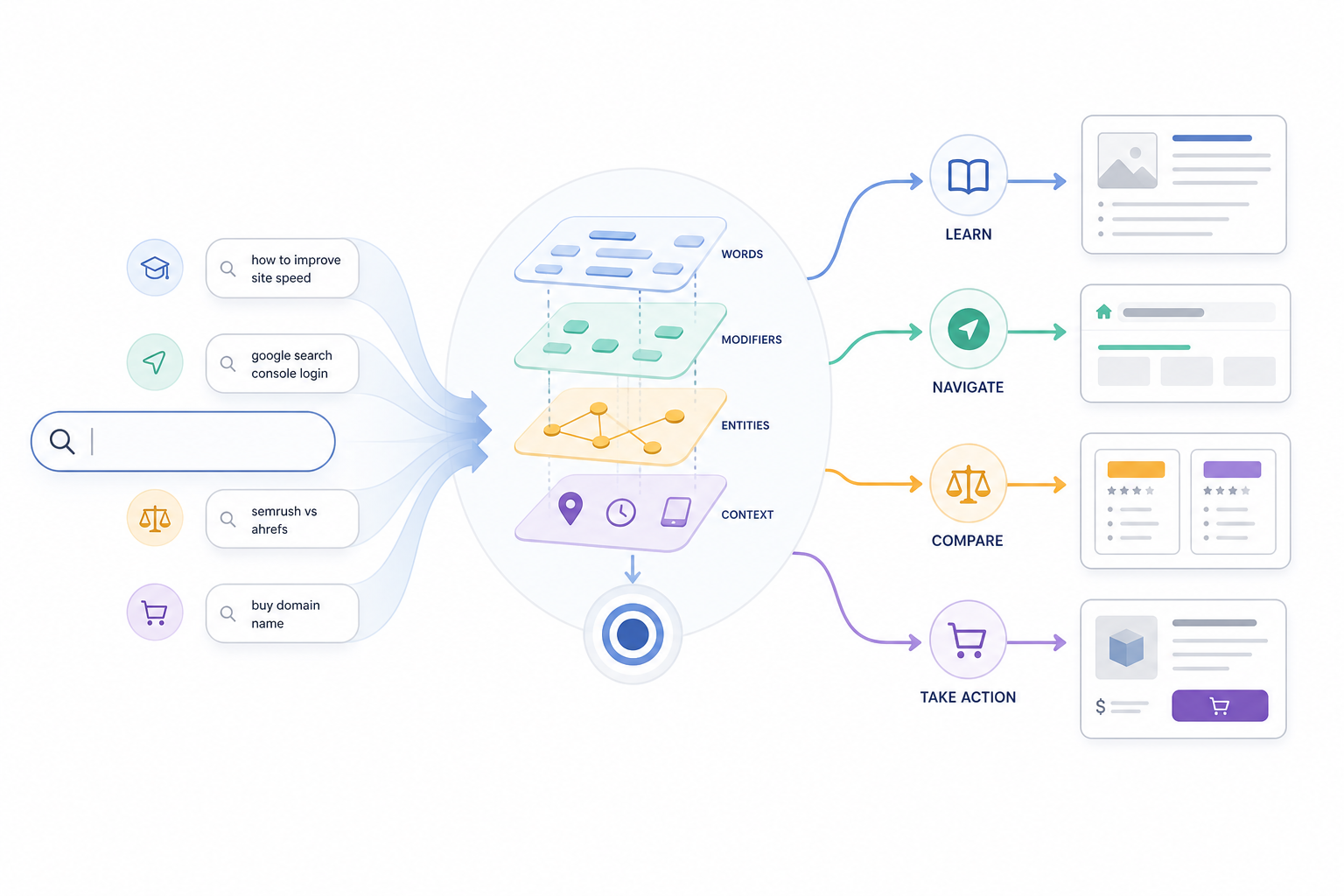
Search intent is the underlying goal a user wants to accomplish when entering a query into a search engine, such as learning something, reaching a specific destination, comparing options, or completing an action. In SEO, search intent connects the meaning of a query with the type of page and content most capable of satisfying that need.
Intent is broader than the keyword itself. Two queries can contain the same main topic while expressing completely different goals.
For example, someone searching for “CRM software” may be exploring the category, while “best CRM software” indicates evaluation and “buy CRM software” indicates a stronger action-oriented need. The underlying topic remains similar, but the expected result changes.
Search engines therefore need to understand more than the individual words in a query. They interpret language, entities, modifiers, context, and broader result patterns to determine what the searcher is most likely trying to accomplish.
SEO commonly groups search intent into four broad categories:
- Informational
- Navigational
- Commercial
- Transactional
These categories are useful for describing user goals, but they are not rigid boxes. A query can contain a dominant intent alongside one or more secondary needs.
SEO practitioners identify intent by interpreting the query itself and then validating that interpretation against the search results currently being shown. Query wording, modifiers, entities, implied actions, ranking page types, and SERP features can all provide evidence.
Understanding search intent becomes useful when it changes how a page is designed. A searcher looking for a definition may need a direct explanatory page, while someone comparing products may require criteria, alternatives, reviews, or comparison tables. Someone ready to act may need pricing, availability, booking, purchase, or sign-up functionality.
Search intent can also change over time. Search behavior, market conditions, seasonality, new products, and changes in the SERP can alter what type of result becomes most useful for a query.
Search intent therefore acts as the connection between what the user asks and the type of result most capable of satisfying that request.
How Do Search Engines Interpret User Intent?
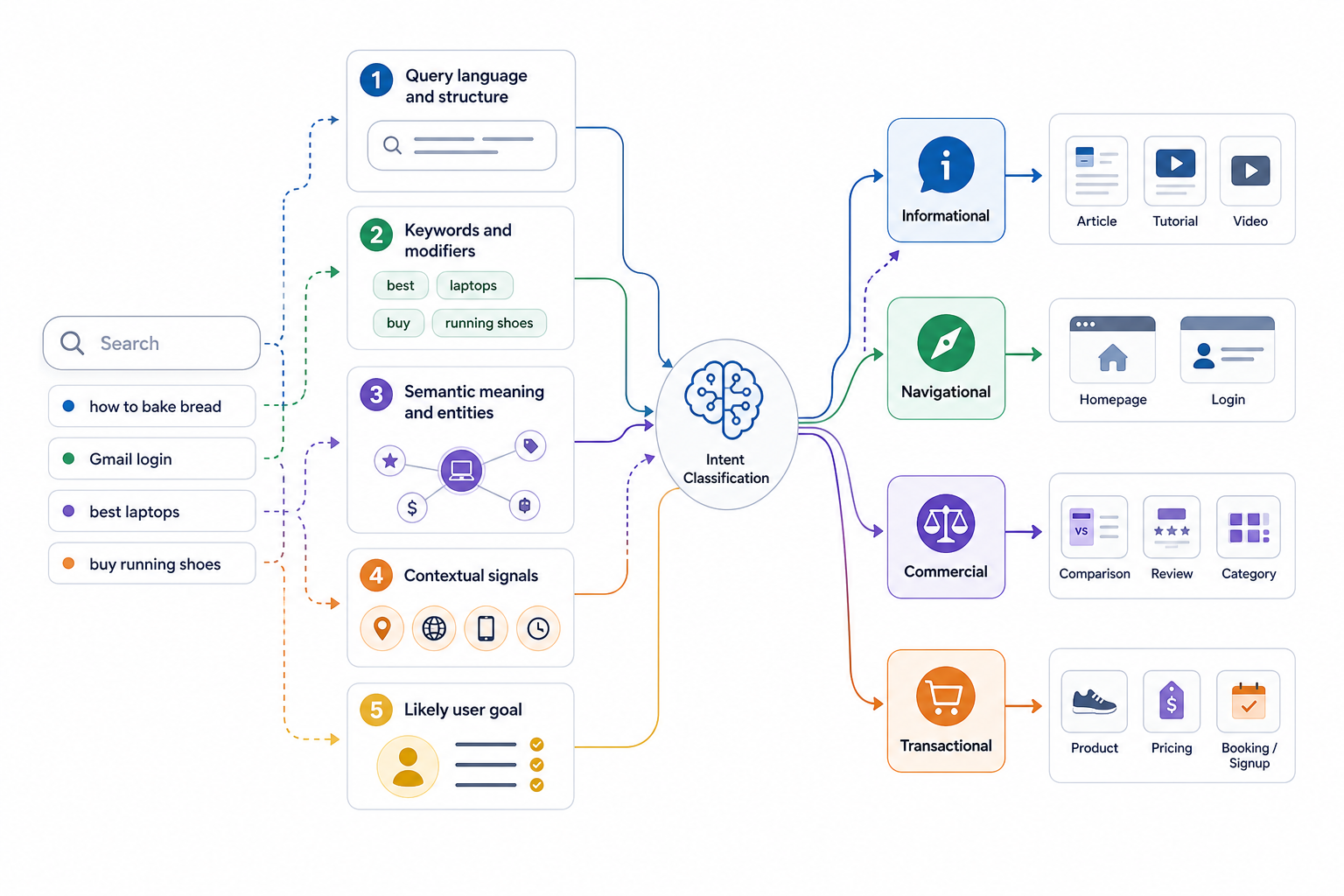
Search engines interpret user intent by analyzing the meaning of the query, its wording and modifiers, relationships between entities and concepts, relevant contextual signals, and the types of results likely to satisfy the search.
The objective is not simply to match the exact words entered into the search box. Search systems try to determine what the user wants to accomplish.
Query Language
Interpretation begins with the terms and structure of the query.
Examples include:
- “how to bake bread”
- “Gmail login”
- “best laptops”
- “buy running shoes”
Each query gives clues about both the subject and the expected action.
Keywords and Modifiers
Certain words can help indicate likely intent.
Examples include:
- “what,” “why,” “how,” “guide” can suggest a need to learn.
- “login,” “support,” or a known brand destination can suggest navigation.
- “best,” “review,” “vs,” “alternative” can suggest evaluation.
- “buy,” “price,” “book,” “order” can suggest action.
These modifiers are clues rather than fixed rules.
A query containing “price,” for example, can still involve comparison rather than immediate purchase.
Semantic Meaning
Search systems interpret relationships between words, concepts, and entities rather than relying exclusively on exact keyword matches.
Different queries can therefore represent the same underlying need.
For example:
- “how to improve website speed”
- “ways to make my site load faster”
use different wording but can express a very similar informational goal.
Semantic interpretation also helps distinguish entities with similar words but different meanings.
Query Context
Context can change what type of result best satisfies a search.
Relevant context can include:
- Location
- Language
- Device environment
- Freshness requirements
- Geographic qualifiers
- Time-sensitive wording
For example, “pizza near me” requires geographic relevance in a way that “how is pizza made” does not.
Context helps refine the likely user need without meaning that every search depends primarily on personalization or historical behavior.
Likely User Goal
Search systems combine the meaning of the query with relevant context to estimate what the user most likely wants to accomplish.
That goal can often be described as:
- Informational: Learn or understand.
- Navigational: Reach a known destination.
- Commercial: Evaluate or compare.
- Transactional: Complete an action.
Real queries can contain more than one need.
For example, a search such as “best project management software pricing” can combine commercial evaluation with a strong transactional element.
Result-Type Matching
The inferred goal influences the types of pages that can satisfy the query.
Common patterns include:
- Informational searches producing guides, definitions, tutorials, or videos.
- Navigational searches producing official websites, login pages, or known destinations.
- Commercial searches producing comparisons, reviews, categories, or buying guides.
- Transactional searches producing products, services, booking pages, pricing pages, or sign-up interfaces.
These are common patterns rather than absolute rules.
The search results themselves provide observable evidence of how a query is currently being served, which is why understanding the major intent categories becomes important for SEO.
Which Types of Search Intent Shape Search Behavior?

Search intent is commonly grouped into informational, navigational, commercial, and transactional intent. Each category describes a different type of user goal.
Informational Intent
Informational intent means the user wants to learn, understand, solve a problem, or find an answer.
Common query patterns include:
- What
- Why
- How
- Guide
- Meaning
- Tutorial
- Examples
Examples:
- “what is search intent”
- “how to tie a tie”
- “why is my website slow”
Typical results can include:
- Guides
- Definitions
- Tutorials
- Videos
- Research pages
- Explanatory resources
Informational searches can range from simple factual questions to complex research tasks.
An informational search is not automatically commercially irrelevant. A user researching a problem can later become a customer, but the immediate search goal remains learning rather than buying.
Navigational Intent
Navigational intent means the user wants to reach a specific website, brand, platform, product area, account page, or known destination.
Common patterns include:
- Brand + login
- Brand + support
- Brand + dashboard
- Brand + website
- Brand + specific page
Examples:
- “Gmail login”
- “Netflix account”
- “Semrush dashboard”
Typical results prioritize the expected destination.
A brand name alone does not always indicate navigational intent. A search for “HubSpot pricing” can involve commercial evaluation even though it contains a brand.
Commercial Intent
Commercial intent means the user is evaluating options before making a decision.
Common modifiers include:
- Best
- Top
- Review
- Vs
- Alternative
- Comparison
- For [use case]
Examples:
- “best gaming laptop”
- “HubSpot vs Salesforce”
- “best CRM for small business”
- “Mailchimp alternatives”
Typical results can include:
- Comparison pages
- Reviews
- Category pages
- Alternatives pages
- Buying guides
- Recommendation lists
Commercial intent differs from transactional intent because the user is still evaluating rather than necessarily completing the action.
Transactional Intent
Transactional intent means the user wants to complete a specific action.
That action can include:
- Buying
- Booking
- Registering
- Downloading
- Signing up
- Requesting a quote
- Starting a trial
- Subscribing
Common modifiers include:
- Buy
- Book
- Order
- Download
- Sign up
- Get quote
- Price
- Coupon
Examples:
- “buy running shoes online”
- “book haircut near me”
- “start HubSpot free trial”
- “download invoice template”
Typical results can include:
- Product pages
- Service pages
- Pricing pages
- Booking interfaces
- Sign-up pages
- Checkout-oriented pages
A transaction does not necessarily involve payment. Registering for a trial or downloading software can still represent transactional intent.
These four categories provide a useful framework, but actual queries can contain mixed intent. The next step is identifying which intent best explains a specific search.
How Can You Identify Search Intent From a Query?
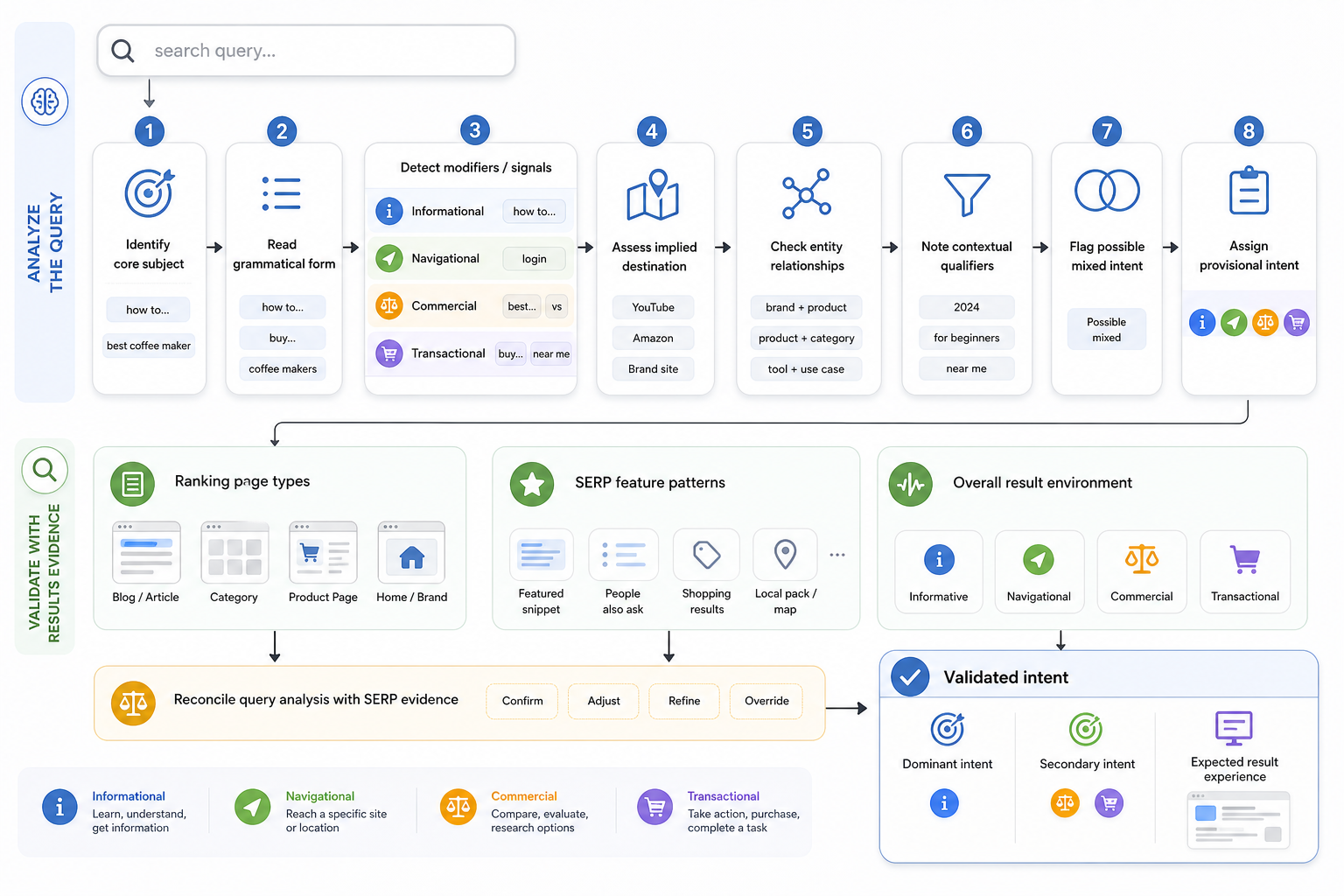
Search intent can be identified by interpreting what the query asks the user to learn, find, compare, or do and then validating that interpretation against current search-result evidence.
Identify the Core Subject
Determine what the query is about.
The subject can be:
- A topic
- Product
- Service
- Brand
- Person
- Place
- Problem
- Entity
- Action
Separate the subject from the user’s goal.
For example, “project management software” identifies the subject, while “best project management software” adds an evaluation goal.
Read the Grammatical Form
The structure of the query can provide clues.
Questions beginning with:
- What
- Why
- How
- When
often indicate an informational need.
However, grammar alone does not determine intent.
“How much does Salesforce cost?” contains a question structure but also reflects commercial evaluation.
Look for Informational Modifiers
Terms such as:
- Guide
- Meaning
- Tutorial
- Examples
- How to
- Definition
- Explanation
often indicate a learning-oriented search.
Use these as signals rather than absolute classification rules.
Look for Navigational Signals
Brand names combined with terms such as:
- Login
- Dashboard
- Support
- Website
- Account
can indicate that the user wants a known destination.
Avoid categorizing every branded query as navigational.
Look for Commercial Modifiers
Terms such as:
- Best
- Top
- Review
- Vs
- Alternative
- Comparison
- For small business
- For beginners
often indicate evaluation.
The user has usually narrowed the category but still needs help selecting among options.
Look for Transactional Signals
Action-oriented language can include:
- Buy
- Book
- Order
- Sign up
- Download
- Start trial
- Get quote
- Subscribe
These queries generally imply that the user wants to complete something rather than continue broad research.
Identify the Implied Destination
Ask what type of result would logically complete the user’s task.
Possible destinations include:
- Definition
- Guide
- Official website
- Comparison
- Category page
- Product
- Service page
- Pricing page
- Booking interface
- Tool
- Calculator
The expected destination gives additional evidence about intent.
Consider Entity Relationships
Determine how the entities in the query relate.
For example:
“Slack vs Teams” compares two entities.
“Slack login” combines an entity with a destination action.
“Slack features” can indicate informational or commercial investigation depending on the broader SERP.
Entity relationships often reveal whether the user wants to learn, compare, navigate, or act.
Check Contextual Qualifiers
Qualifiers can significantly change intent.
Examples include:
- Near me
- City names
- Today
- 2026
- Online
- Free
- Enterprise
- For students
“Dentist” and “dentist near me” refer to the same service but create very different result expectations.
Identify Mixed Intent
Some queries reasonably support more than one user goal.
For example:
“best laptops under $1,000”
is mainly commercial because the user is evaluating options, but it also contains stronger purchase readiness than a broad “best laptops” search.
In these cases, identify:
- Dominant intent
- Relevant secondary intent
Determine the Provisional Intent
Based on the query language, classify the most likely primary user goal.
Treat this classification as provisional until the SERP is reviewed.
Inspect Ranking Page Types
Search the query and examine what types of pages rank prominently.
Look for:
- Guides
- Definitions
- Product pages
- Categories
- Comparison pages
- Official brand pages
- Tools
- Videos
- Local results
The goal is to understand what those pages help users accomplish, not simply which keywords they contain.
Inspect the Broader SERP Pattern
Look at the overall result environment.
Search features and result formats can support or challenge the initial interpretation.
One unusual result does not necessarily change the dominant intent.
Reconcile Query Signals With SERP Evidence
Compare the initial query interpretation with the search-result pattern.
If the query appears informational but the SERP is consistently dominated by commercial pages, investigate whether:
- The query is ambiguous.
- Commercial evaluation is actually dominant.
- Multiple intents coexist.
- Search behavior around the phrase has changed.
Establish the Validated Intent
Record the final interpretation as:
- Dominant intent
- Relevant secondary intent
- Expected result experience
This validated intent becomes the basis for deciding what type of page and content experience is appropriate.
What Do SERP Features Reveal About Search Intent?
SERP features provide supporting evidence about how a search engine is currently serving a query because different result formats correspond with different user needs.
No single SERP feature proves intent on its own. Interpret features together with query wording, ranking page types, and the broader result pattern.
| SERP Feature / Pattern | Likely User Need | Intent It Can Support | What to Validate |
|---|---|---|---|
| Featured Snippet | Concise explanation or answer | Primarily informational | Whether the rest of the SERP is also informational |
| People Also Ask | Follow-up questions and supporting information | Often informational | Whether the primary query itself has mixed intent |
| AI Overview | Synthesized explanation or comparison | Informational, commercial, mixed | Ranking pages and wider result composition |
| Knowledge Panel | Entity-specific information | Informational or navigational | Whether the query targets a known entity |
| Sitelinks | Direct access to sections of a known website | Navigational | Whether official branded results dominate |
| Local Pack / Maps | Geographic or visit-oriented need | Can overlap several intents | Whether users want information, evaluation, or action |
| Shopping Results | Product evaluation or purchase | Commercial or transactional | Whether users are comparing or ready to buy |
| Review Results | Evaluation and reassurance | Commercial | Whether reviews and comparisons dominate |
| Comparison / List Results | Compare choices | Commercial | Whether “best,” “vs,” or alternatives dominate |
| Video Results | Demonstration or visual explanation | Often informational, sometimes commercial | Query and surrounding results |
| Image Results | Visual discovery or inspiration | Mixed | Whether users need identification, ideas, or products |
| Forum Results | First-hand experience or peer opinion | Informational or commercial | Whether community validation is important |
| Brand-Dominated SERP | Reach a known destination | Navigational | Presence of official homepage, login, app, or branded sitelinks |
Featured Snippets
Featured snippets often appear when a concise answer can satisfy part of the search need.
They commonly support:
- Definitions
- Factual answers
- Procedures
- Explanations
Their presence often suggests informational demand, but the wider SERP still matters.
People Also Ask
People Also Ask results reveal related questions users can have around the topic.
They can expose:
- Supporting questions
- Clarifications
- Additional informational needs
A PAA box does not automatically mean the primary query is entirely informational.
AI Overviews
AI-generated answer experiences can indicate demand for:
- Synthesized explanations
- Multi-source answers
- Comparisons
- Complex information
They can appear across informational, commercial, local, or mixed searches, so their presence alone does not define intent.
Knowledge Panels
Knowledge panels often indicate entity-based searches.
They can support users looking for concise information about:
- Organizations
- People
- Places
- Products
- Concepts
When combined with branded results and sitelinks, they can also support navigational intent.
Sitelinks
Sitelinks can provide strong navigational evidence.
For example, a branded SERP showing:
- Homepage
- Login
- Pricing
- Support
- Products
suggests that users commonly want to navigate directly into specific parts of the brand’s website.
Local Packs and Maps
Local packs indicate geographic relevance.
They can support different intent types.
For example:
- “best dentist near me” is strongly commercial and local.
- “24 hour pharmacy near me” can be transactional and local.
- “Starbucks near me” can be navigational and local.
Local intent therefore overlaps with the broader intent categories rather than replacing them.
Shopping and Product Results
Shopping grids, prices, merchant listings, and availability can indicate commercial or transactional demand.
The wider SERP determines whether users are mainly:
- Comparing options
- Checking pricing
- Looking for products
- Ready to purchase
Review and Comparison Results
SERPs dominated by:
- Best
- Top
- Vs
- Reviews
- Alternatives
- Buying guides
provide strong evidence of commercial investigation.
In many cases, the ranking page types reveal the expected user task more clearly than an individual SERP feature.
Video Results
Videos can indicate a need for:
- Demonstration
- Visual instruction
- Product evaluation
- Experiential understanding
The same feature can support different intents depending on the query.
Image Results
Strong image visibility can indicate:
- Inspiration
- Identification
- Visual browsing
- Design exploration
- Product discovery
Images are supporting evidence rather than one fixed intent signal.
Forum and Discussion Results
Forum results can indicate demand for:
- Personal experience
- Troubleshooting
- Peer recommendations
- Subjective opinions
- Community validation
This can be particularly relevant for searches involving reviews, technical problems, product experiences, or nuanced decision-making.
Brand-Dominated Results
A SERP containing:
- Official homepage
- Login page
- Brand social profiles
- App listing
- Branded sitelinks
provides stronger evidence of navigational intent than a brand term alone.
SERP analysis becomes more reliable when several signals point toward the same need.
A mixed SERP containing guides, categories, products, reviews, and videos can indicate that more than one user goal exists. In that situation, preserve the dominant and secondary intents rather than forcing the query into one rigid category.
How Should Content Be Optimized for Search Intent?
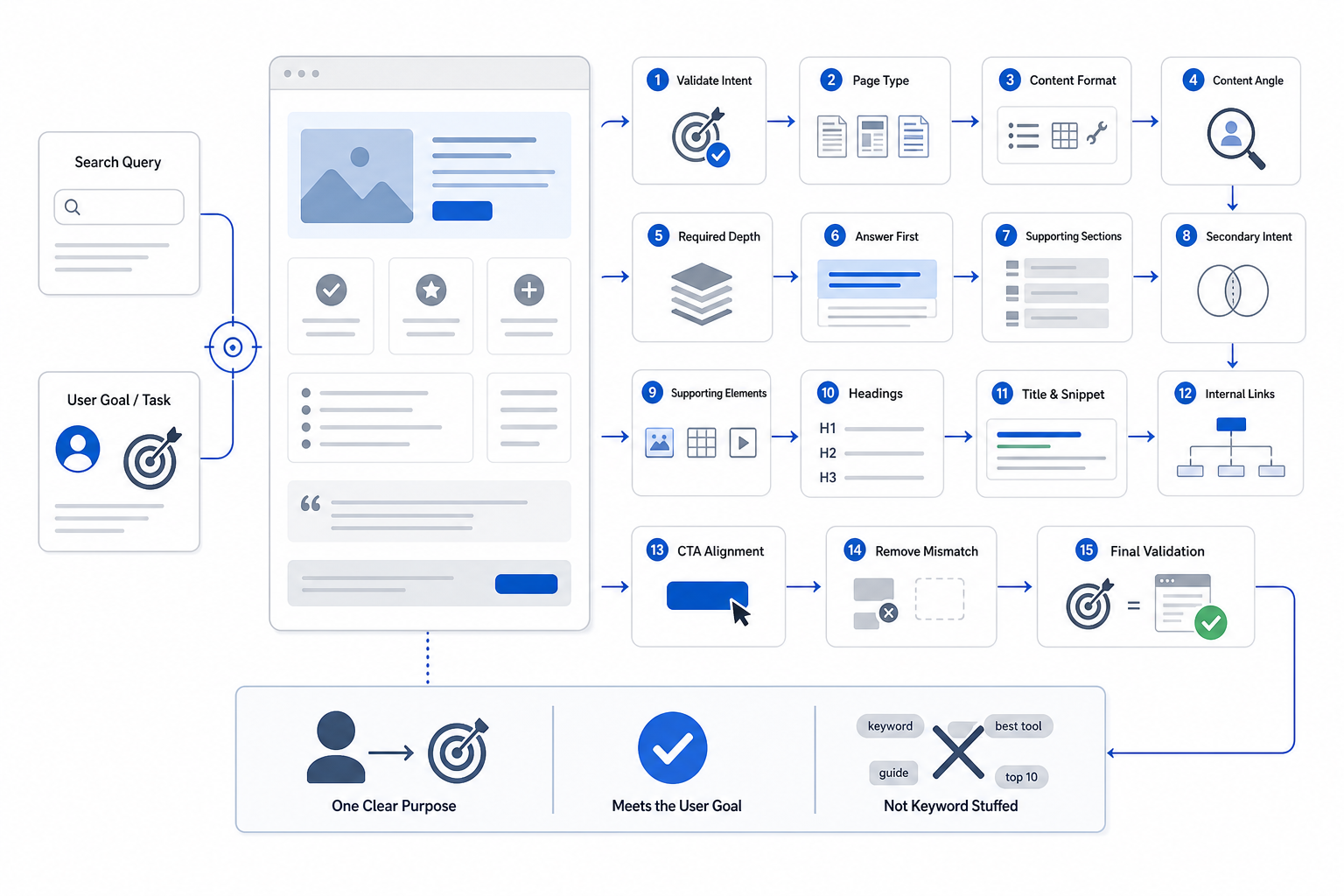
Content should be optimized for search intent by matching the page’s purpose, type, format, angle, depth, and answer structure with what users are trying to accomplish through the query.
Search intent optimization is not about adding more intent-related keywords. It is about designing the page around the user task.
1. Confirm the Validated Intent
Begin with the established:
- Dominant intent
- Relevant secondary intent
- Expected result experience
Avoid restarting the intent-identification process while writing.
2. Choose the Appropriate Page Type
Match the user goal with a page type capable of satisfying it.
Common mappings include:
- Informational need → guide, definition, tutorial, explanatory page, tool
- Navigational need → expected brand or destination page
- Commercial need → comparison, alternatives page, review, buying guide, category
- Transactional need → product, service, booking, pricing, sign-up page
These mappings are common patterns rather than fixed rules.
3. Match the Content Format
Determine how users expect the answer to be presented.
Possible formats include:
- Direct answer
- Long-form guide
- Ordered process
- List
- Comparison table
- Product grid
- Calculator
- Video
- Template
- Interactive tool
The SERP can provide evidence about which formats currently satisfy the search effectively.
4. Match the Content Angle
Identify the perspective the query requires.
Examples include:
- Beginner-friendly
- Advanced
- Affordable
- Current
- Local
- Enterprise
- Industry-specific
- Use-case-specific
For example, “best CRM for startups” requires a different angle from “best enterprise CRM.”
5. Match the Required Depth
Provide enough information to complete the user task.
A simple factual query can require a concise answer.
A complex evaluation query can require:
- Criteria
- Comparisons
- Advantages
- Limitations
- Alternatives
- Evidence
Depth should reflect the task rather than a target word count.
6. Answer the Primary Need Early
Give the main answer, definition, recommendation, or action without unnecessary delay.
Then expand with supporting information.
Users searching for “what is search intent” should receive the definition before several paragraphs of background.
7. Structure Supporting Information Logically
After answering the primary need, organize the remaining information according to what the user needs next.
This can include:
- Clarification
- Examples
- Evidence
- Comparisons
- Alternatives
- Next actions
Each section should perform a distinct information job.
8. Cover Secondary Intent Where Relevant
Satisfy the dominant intent first.
Include secondary needs where they genuinely support the page.
Avoid forcing unrelated user tasks into one URL simply because they share keywords.
9. Align Supporting Elements
Different intents require different supporting information.
Informational pages can need:
- Definitions
- Examples
- Evidence
- Instructions
- Demonstrations
Commercial pages can need:
- Criteria
- Comparisons
- Pros and cons
- Alternatives
- Pricing context
- Use-case differences
Transactional pages can need:
- Product or service details
- Availability
- Pricing
- Trust information
- Booking
- Purchase or sign-up actions
10. Align Headings With the User Task
Use headings to organize:
- The main need
- Supporting questions
- Necessary decisions
- Relevant next steps
Avoid creating sections simply to insert keywords.
11. Align Titles and Search-Result Messaging
The title should accurately communicate what the page delivers.
Use relevant intent language naturally.
Meta descriptions can reinforce expectations by explaining what the user can find on the page.
Avoid rigid character-length or exact-match rules as the primary optimization criteria.
12. Use Internal Links for Adjacent Needs
Link to another page when a different URL can better satisfy the next user task.
For example:
- An informational article can link to a comparison.
- A comparison can link to pricing.
- A product guide can link to specific products.
Internal linking prevents one page from becoming overloaded with every adjacent intent.
13. Align Conversion Elements With Readiness
Calls to action should match the user’s current goal.
Informational users may need:
- Another guide
- Downloadable resource
- Supporting example
Commercial users may need:
- Comparison
- Demo
- Pricing
- Product details
Transactional users may need:
- Buy
- Book
- Sign up
- Start trial
- Request quote
A CTA that is too aggressive for the current intent can interrupt the user journey.
14. Remove Intent Mismatch
Remove or reposition content that:
- Delays the main answer
- Answers unrelated questions
- Changes the page purpose
- Creates competing signals
- Adds unnecessary sections
More content does not automatically create better intent alignment.
15. Validate the Completed Page
Compare the finished page against the validated intent.
Check:
- Page type
- Format
- Angle
- Depth
- Answer structure
- Supporting content
- SERP expectations
Look for meaningful gaps rather than copying competing pages.
The completed page should still have one clear primary purpose.
Search intent optimization works when the content behaves like the result the user actually needs.
How To Track Search Intent?
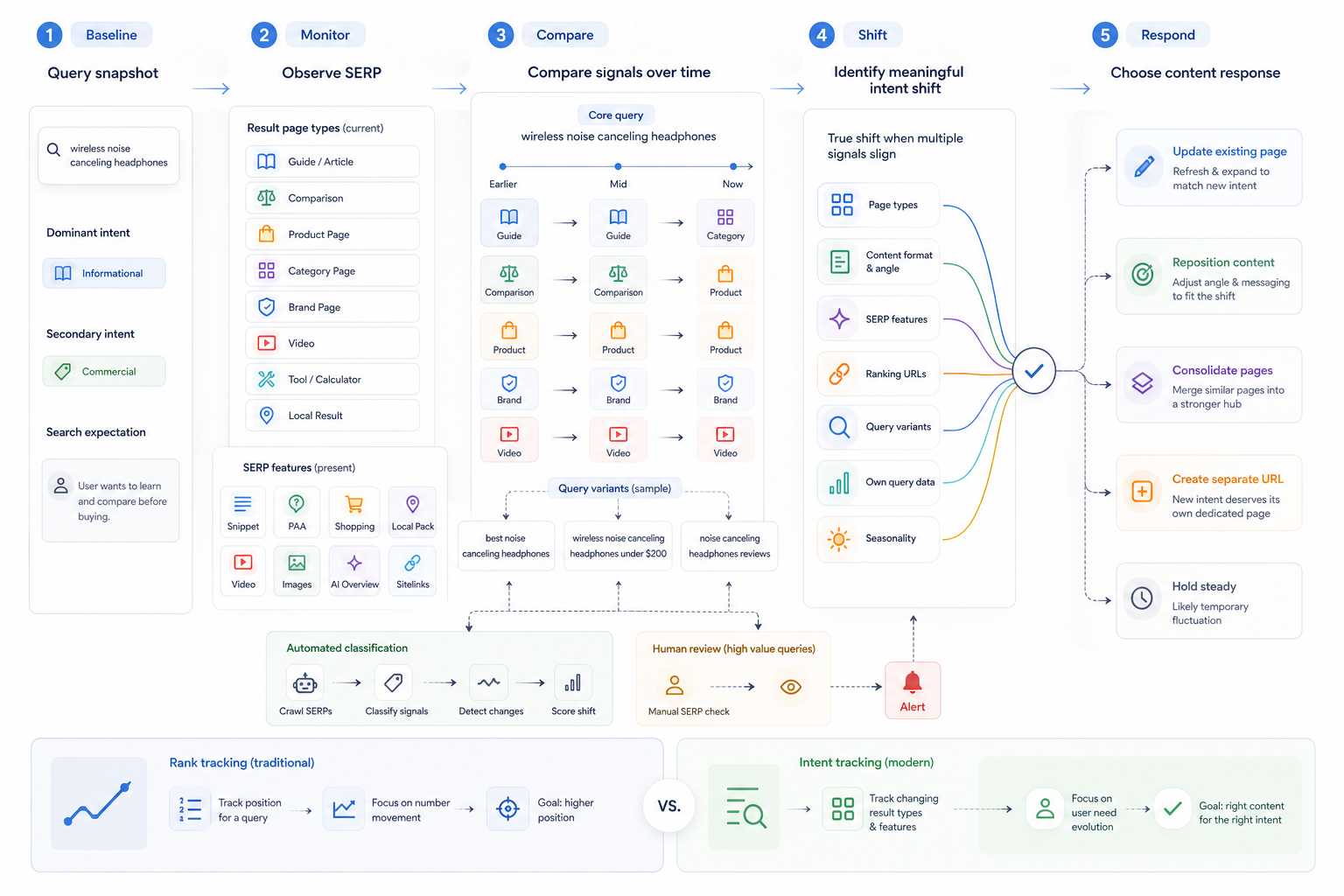
Search intent can be tracked by recording the current intent of a query, monitoring changes in the SERP and ranking page types over time, and reassessing the classification when the dominant user need changes meaningfully.
Tracking intent differs from identifying it once. The objective is to determine whether the search environment continues to reward the same type of user experience.
Record the Baseline Intent
Document the current:
- Dominant intent
- Secondary intent
- Search-result expectation
Use informational, navigational, commercial, and transactional labels where they fit.
Keep mixed intent where necessary.
Record the Dominant Ranking Page Types
Document what currently ranks.
Examples include:
- Guides
- Comparisons
- Product pages
- Categories
- Brand pages
- Videos
- Tools
- Local pages
Ranking page types provide stronger practical evidence than an automated intent label alone.
Record the Dominant Content Format and Angle
Note whether the SERP currently favors:
- Tutorials
- Definitions
- Listicles
- Comparisons
- Reviews
- Product grids
- Calculators
- Local results
- Current-year content
Changes in format or angle can indicate changes in user expectations.
Track SERP Features
Monitor changes in:
- Featured Snippets
- People Also Ask
- AI Overviews
- Shopping results
- Local packs
- Video results
- Images
- Sitelinks
- Other prominent modules
Treat these as supporting evidence rather than definitive proof of an intent change.
Use Automated Intent Labels at Scale
SEO platforms can classify large keyword sets into common intent categories.
These labels help:
- Organize keyword portfolios
- Monitor broad patterns
- Flag queries for manual review
Treat them as modeled classifications rather than final truth.
Recheck Important Queries Manually
High-value queries deserve periodic live SERP review.
Manual inspection verifies what type of content and pages users are currently being shown.
This becomes particularly important after significant ranking or traffic changes.
Track Changes in Ranking URLs
Notice when one type of page begins replacing another.
Examples include:
- Guides replaced by category pages
- Comparisons replaced by product pages
- Product pages replaced by informational results
Repeated changes across several ranking positions can indicate that the dominant intent is evolving.
Track SERP Composition
Look beyond one result.
Compare the broader mix of:
- Informational pages
- Commercial pages
- Transactional pages
- Brand destinations
- Local results
- Videos
- Tools
One unusual ranking page does not necessarily indicate an intent shift.
Track Query Modifiers and Variants
Small wording changes can create different goals.
For example:
- “email marketing software”
- “best email marketing software”
- “email marketing software pricing”
- “buy email marketing software”
Monitoring related variants helps distinguish the stable core topic from modifier-driven changes in intent.
Review Your Own Query Data
Search Console can reveal queries that begin generating impressions for a page.
A page originally targeting informational intent can gradually start appearing for more commercial searches.
These changes can indicate:
- Broader relevance
- Mixed intent
- Changing search interpretation
- A need for a separate page
Watch for Seasonal Changes
Some queries behave differently during:
- Holidays
- Annual events
- Product launches
- News cycles
- Seasonal demand
- Market changes
A temporary SERP change does not always represent a permanent intent shift.
Compare Intent at Meaningful Intervals
Important queries can be reviewed:
- Monthly
- Quarterly
- After major SERP changes
- After significant traffic movement
- After material ranking changes
No single monitoring frequency fits every keyword.
High-value and volatile queries justify closer monitoring than stable low-priority terms.
Flag Meaningful Intent Changes
Treat a shift as more significant when several signals change together.
Examples include:
- Ranking page types change.
- SERP features change.
- Content formats change.
- Query patterns change.
- Your ranking URL changes.
- User behavior around the query changes.
Avoid reacting to normal day-to-day SERP volatility.
Reassess Content Alignment
When the dominant intent genuinely changes, review whether the current page still matches:
- Page type
- Format
- Angle
- Depth
- Supporting information
Possible responses include:
- Update the page.
- Reposition the content.
- Consolidate overlapping pages.
- Create a separate URL.
- Leave the page unchanged if the shift is temporary.
Intent tracking also differs from rank tracking. Rank tracking measures where a page appears. Intent tracking examines whether the type of result being rewarded has changed.
The purpose of tracking search intent is therefore to identify meaningful changes in what users appear to need and adjust content only when that change is supported by consistent evidence.
Need links on real SaaS and business websites?
Links are placed after your approval, on sites with guaranteed DR and traffic, with a 1-year replacement guarantee.

