
On-Page SEO: Comparison, Benefits, Optimization, Applications, Analysis & Services
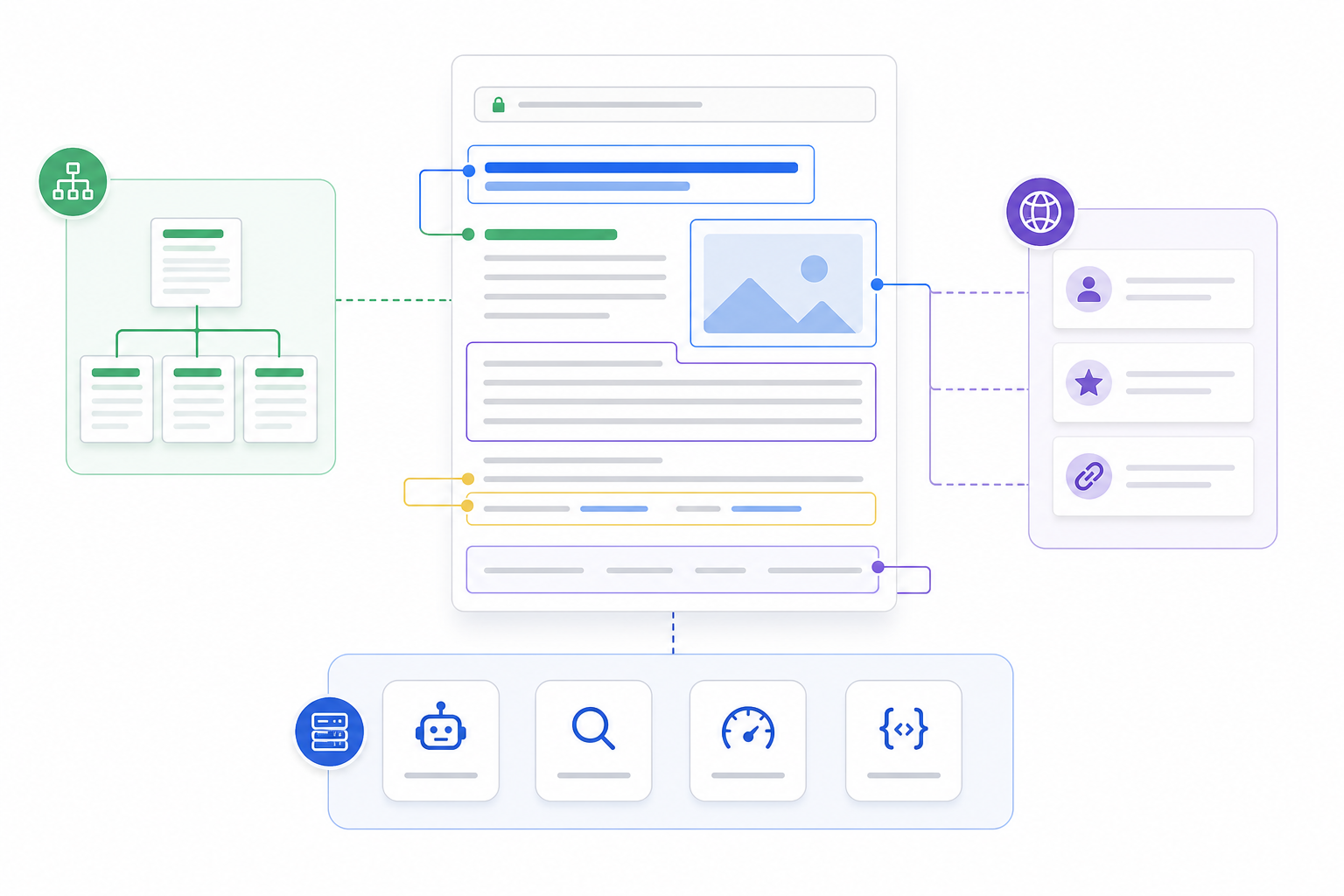
On-page SEO is the practice of optimizing individual webpages so their content, targeting, structure, and page-level signals clearly communicate relevance to users and search engines. It focuses primarily on what happens within a specific URL rather than on external authority or the broader technical infrastructure of the website.
On-page SEO includes the information users consume and the elements that organize and describe that information. These include search intent, content quality, keyword targeting, page titles, headings, URLs, images, contextual links, and other page-level signals.
A well-optimized page has a clear purpose. Its content answers the searcher’s need, its headings organize that information logically, its terminology reflects the subject naturally, and its internal and external links support relevant relationships.
On-page SEO should not be treated as a collection of isolated rules for keyword frequency, title length, heading count, alt text, or plugin scores. The value comes from how the elements work together to establish one clear topic and satisfy one identifiable search need.
It also has a defined boundary. On-page SEO focuses on page-level relevance, while technical SEO deals with crawling, rendering, indexing, and infrastructure. Off-page SEO focuses on external authority. Broader on-site SEO can include internal architecture and relationships across the website.
Understanding these boundaries makes it easier to see where on-page SEO fits within the wider SEO system.
How Is On-Page SEO Different From On-Site, Off-Page, and Technical SEO?
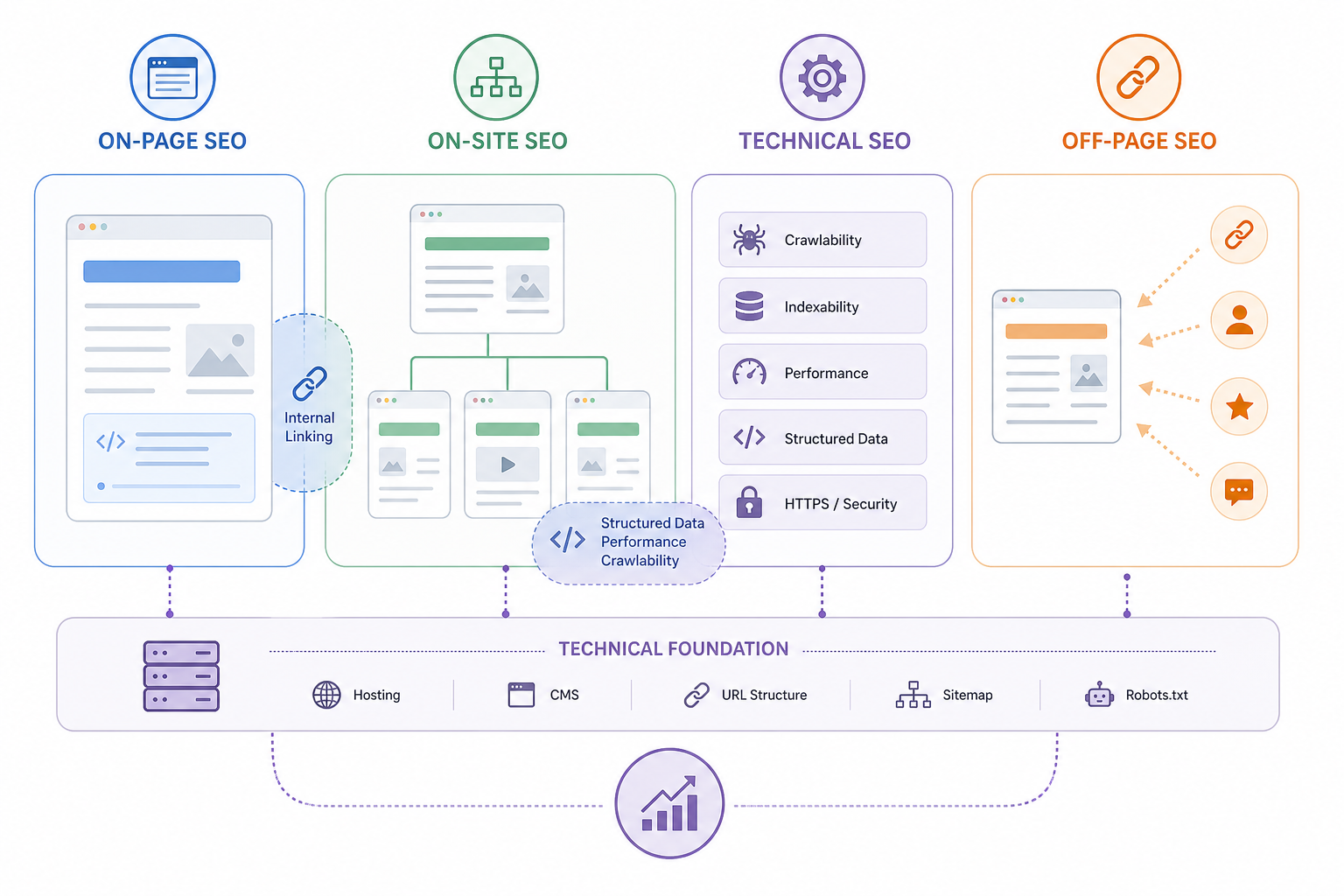
On-page SEO focuses primarily on individual webpage relevance and content optimization, while on-site SEO can refer more broadly to optimization across the website, technical SEO focuses on search accessibility and infrastructure, and off-page SEO focuses on external authority.
The terms on-page SEO and on-site SEO are sometimes used interchangeably, so their boundary is not universally fixed.
| SEO Type | Primary Scope | Main Focus | Typical Activities | Main SEO Outcome |
|---|---|---|---|---|
| On-Page SEO | Individual webpages | Relevance, intent, content, page signals | Content quality, title tags, headings, URLs, images, contextual links | Helps users and search engines understand what the page is about |
| On-Site SEO | Wider website | Internal relationships and sitewide optimization | Information architecture, internal linking, navigation, content relationships | Strengthens how pages work together across the site |
| Technical SEO | Website infrastructure | Crawling, rendering, indexing, technical performance | Robots directives, canonicals, sitemaps, redirects, page performance, structured data | Helps search engines access and process the site |
| Off-Page SEO | Outside the website | External authority and reputation | Backlinks, digital PR, editorial mentions, citations, brand references | Strengthens external authority and competitive credibility |
Internal linking can overlap between on-page and on-site SEO. A contextual link inside one page is a page-level optimization decision, while large-scale internal architecture belongs more broadly to on-site and technical SEO.
The same overlap can occur with structured data, page performance, and crawlability. These factors can affect an individual page, but their primary ownership remains technical SEO.
Effective SEO requires these areas to support one another rather than treating them as independent strategies.
In particular, Off-Page SEO sits outside the page itself, focusing on backlinks, external references, reputation, and authority rather than page-level relevance.
Why Is On-Page SEO Important?
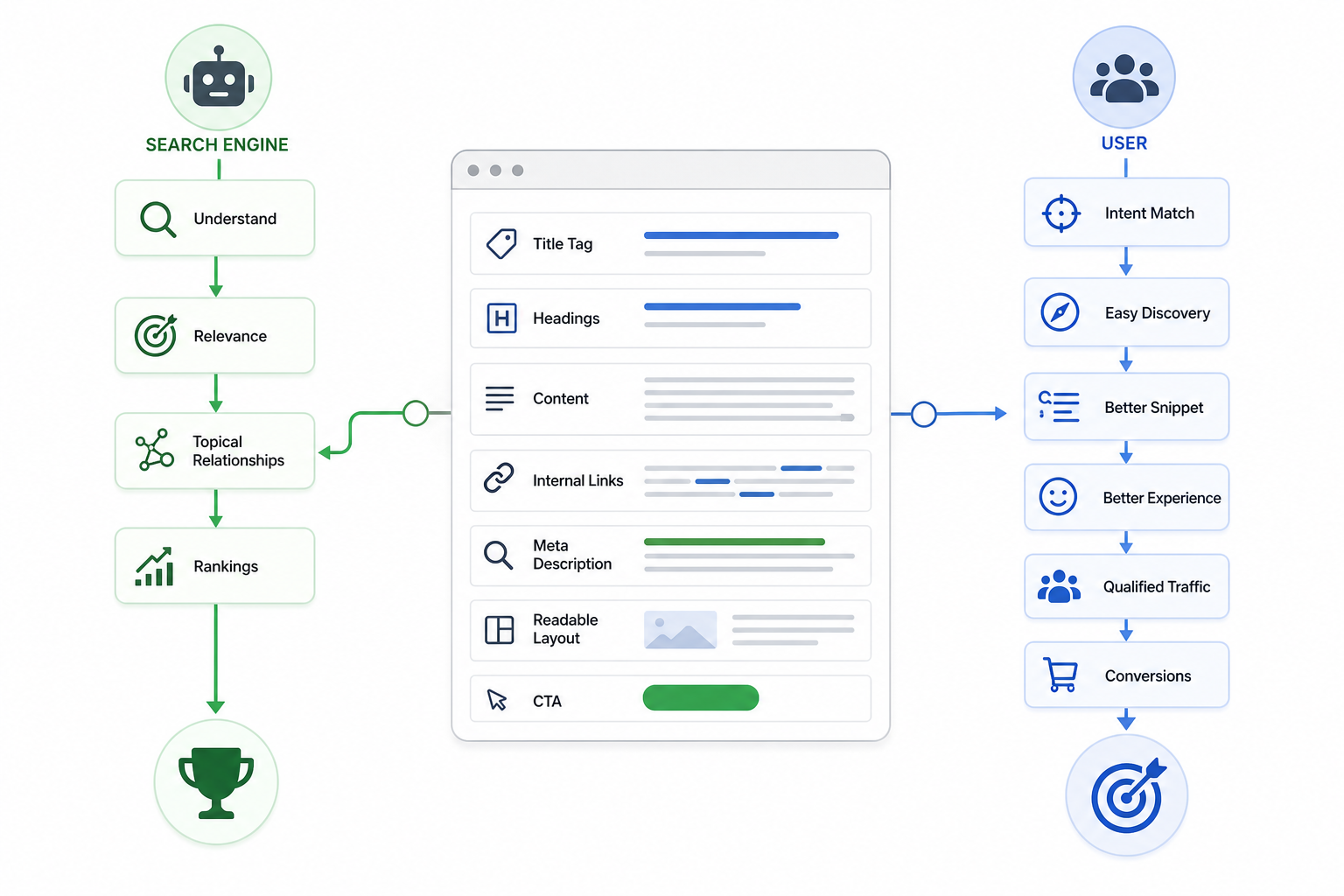
On-page SEO is important because it helps search engines understand a page’s topic and relevance while helping users find information that matches their search intent.
Its main benefits include:
- Improve topical relevance
- Titles, headings, content, terminology, and contextual links help establish what the page is about.
- Clear topic communication reduces ambiguity around the page’s purpose.
- Match search intent
- On-page optimization aligns the page type, content, structure, and answer format with what users expect from the query.
- A commercial search requires a different page experience from a purely informational search.
- Support organic rankings
- Useful content, clear relevance, and stronger information organization improve the page’s ability to compete for appropriate searches.
- On-page optimization does not guarantee rankings because competition, authority, technical accessibility, and other factors also influence performance.
- Attract qualified traffic
- Pages aligned with relevant search demand are more likely to attract users genuinely interested in the subject, product, or service.
- Improve search-result communication
- Clear titles and descriptions help users understand the likely content of the page before clicking.
- Better search-result communication can improve engagement where those elements are displayed.
- Improve user experience
- Logical headings, useful content, readable formatting, and relevant navigation make information easier to locate and understand.
- Support conversions
- Strong intent alignment helps guide qualified visitors toward appropriate actions such as enquiries, sign-ups, purchases, or downloads.
- Strengthen internal topical relationships
- Contextual internal links connect pages around related subjects and help clarify how information fits together across the website.
- Provide direct optimization control
- Most on-page elements can be reviewed and changed directly by the website owner, SEO team, writer, or developer.
The importance of on page SEO comes from making each page easier to understand, more relevant to the right search, and more useful to the person visiting it.
How Do You Optimize a Page for On-Page SEO?
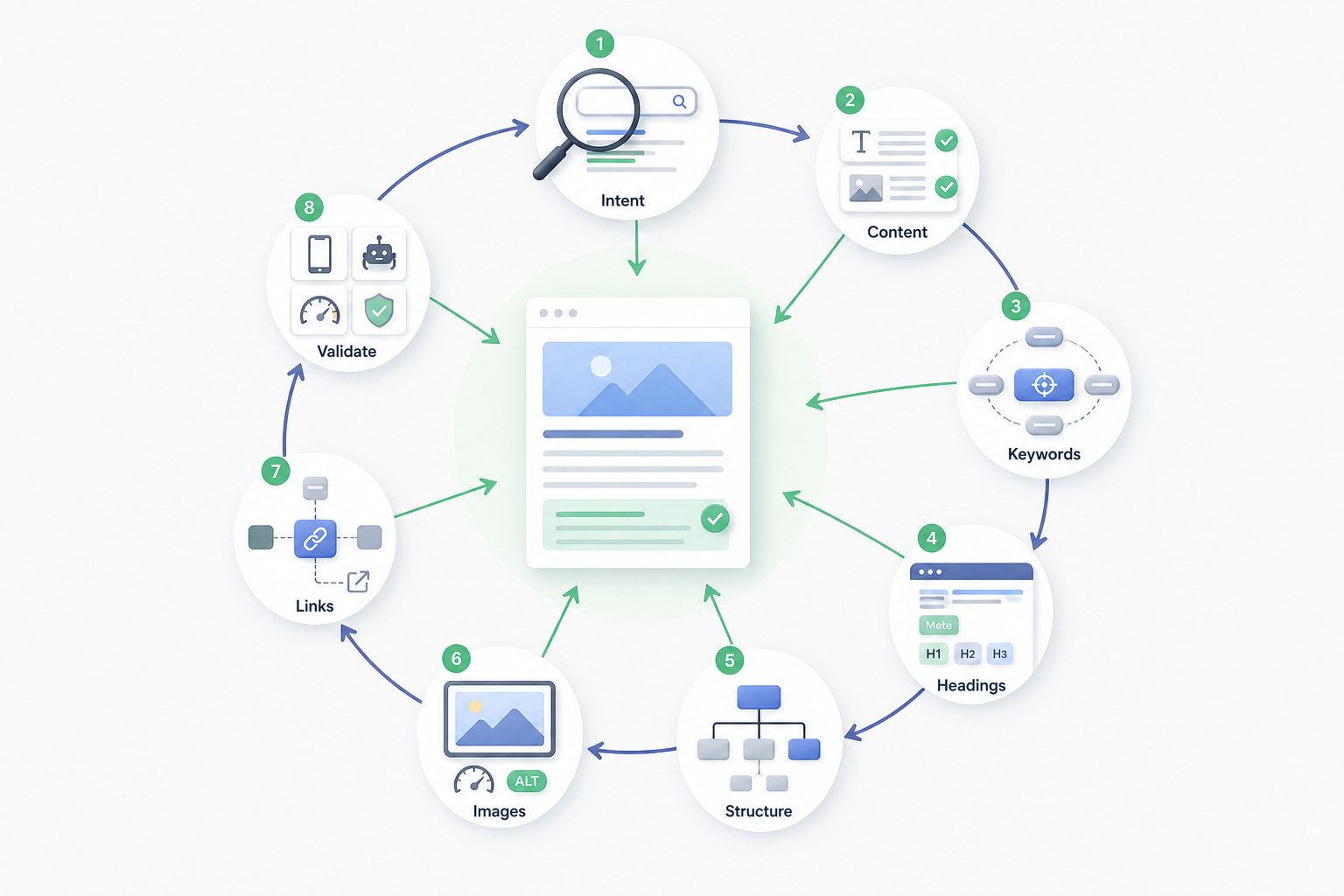
On-page optimization begins by establishing the page’s search intent and then aligning its content, keyword targeting, page signals, information structure, images, and contextual links with that purpose.
1. Identify the Page’s Search Intent
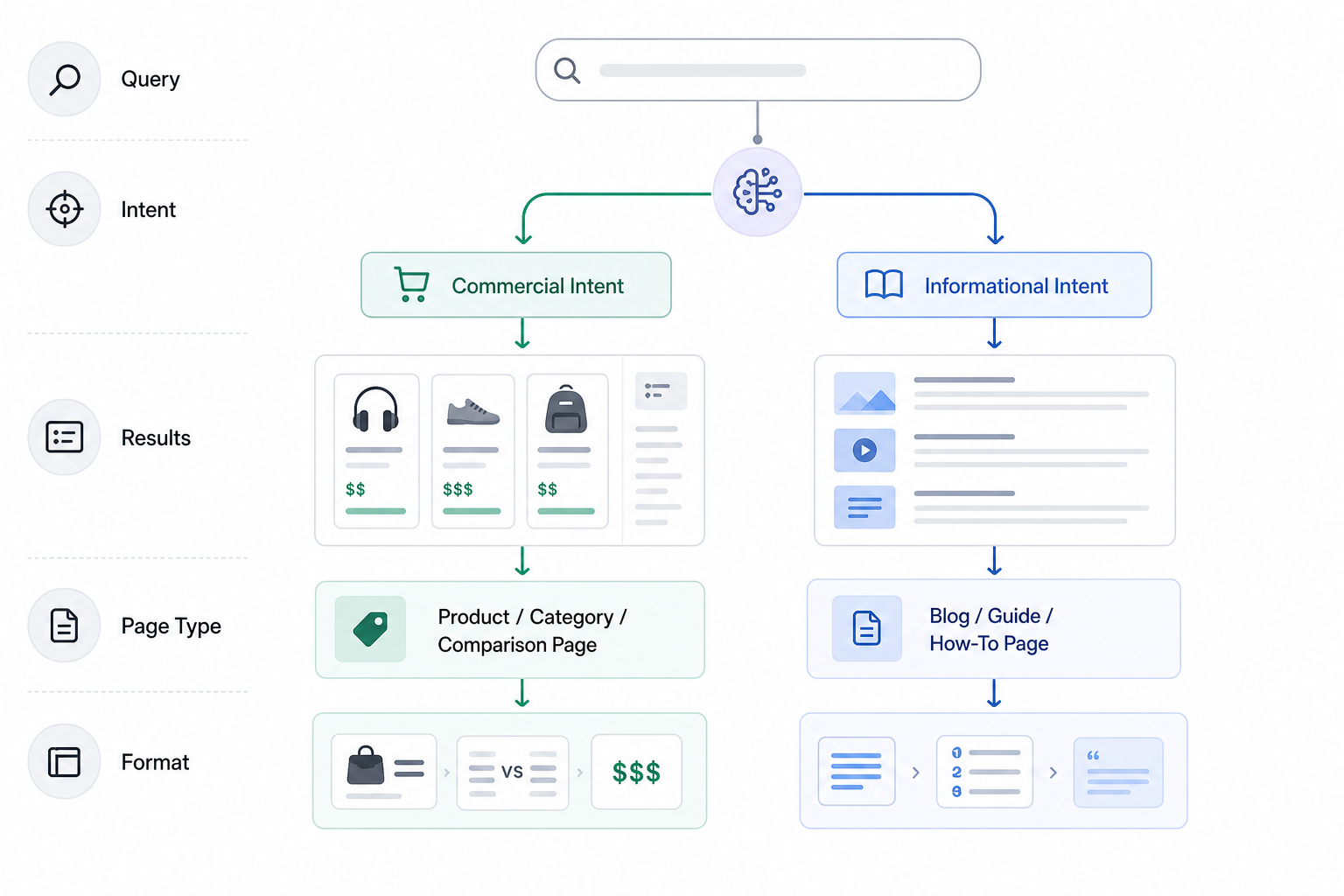
Determine:
- The primary query
- The audience need
- The page purpose
- The expected page type
- The information users expect
- The likely answer format
Review relevant search results where useful.
A query dominated by product pages indicates a different need from a query dominated by educational guides. The page has to satisfy the searcher’s objective before smaller optimization details matter.
2. Optimize the Content
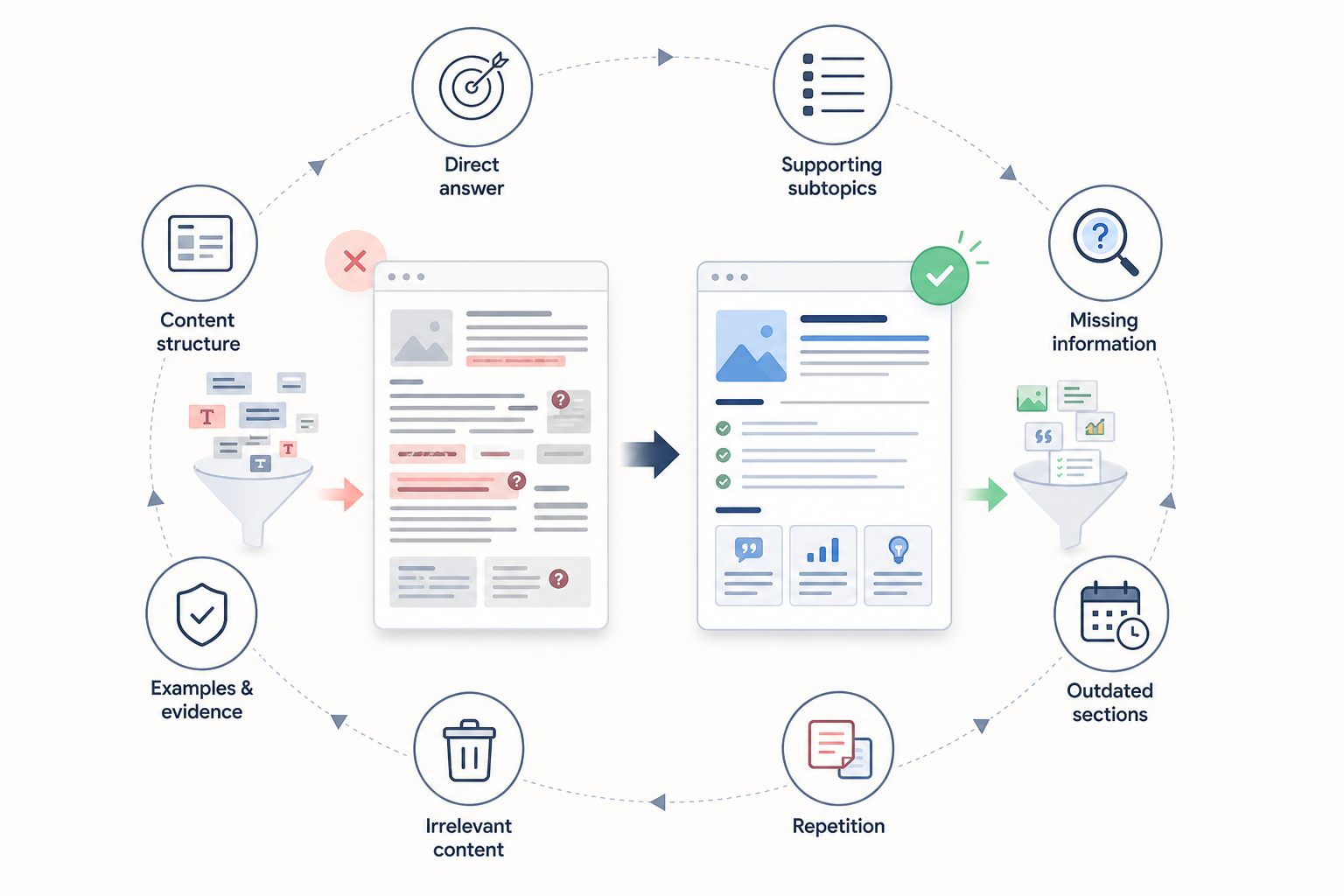
Make the page useful, accurate, clear, and complete enough for its intended search needs.
Review:
- The direct answer
- Supporting subtopics
- Missing information
- Outdated sections
- Repetition
- Irrelevant content
- Examples
- Evidence
- Content structure
The objective is to improve the actual usefulness of the page rather than add words for the sake of SEO.
This page-level work overlaps directly with SEO content, where search intent, information coverage, structure, usefulness, and ongoing content quality are considered together.
3. Refine Keyword Targeting
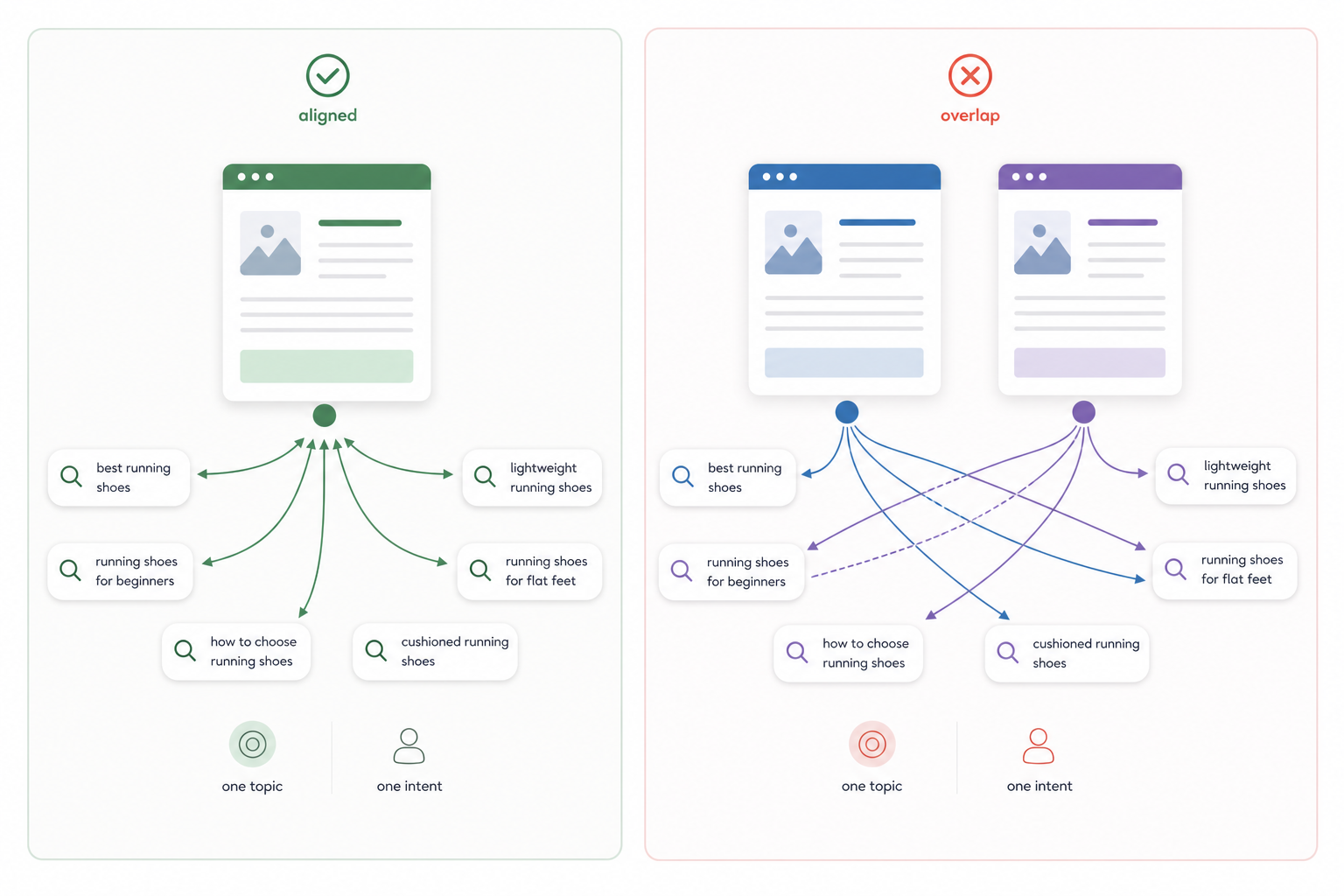
Define the primary query or query family the page represents.
Identify supporting searches that belong to the same topic and intent.
Confirm that the URL is the correct page for those queries.
Check whether another page targets substantially the same search need. Where unnecessary overlap exists, pages may require differentiation, consolidation, or remapping.
4. Optimize Titles, Metadata, and Heading Signals
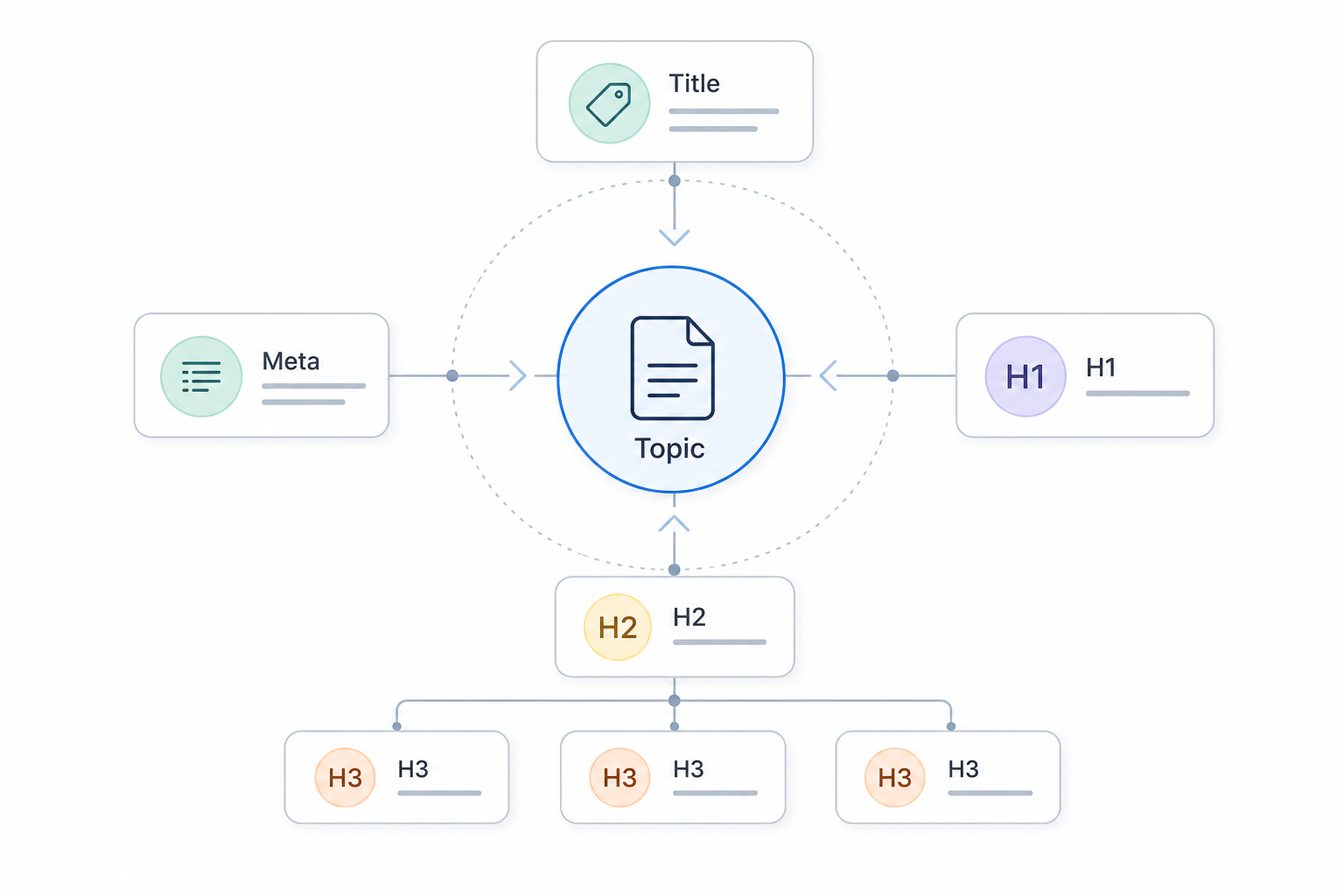
Align the:
- Title tag
- Meta description
- H1
- H2 headings
- H3 headings
with the page’s established topic and purpose.
These elements should describe and organize the page accurately rather than exist simply as locations for keywords.
5. Optimize the URL and Information Structure
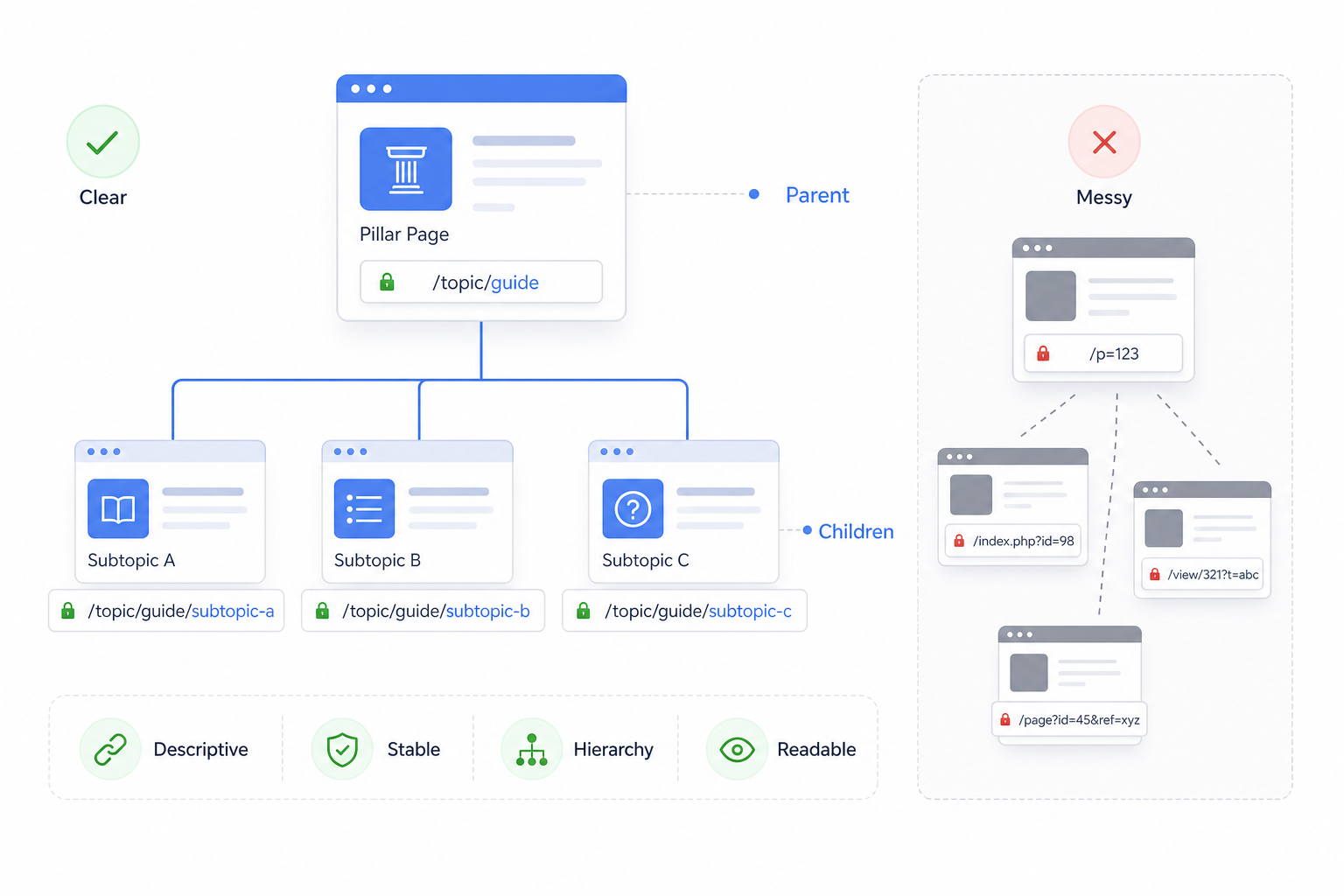
Keep the URL:
- Descriptive
- Stable
- Readable
- Logically connected with the site hierarchy
Organize the content so supporting sections remain clearly related to the central page topic.
Avoid changing an established URL only to add a keyword unless a stronger structural reason exists.
6. Optimize Images and Visual Elements

Use images where they improve:
- Explanation
- Demonstration
- Accessibility
- Product understanding
- Comparison
- User experience
Optimize delivery, dimensions, visual context, and descriptive attributes.
7. Strengthen Contextual Links
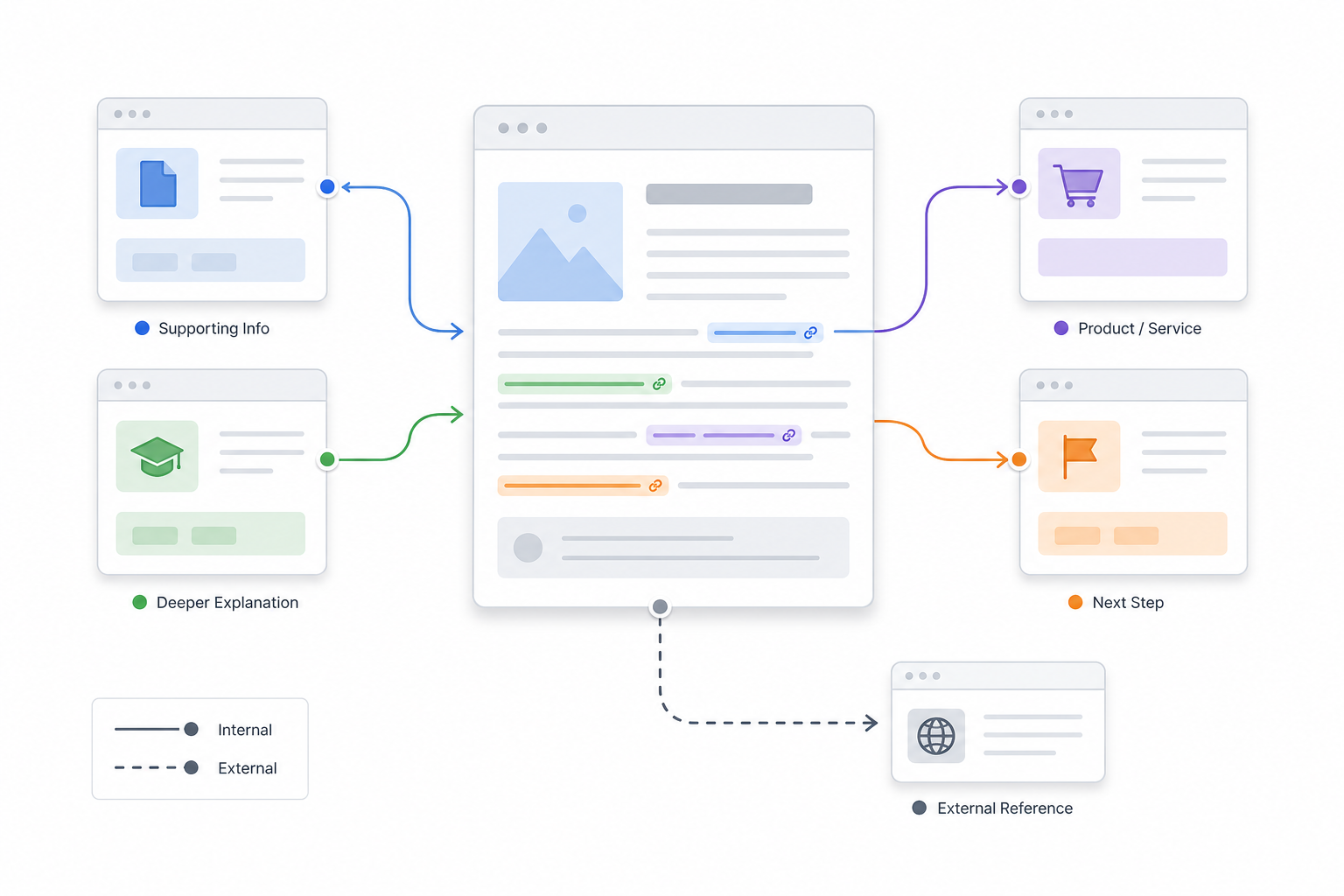
Add internal links where related pages provide:
- Supporting information
- Deeper explanation
- Relevant products or services
- Logical next steps
Use descriptive anchors and surrounding context.
Add external references where they improve evidence, attribution, definitions, or factual support.
8. Validate the Finished Page
Review the page after optimization.
Confirm that it:
- Still satisfies the intended search need
- Remains readable and useful
- Is crawlable and indexable where appropriate
- Renders correctly
- Works on mobile devices
- Does not contain page-level technical problems that prevent proper use
Re-read the page from the user’s perspective. Optimization has failed if the result is less clear or useful than the original page.
The on page SEO steps are complete when the content, targeting, structure, and page signals reinforce the same search purpose.
How Do You Optimize Content for On-Page SEO?
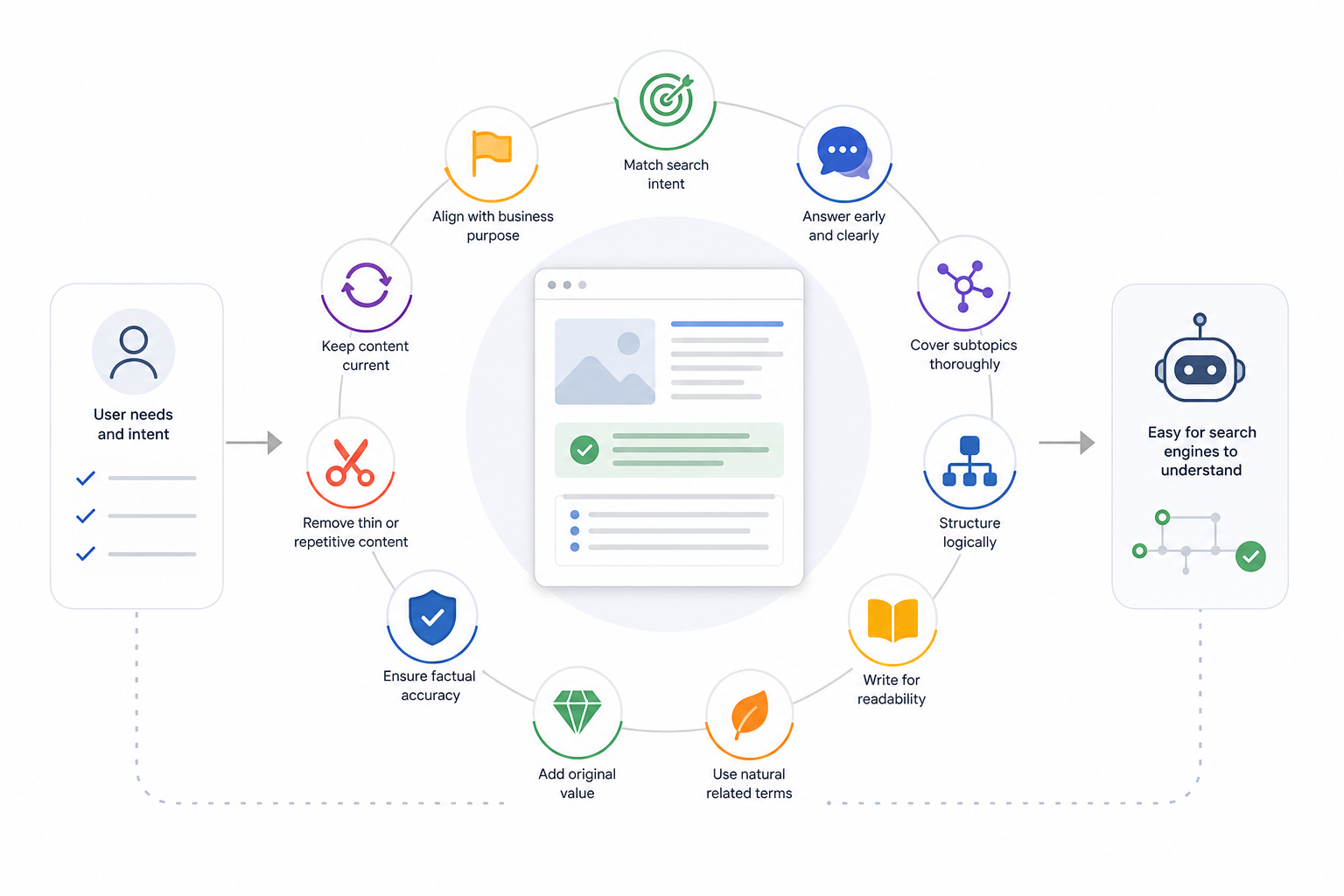
On-page content optimization means matching search intent, answering the query clearly, covering the necessary subtopics, and organizing information so users and search engines can understand the page easily.
Strong optimized content contains several characteristics:
- Match search intent
- Determine what the user wants to know, compare, evaluate, buy, or accomplish.
- Match the page type and answer format with that expectation.
- Answer the primary query directly
- Give the main answer early.
- Avoid long introductions that delay the information the user came to find.
- Cover the necessary subtopics
- Include relevant attributes, questions, examples, entities, and supporting information.
- Do not add sections merely to increase word count.
- Structure information logically
- Use a clear heading hierarchy.
- Keep related information together.
- Use paragraphs, lists, tables, or ordered steps according to the information being presented.
- Improve readability and clarity
- Use understandable terminology.
- Keep sentences focused.
- Add examples where they clarify complex ideas.
- Make important information easy to scan without oversimplifying it.
- Use related terms and entities naturally
- Include relevant terminology where it improves explanation.
- Avoid inserting synonyms or semantic keywords simply because a tool recommends them.
- Provide original value
- Add first-hand experience.
- Include original examples.
- Use expert insight.
- Add proprietary data where available.
- Offer clearer explanations or useful comparisons.
- Support factual accuracy
- Verify important claims.
- Use credible references where evidence matters.
- Keep statistics and factual examples current.
- Remove thin or repetitive sections
- Consolidate overlapping information.
- Remove passages that repeat the same point without adding value.
- Keep content current
- Review statistics, products, screenshots, processes, recommendations, and references that can become outdated.
- Align content with the page’s business purpose
- Informational pages can educate.
- Commercial pages can support evaluation.
- Transactional pages can help users complete an action.
On-page content optimization does not require fixed word counts, mandatory keyword positions, or a predetermined number of headings. The page requires enough information to satisfy its intended search needs accurately and completely.
How Do You Optimize Keywords for On-Page SEO?
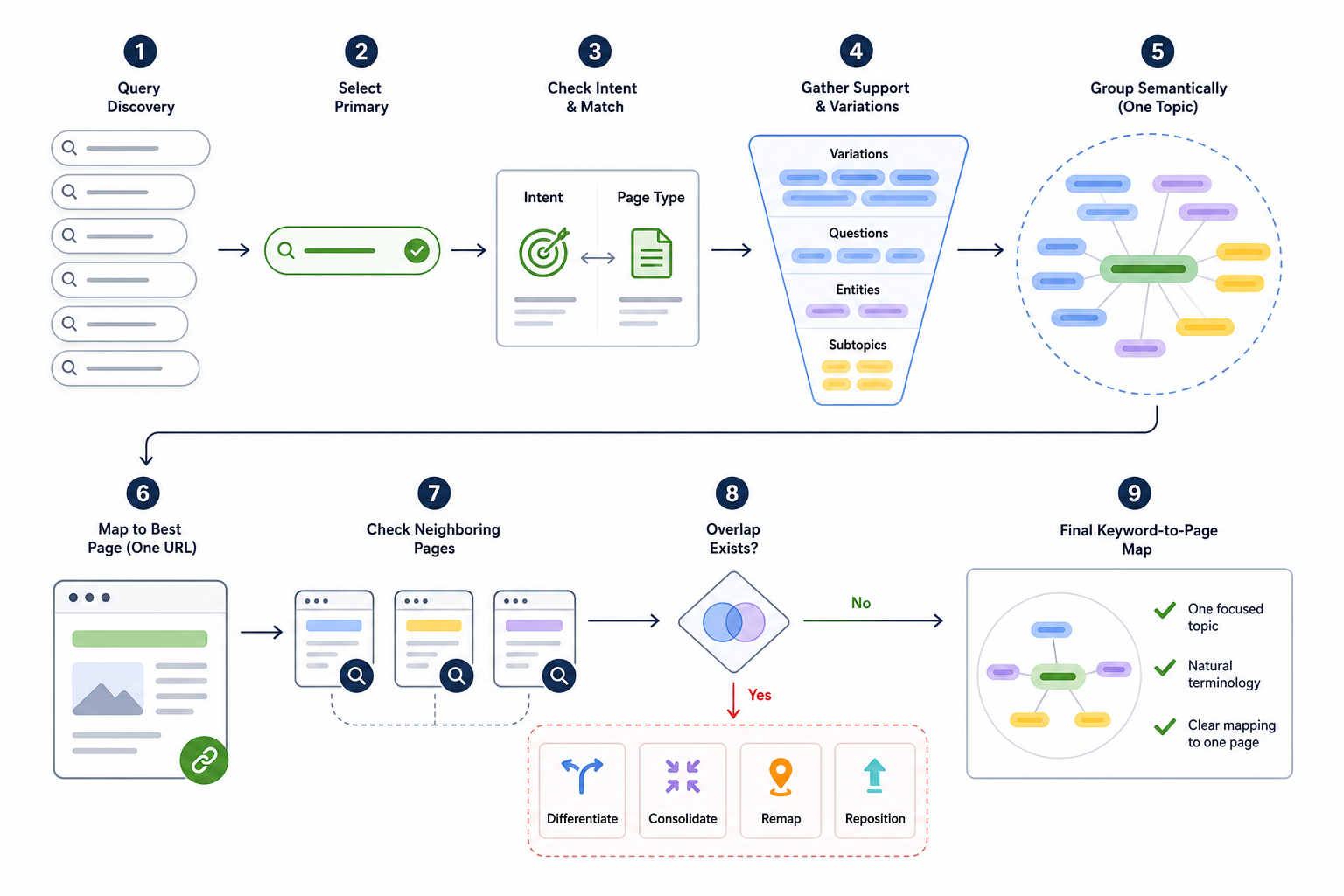
Keyword optimization means selecting and organizing the search terms a page should represent so its targeting remains aligned with one clear topic and search intent.
Those targeting decisions should originate from Keyword Research in SEO, which determines which queries are relevant, valuable, and suitable for the page before on-page implementation begins.
The main keyword-targeting checks include:
- Choose one clear primary search target
- Identify the main query or query family that best represents the page’s purpose.
- Match the target with search intent
- Confirm that the page type satisfies what users searching that query expect.
- Identify supporting queries
- Find related variations, questions, subtopics, terminology, and entities that belong to the same underlying search need.
- Group terms semantically
- Treat queries representing the same intent as one page topic.
- Do not create a separate URL for every keyword variation.
- Distinguish primary and supporting roles
- The primary term represents the page.
- Supporting queries expand the same subject.
- Check keyword-to-page mapping
- Confirm that the URL is the most appropriate destination for the query group.
- Check overlap with other pages
- Identify other URLs addressing substantially the same search intent.
- Resolve unnecessary cannibalization
- Differentiate, consolidate, remap, or reposition pages when several URLs compete for the same purpose.
- Evaluate topical relevance
- Keep only queries directly related to the page and website subject.
- Evaluate business relevance
- Prioritize terms that support the role of the page rather than choosing keywords only because they have more search volume.
Keyword optimization does not require keyword density targets, exact-match repetition counts, or mandatory placement in every heading.
Once the targeting is clear, relevant terminology can appear naturally within the content and appropriate page elements.
How Do You Optimize On-Page SEO Tags?
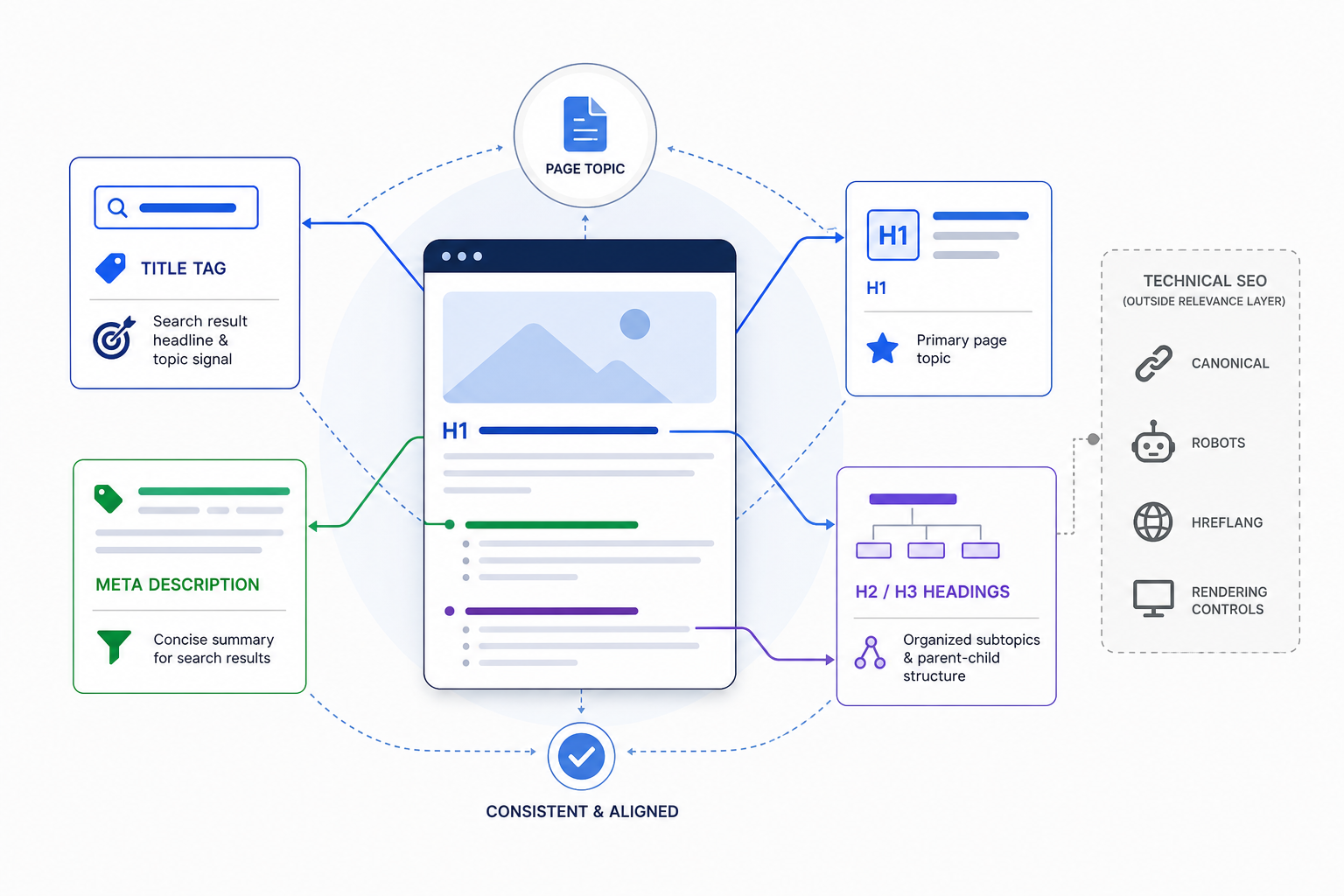
On-page SEO tags are optimized by making the title, description, and heading elements accurately communicate the page’s topic, purpose, and information hierarchy.
The main elements include:
- Optimize the title tag
- Write a unique and descriptive title.
- Represent the page topic accurately.
- Include primary terminology naturally.
- Place important meaning early enough that the title remains understandable if visually truncated.
- Add the brand name where it improves identification.
- Optimize the meta description
- Summarize the page accurately.
- Communicate why the result is relevant.
- Use important query language naturally where useful.
- Treat the description primarily as search-result communication rather than a direct ranking factor.
- Avoid treating one fixed character count as an SEO requirement.
- Optimize the H1
- Use the H1 to establish the primary page topic.
- Align it with the page purpose.
- Keep it consistent with the title without requiring an exact duplicate.
- Prioritize natural topic communication.
- Optimize H2 and H3 headings
- Use headings to organize genuine subtopics, questions, attributes, or processes.
- Maintain clear parent-child relationships.
- Use relevant terminology when it accurately represents the section.
- Avoid inserting target phrases into headings that do not match the content beneath them.
Canonical tags, robots directives, hreflang, and rendering controls primarily belong to technical SEO rather than the central on-page relevance layer.
On page SEO tags work best when they communicate the information already established by the page rather than being optimized independently from the content.
How Do Images Affect On-Page SEO?
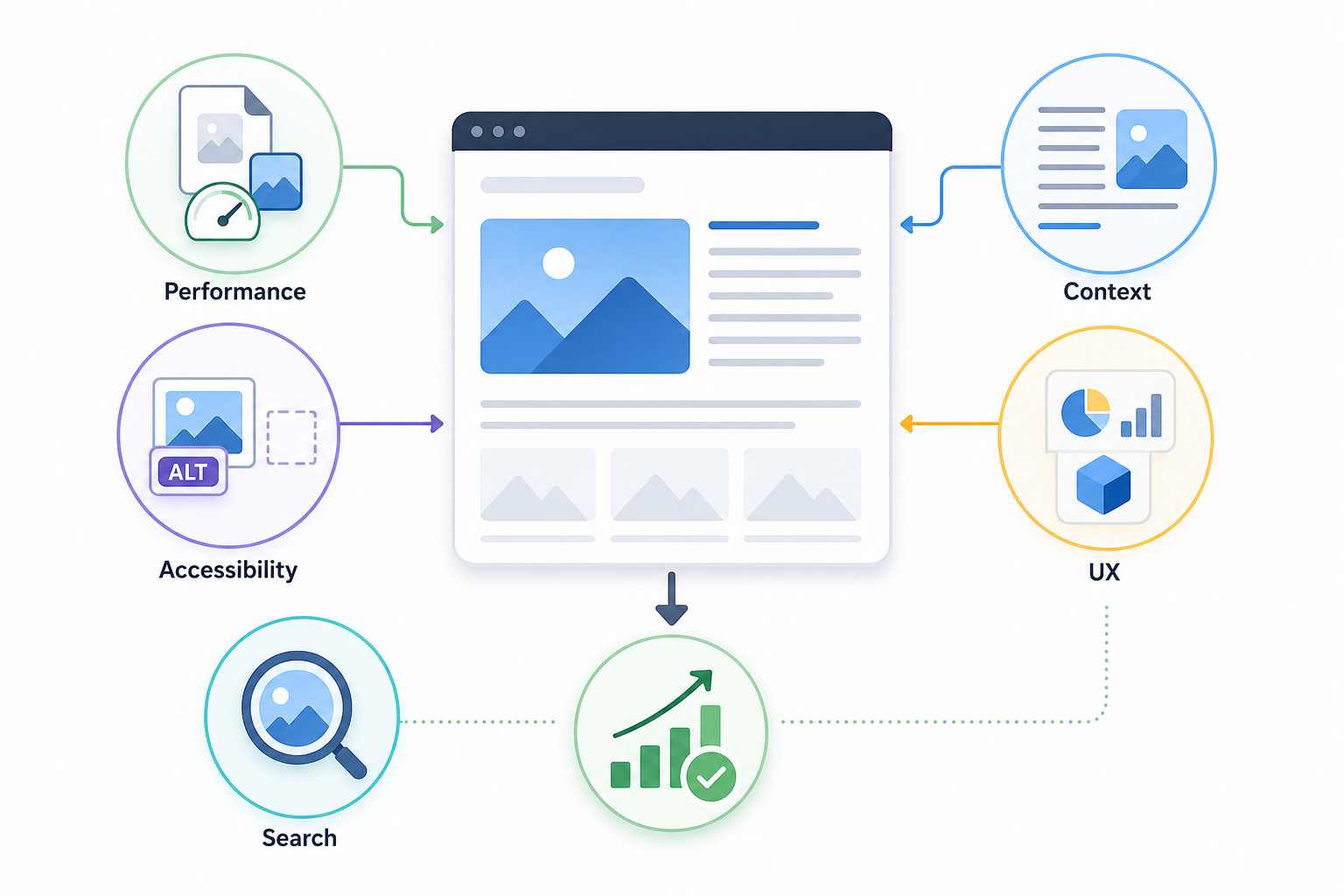
Images affect on-page SEO through page performance, accessibility, visual context, user experience, and image-search visibility.
Important image considerations include:
- Use relevant images
- Add visuals that explain concepts, demonstrate processes, show products, present data, or improve understanding.
- Avoid unnecessary decorative assets that increase page weight without adding value.
- Optimize file size
- Compress images.
- Avoid delivering files significantly larger than their displayed dimensions.
- Choose efficient image formats
- Use formats such as WebP or AVIF where appropriate.
- Maintain sufficient visual quality and compatibility.
- Control image dimensions
- Deliver responsive sizes.
- Prevent unnecessarily large images from loading on smaller screens.
- Define dimensions where appropriate to reduce layout shifts.
- Support page performance
- Pay particular attention to large above-the-fold images.
- Optimize images that contribute to Largest Contentful Paint.
- Reserve space to reduce layout shifts.
- Write descriptive alt text
- Describe meaningful image content accurately.
- Include relevant terminology only where it naturally describes the visual.
- Decorative images can use empty alt attributes when appropriate for accessibility.
- Use descriptive filenames where useful
- Give important assets understandable filenames.
- Treat filenames as supporting context rather than a major ranking factor.
- Provide surrounding context
- Place images near relevant paragraphs, headings, or captions.
- Make the relationship between the visual and the topic clear.
- Support image-search visibility
- Relevant and well-described images can appear in image-search environments and create additional organic discovery opportunities.
- Improve content usability
- Screenshots, charts, diagrams, examples, and product visuals can communicate information more efficiently than text alone.
Avoid keyword stuffing in alt text, filenames, captions, or surrounding content.
Image optimization improves the page when the visual contributes useful information and is delivered efficiently.
How Do Links Support On-Page SEO?
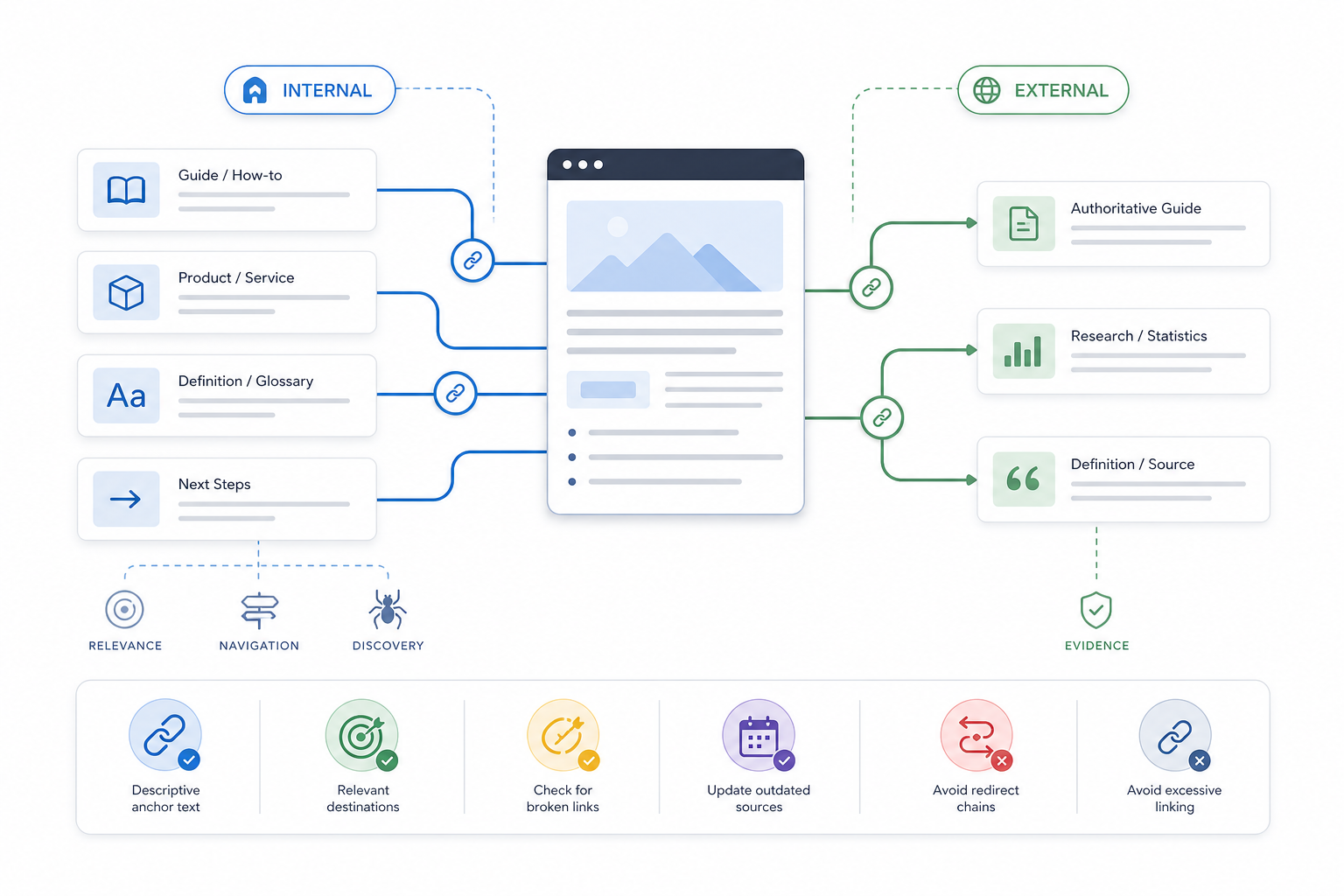
Links support on-page SEO by connecting the current page with contextually related information, helping users navigate to useful destinations, and helping search systems understand relationships between pages.
Internal and external links serve different purposes. Internal Links connect related pages within the same website, while external links connect the page with relevant information or evidence outside it.
- Connect related internal pages
- Link to supporting guides, related products, services, definitions, or logical next-step pages.
- Keep the destination relevant to the surrounding section.
- Clarify page relationships
- Use links to show how topics, services, products, and supporting information connect.
- Keep page-level linking focused on useful contextual relationships.
- Use descriptive anchor text
- Make anchor wording understandable.
- Describe the likely destination.
- Avoid mechanically repeating exact-match anchor phrases.
- Support useful navigation
- Add links when they help users continue a logical information or conversion journey.
- Support page discovery
- Crawlable internal links can help search systems discover and revisit URLs.
- Page-level optimization does not replace broader site architecture or orphan-page management.
- Use external references for evidence
- Link to authoritative or primary sources when they support statistics, definitions, factual claims, or attribution.
- Do not add external links merely because they are assumed to create a ranking signal.
- Check link relevance
- Confirm that the source context and destination remain meaningfully related.
- Check broken or outdated links
- Replace links to broken pages.
- Update obsolete sources.
- Avoid unnecessary redirect chains where they reduce usability.
- Avoid excessive linking
- Add links because they improve navigation, evidence, context, or information discovery rather than to reach a fixed target.
On-page links strengthen the page when the destination and surrounding context have a genuine informational relationship.
How Do You Apply On-Page SEO to Different Websites and Page Types?
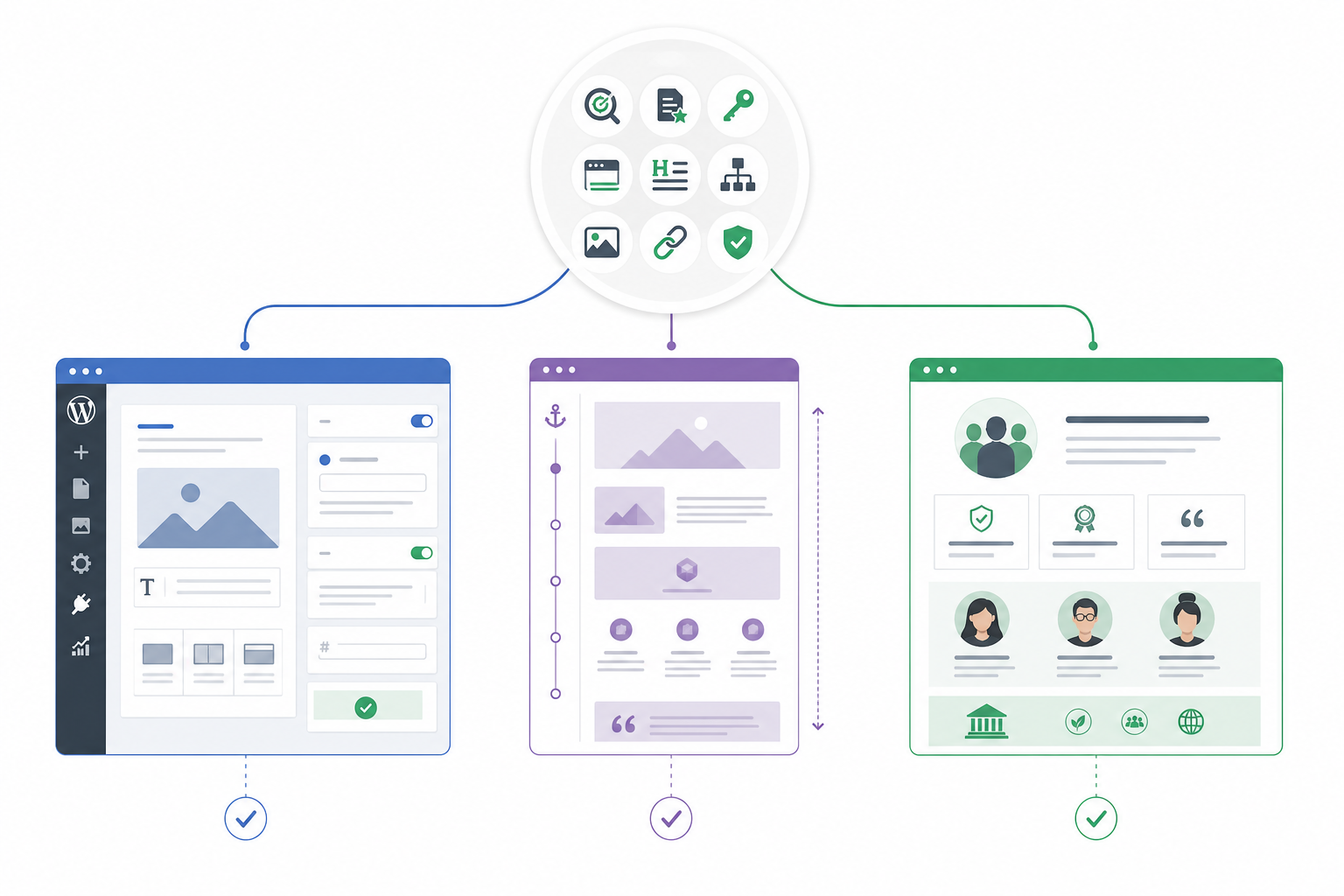
The core principles of on-page SEO remain consistent, but implementation changes according to the website platform, URL architecture, and purpose of the individual page.
Search intent, content quality, keyword targeting, titles, headings, information structure, images, links, and validation remain relevant across page types.
The difference is how those principles are applied.
A WordPress page uses CMS controls and plugins for implementation. A single-page website has architectural constraints because several subjects share one URL. An About page focuses more heavily on organizational identity and credibility than on conventional commercial keyword targeting.
The optimization principles remain the same while the practical implementation adapts to the context.
How Do You Apply On-Page SEO in WordPress?
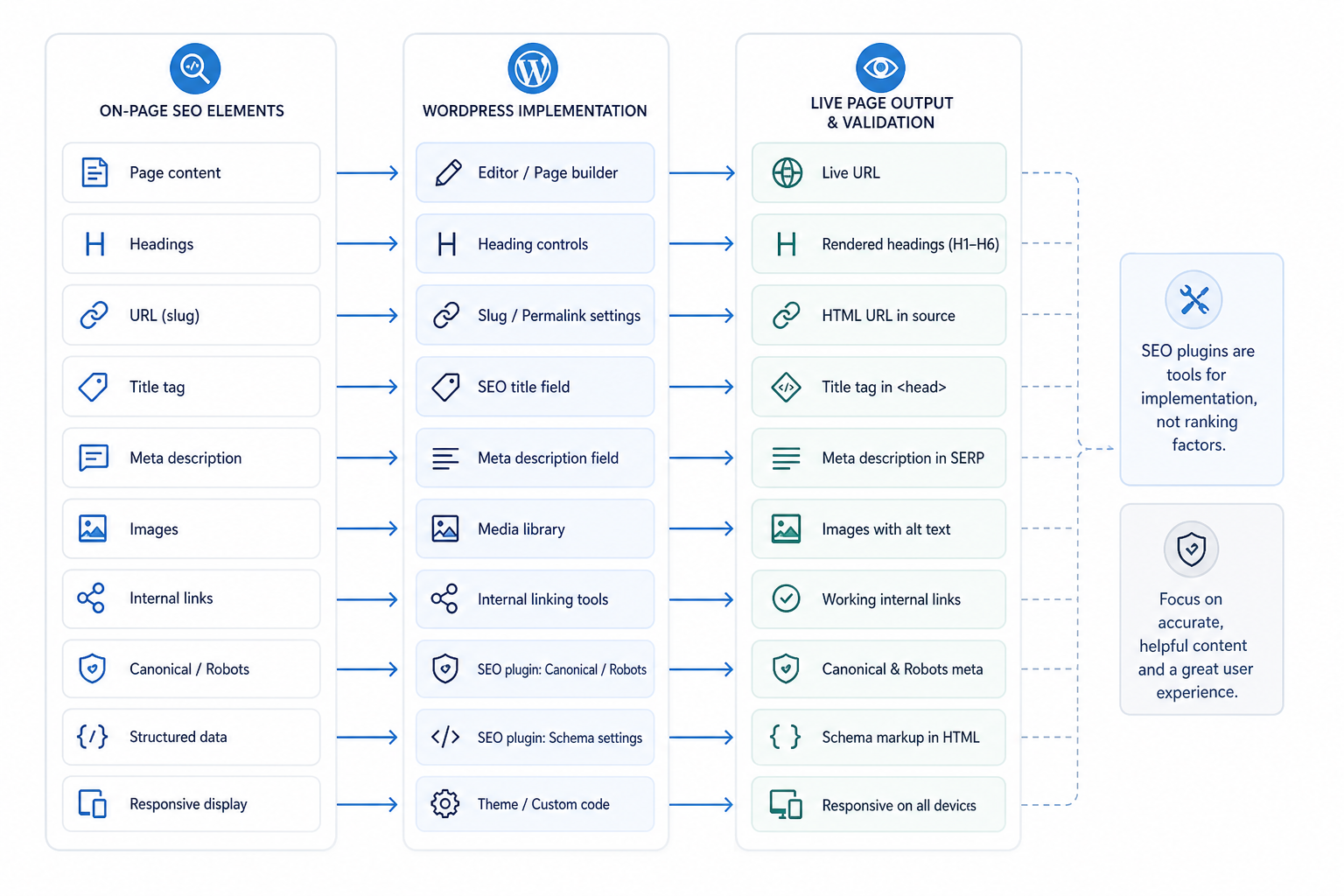
On-page SEO in WordPress means implementing established optimization decisions through WordPress page controls, media settings, theme options, and SEO-plugin fields.
WordPress changes where the optimization is implemented, not what makes the page relevant. On WordPress ecommerce sites, these same page-level controls also support Ecommerce SEO across product, category, collection, and supporting content pages.
| On-Page Element | WordPress Control | Where It Is Managed | Validation |
|---|---|---|---|
| Page content | Editor or page builder | WordPress editor | Review live page |
| H1, H2, H3 | Heading blocks / builder controls | Editor | Inspect rendered structure |
| URL | Slug / permalink settings | Page or post settings | Check live URL |
| Title tag | SEO plugin or theme settings | Yoast, Rank Math, AIOSEO, theme, custom implementation | Inspect rendered HTML / SERP preview |
| Meta description | SEO plugin field | SEO plugin | Review HTML output |
| Images | Media controls | Media Library / editor | Check rendered image and alt text |
| Internal links | Editor link controls | Page/post editor | Test live links |
| Canonical / robots | SEO plugin or custom settings | SEO plugin / theme | Inspect source |
| Structured data | Theme, plugin, or custom implementation | Relevant configuration | Validate rendered markup |
| Responsive display | Theme / page builder / browser | Front end | Test desktop and mobile |
Common plugins such as Yoast SEO, Rank Math, and AIOSEO provide interfaces for implementing metadata and related settings.
Their scores, readability indicators, and traffic-light systems are workflow aids. They are not Google ranking factors.
Installing an SEO plugin does not optimize the website by itself. The plugin only provides controls for implementing SEO decisions.
How Do You Optimize a Single-Page Website for SEO?
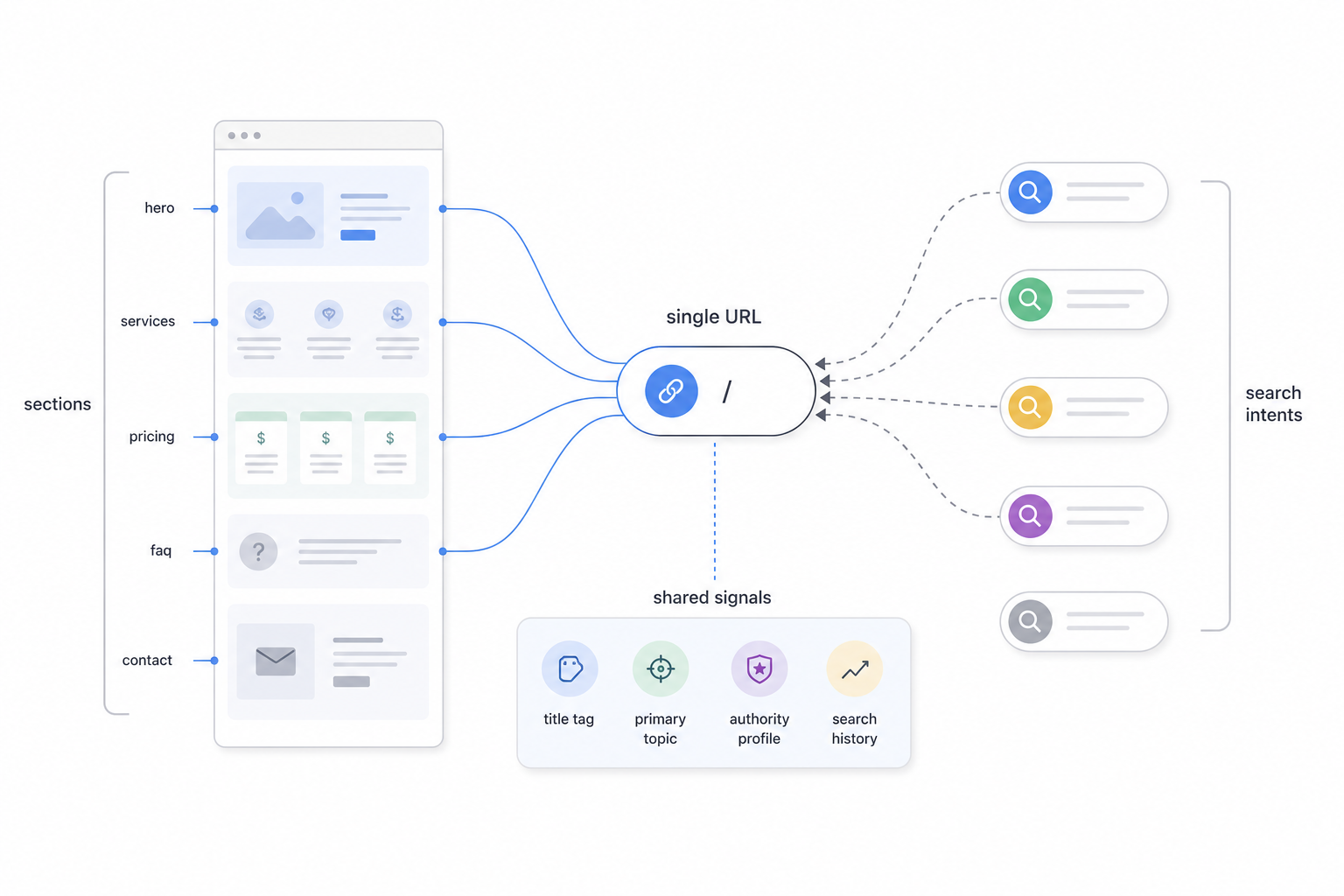
Single page website SEO requires applying relevance and information-structure principles within one primary URL, which limits how independently different search intents can be targeted.
The main challenge is architectural. Every major section shares the same URL, title, primary topic, authority profile, and search-performance history.
1. Define the Primary Intent Cluster
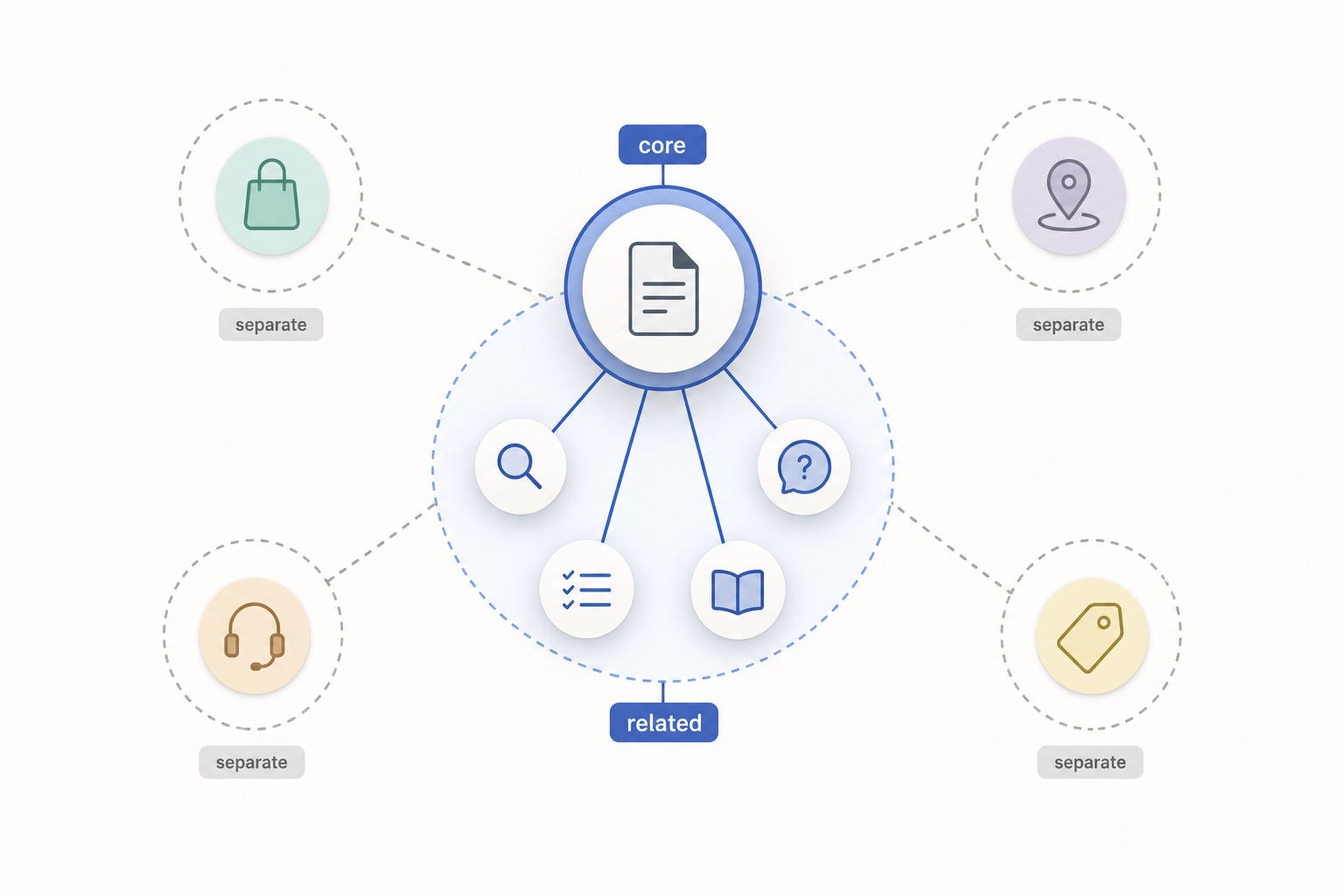
Identify the central topic or commercial purpose of the page.
Include supporting searches only when they belong to the same closely related user need.
Avoid combining unrelated products, services, locations, and intents simply because the website uses one URL.
2. Build a Clear Section Architecture
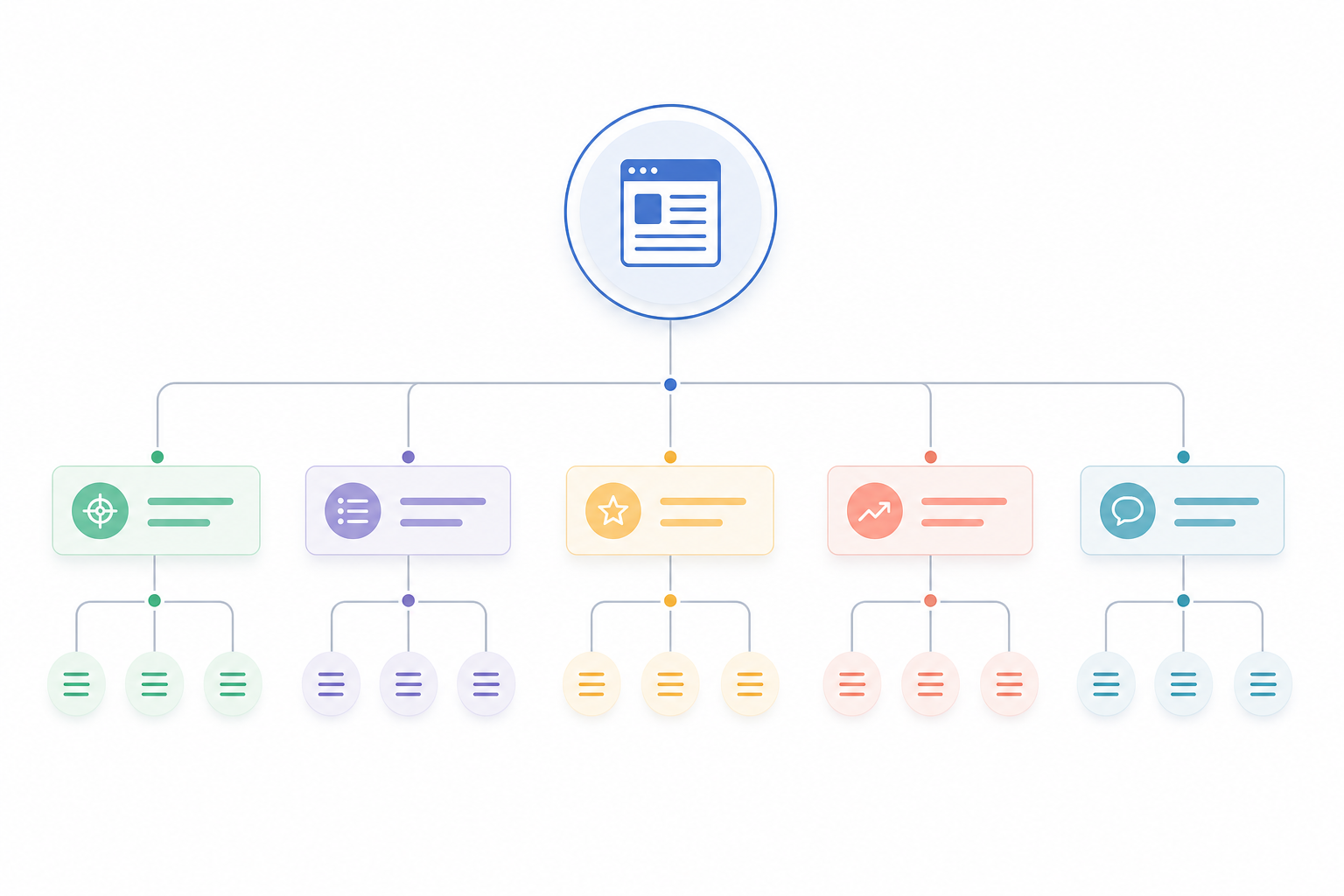
Use logical H2 and H3 sections to organize supporting attributes and questions.
Give each major section a distinct role beneath the central page topic.
The page still requires one coherent primary purpose.
3. Map Supporting Demand to Sections
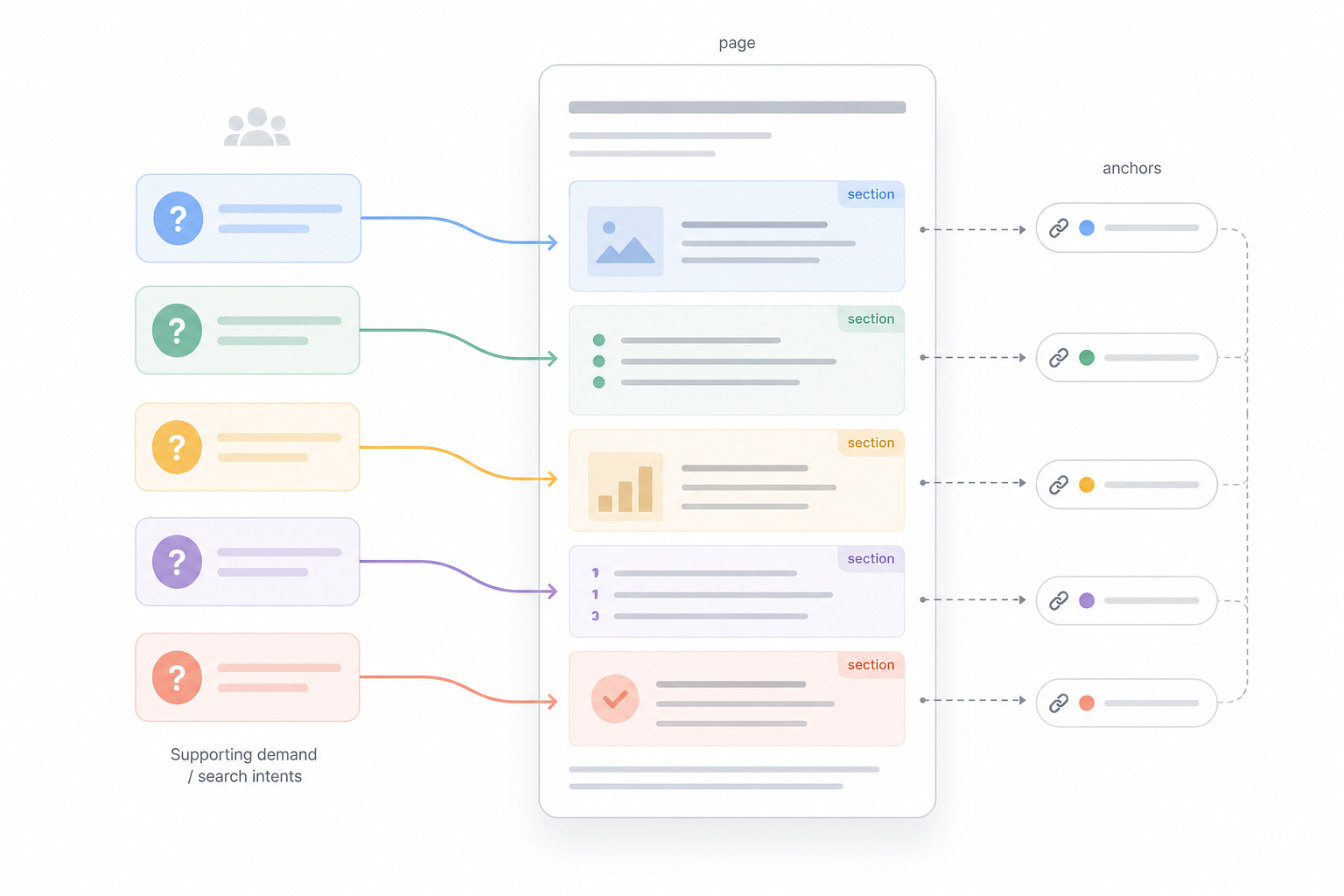
Assign related questions and subtopics to relevant sections.
Anchor sections do not function as independent indexable pages simply because they have unique fragment URLs.
4. Create Useful Section Navigation
Use descriptive jump links where they help users reach important parts of a long page.
Treat anchor navigation primarily as a usability feature rather than a replacement for separate landing pages.
5. Maintain Logical Information Organization
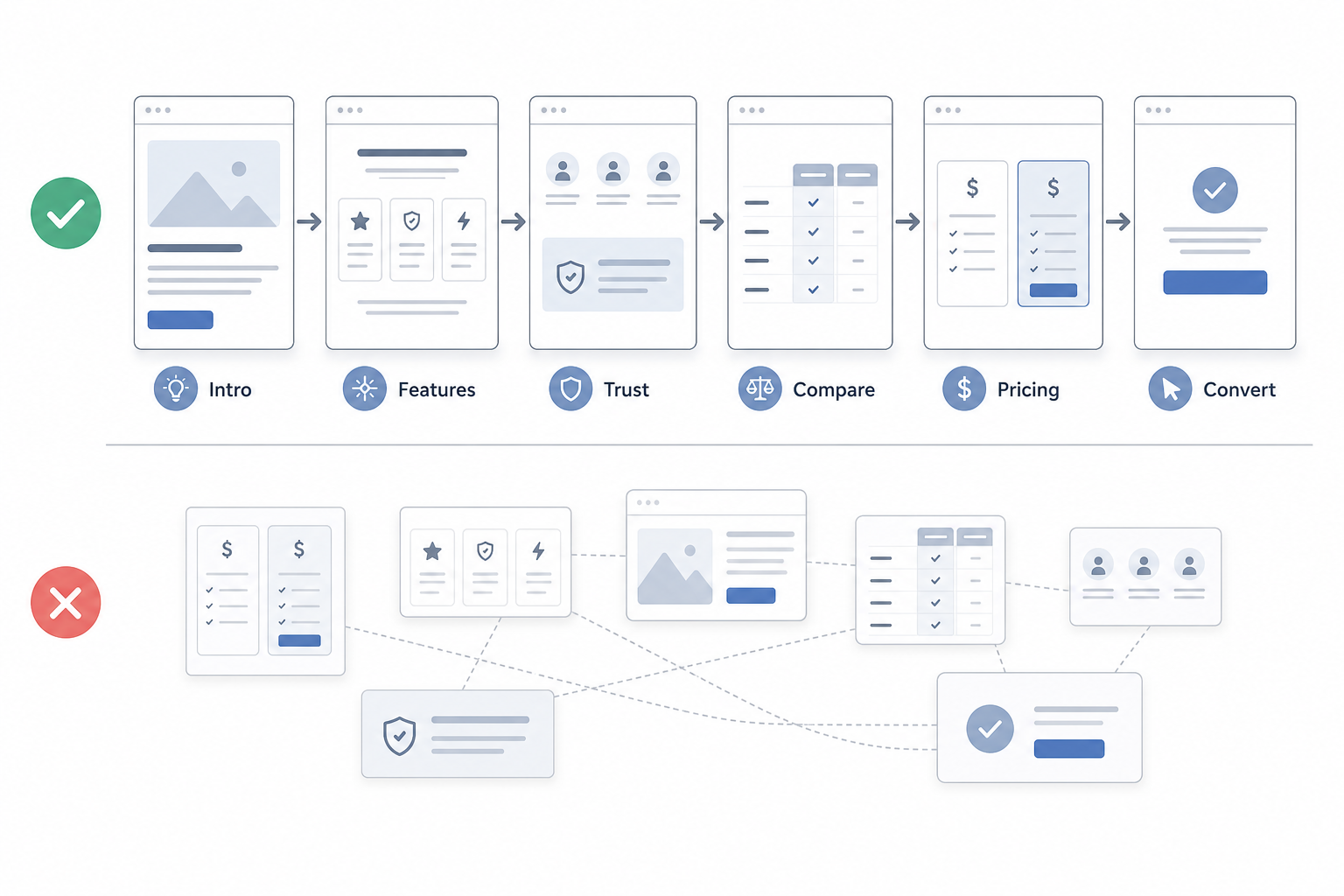
Place sections in an order that makes sense for the user.
A commercial single-page site can move from explanation into features, proof, comparison, pricing, and conversion where that progression serves the intended audience.
Avoid forcing unrelated subjects into the page only because separate URLs do not currently exist.
6. Decide When One URL Is No Longer Sufficient
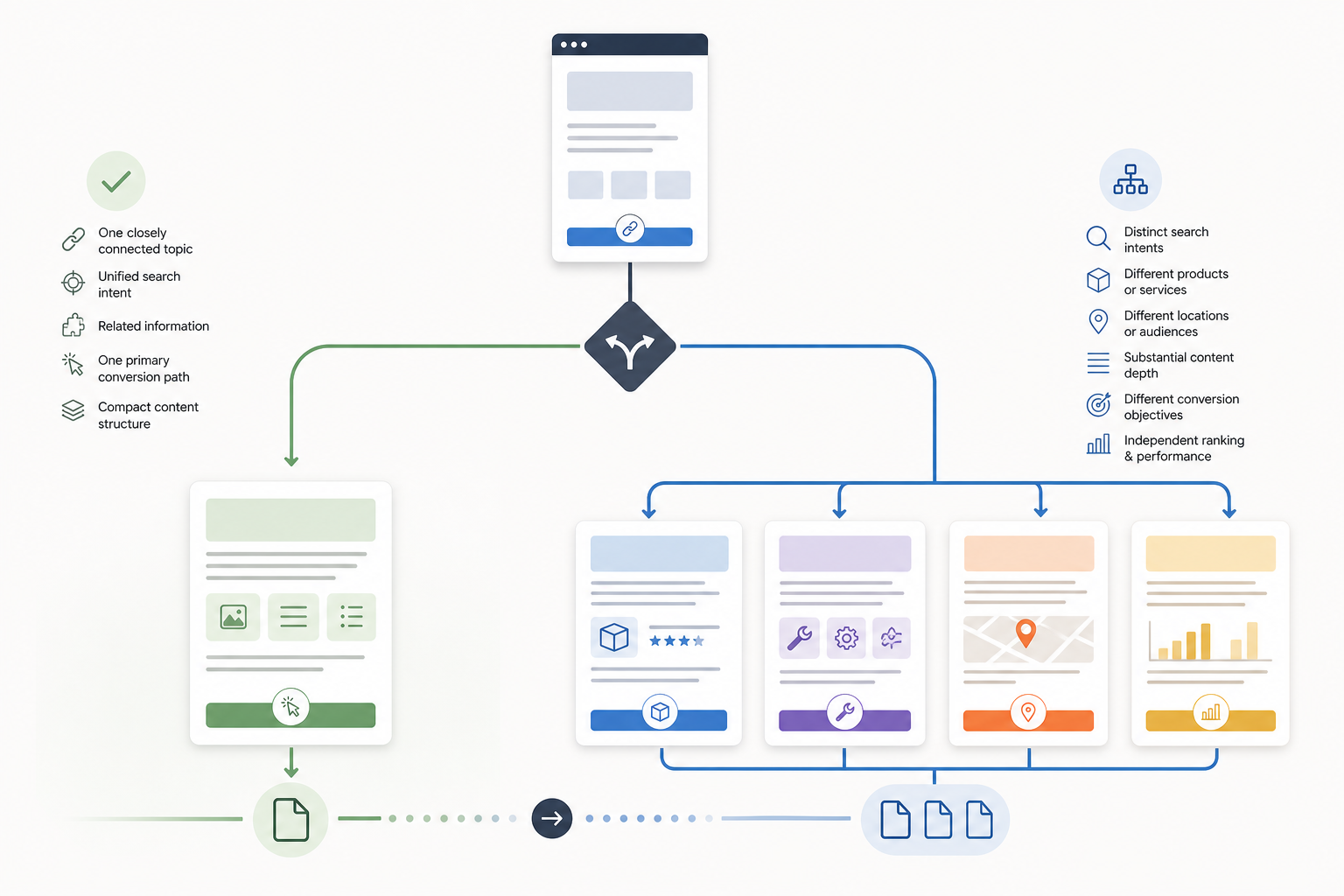
Create separate URLs when individual topics develop:
- Distinct search intent
- Separate products
- Different services
- Independent locations
- Substantial content depth
- Different conversion objectives
- A need for independent ranking and performance measurement
Single-page architecture works best when the information represents one closely connected subject. It becomes restrictive when several independent search needs require separate targeting.
How Do You Optimize an About Page for SEO?
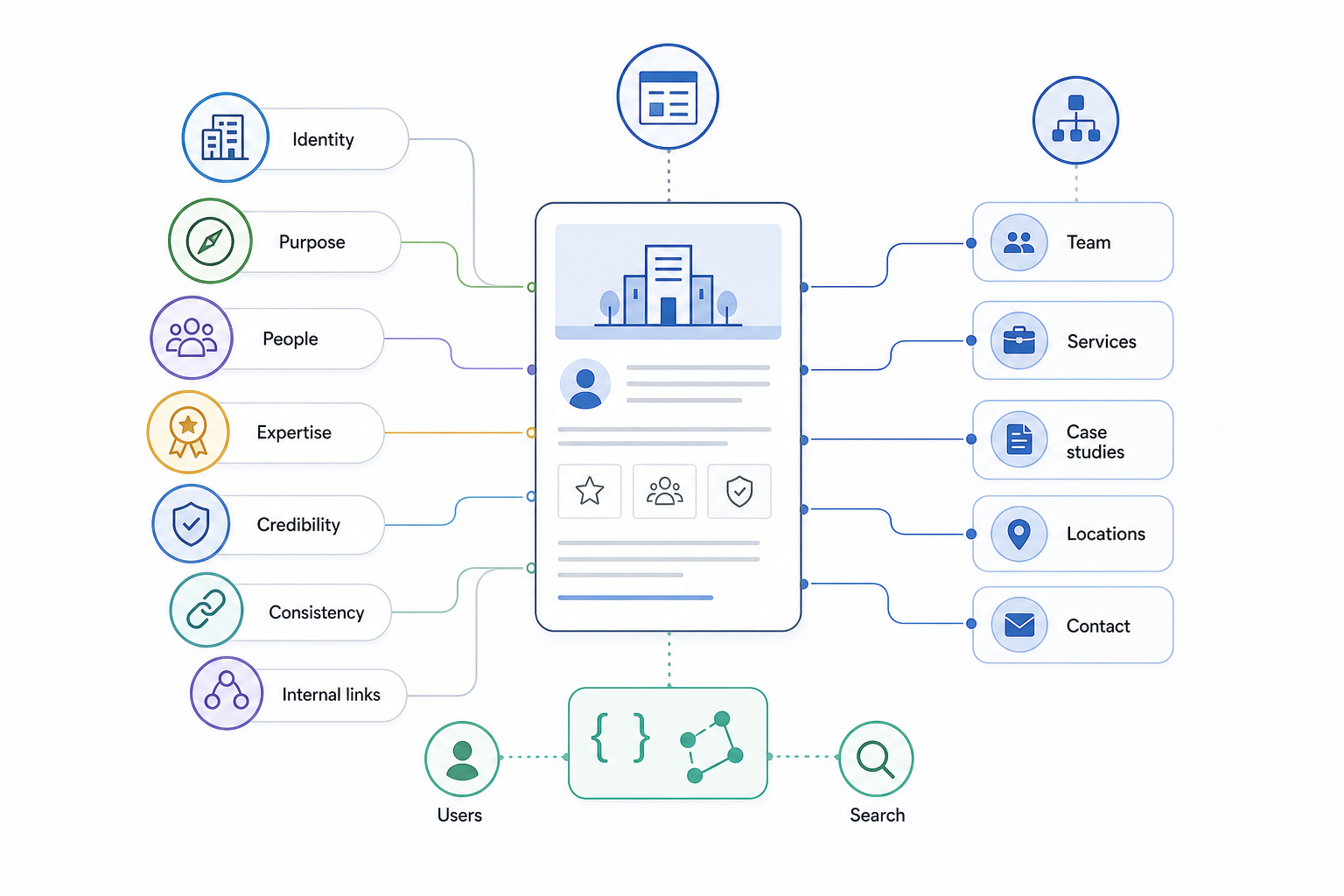
About page SEO should focus primarily on clarifying the organization or brand entity, its people, expertise, purpose, and relationship with the rest of the website.
The page usually serves a different intent from commercial or informational landing pages. Users want to understand who the organization is, what it does, who is behind it, and whether its claims are credible.
Important About-page elements include:
- Clarify the organization identity
- State the brand or organization name clearly.
- Explain what it does.
- Identify who it serves.
- Establish its primary area of activity.
- Explain the organization context
- Provide useful background.
- Include history where relevant.
- Explain the company's purpose.
- Identify products, services, markets, or geographic context where they help users understand the organization.
- Identify relevant people
- Include founders, leadership, experts, authors, or team members when these people materially establish who is behind the organization.
- Demonstrate experience and expertise
- Include real experience.
- Mention relevant qualifications.
- Show company history.
- Reference meaningful projects, research, or accomplishments where appropriate.
- Provide verifiable credibility signals
- Use genuine certifications.
- Include memberships.
- Reference awards.
- Show relevant partnerships.
- Link to credible press coverage or customer proof where applicable.
- Avoid unsupported trust claims.
- Maintain entity consistency
- Keep important company details consistent across the website and authoritative external profiles.
- Connect the About page contextually
- Link to relevant team pages.
- Link to services or products.
- Connect case studies, locations, contact information, or other useful organizational relationships.
- Support branded understanding
- Make it easy for someone searching the company name to understand who the organization is and what it does.
- Use relevant structured entity information where useful
- Organization or another appropriate structured-data type can support machine-readable entity information when it accurately reflects visible page content.
Do not force unrelated commercial keywords onto the About page when another page better satisfies that search intent.
An effective About page helps users and search systems understand the organization, its purpose, its people, and the evidence supporting its credibility.
How Do You Analyze On-Page SEO?
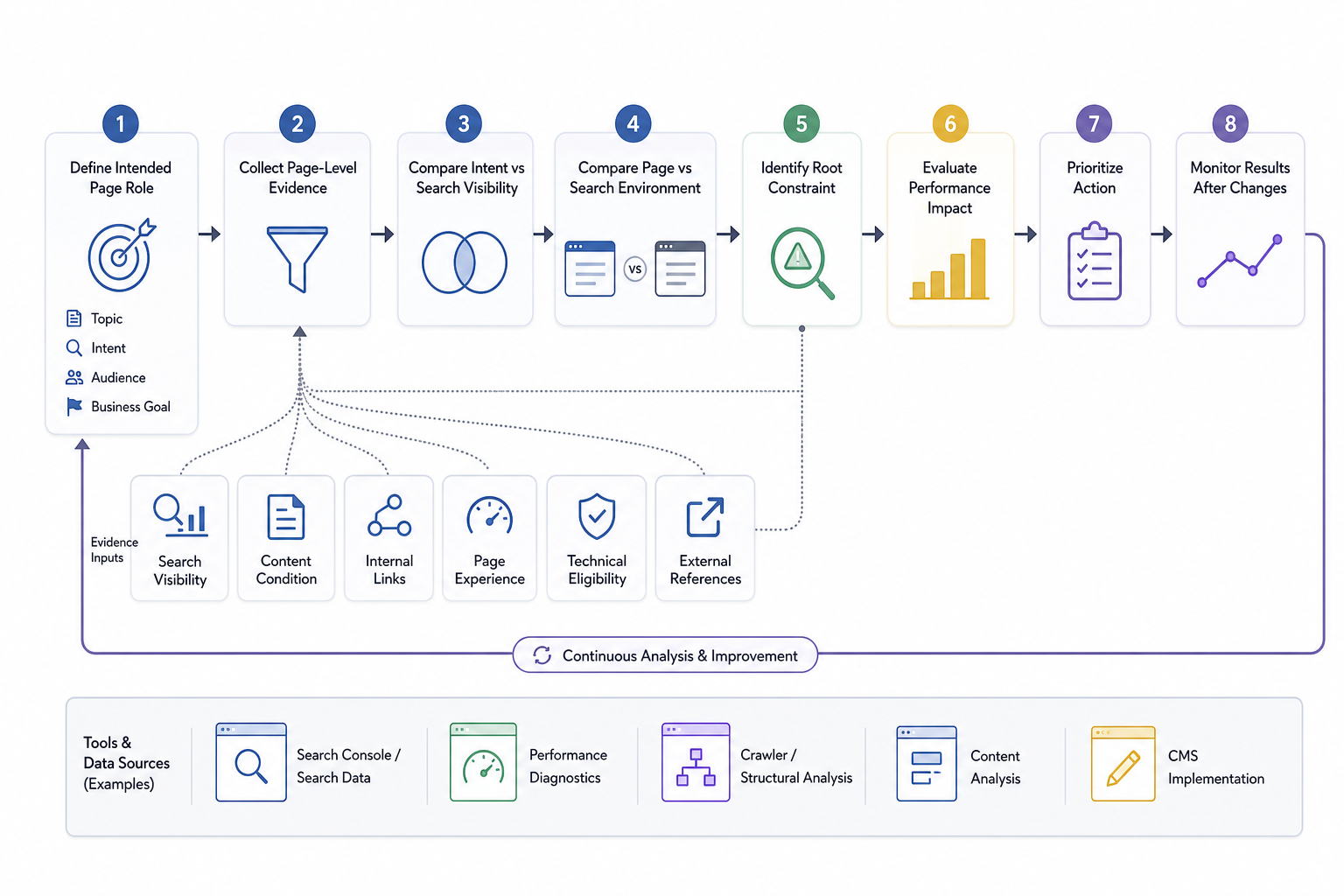
On-page SEO analysis determines whether a published page is satisfying its intended search purpose, where its performance is constrained, and which optimization decision deserves priority.
Optimization establishes what the page is intended to do. Analysis evaluates whether the finished page is actually achieving that purpose.
That diagnosis is a page-level application of broader SEO analysis, using performance and search evidence to identify what is constraining results.
1. Establish the Intended Page Role
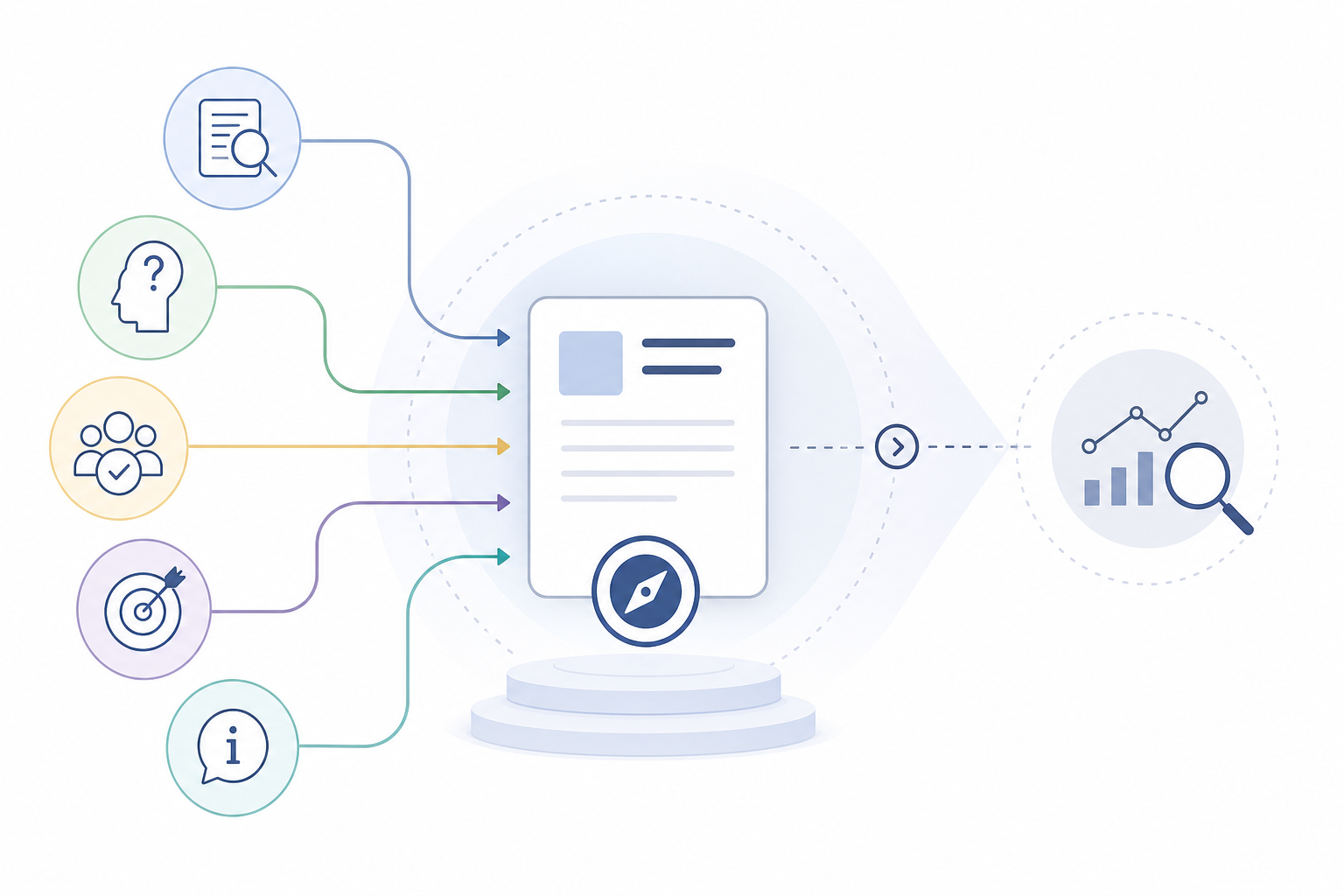
Confirm:
- The primary topic
- Search intent
- Audience need
- Business purpose
- Intended conversion or information goal
Use this role as the baseline for interpreting the page’s performance.
2. Collect Page-Level Evidence
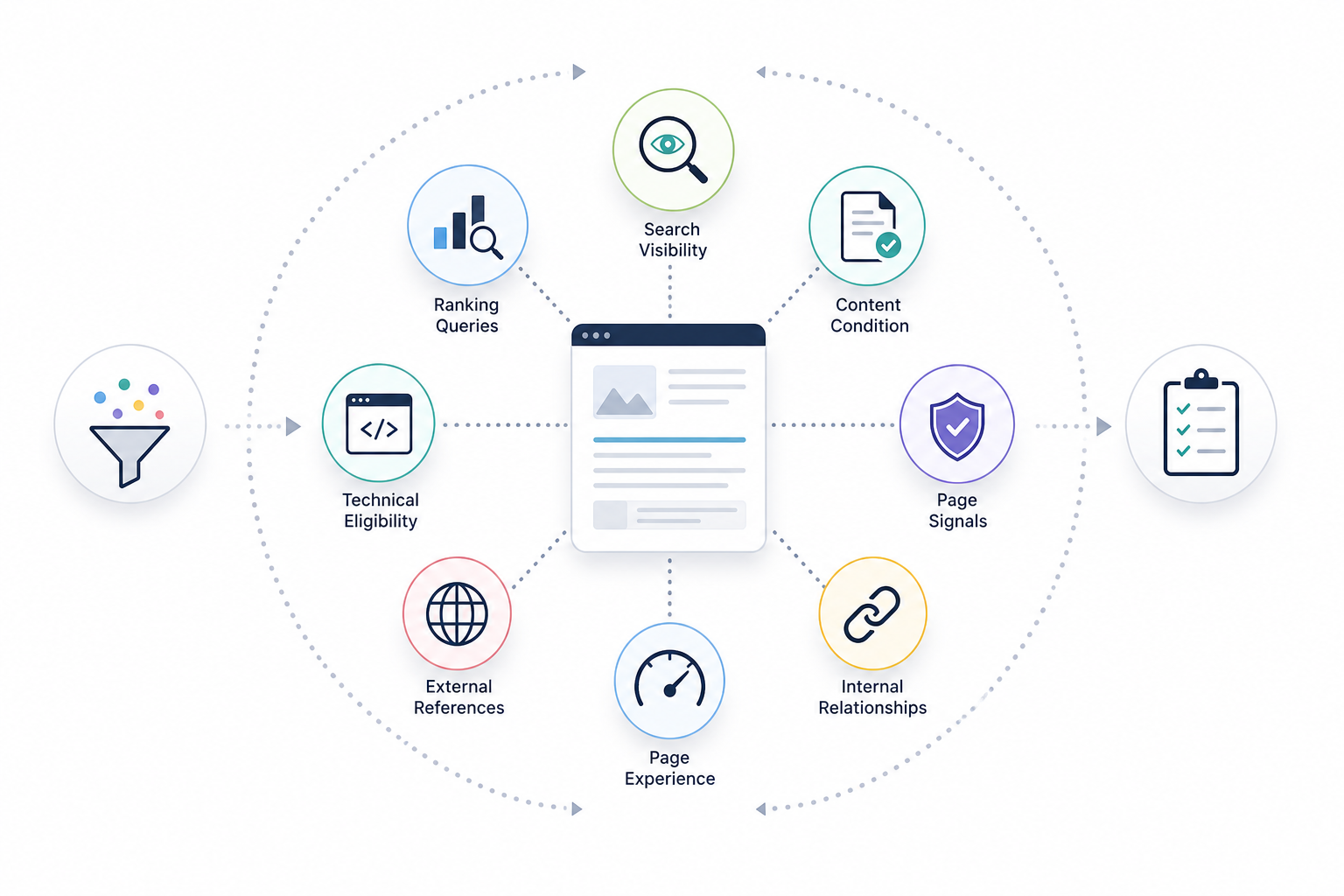
Gather information about:
- Search visibility
- Ranking queries
- Content condition
- Page signals
- Internal relationships
- External references
- Page experience
- Technical eligibility
The objective is to understand the current page before deciding what to change.
3. Compare Intent With Actual Search Visibility
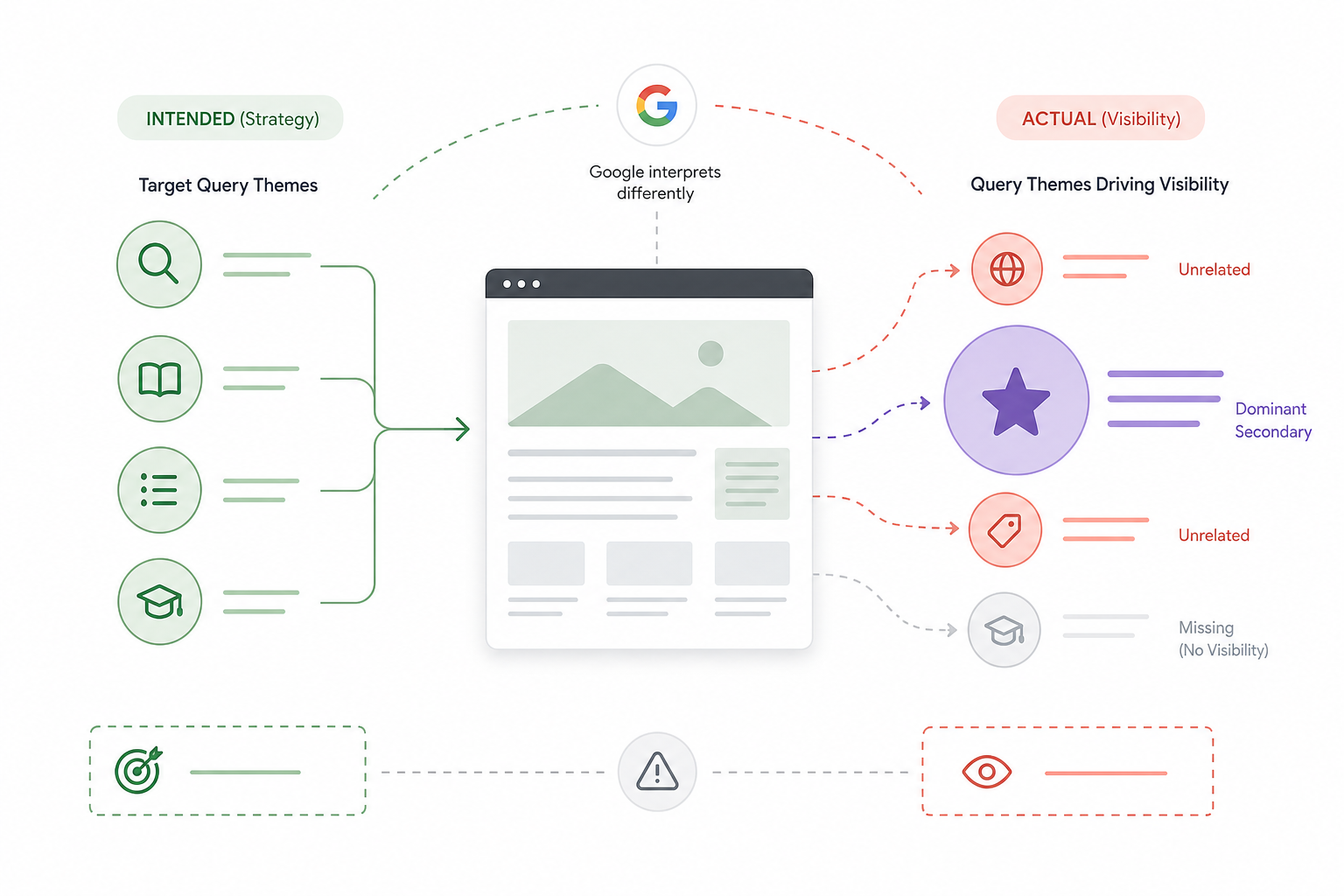
Identify the queries for which the page currently appears.
Determine whether those searches match the intended page role.
Look for cases where:
- The page ranks for unrelated queries.
- Important intended queries produce no visibility.
- One secondary query dominates visibility.
- Google associates the page with a different intent than originally planned.
4. Compare the Page With the Search Environment
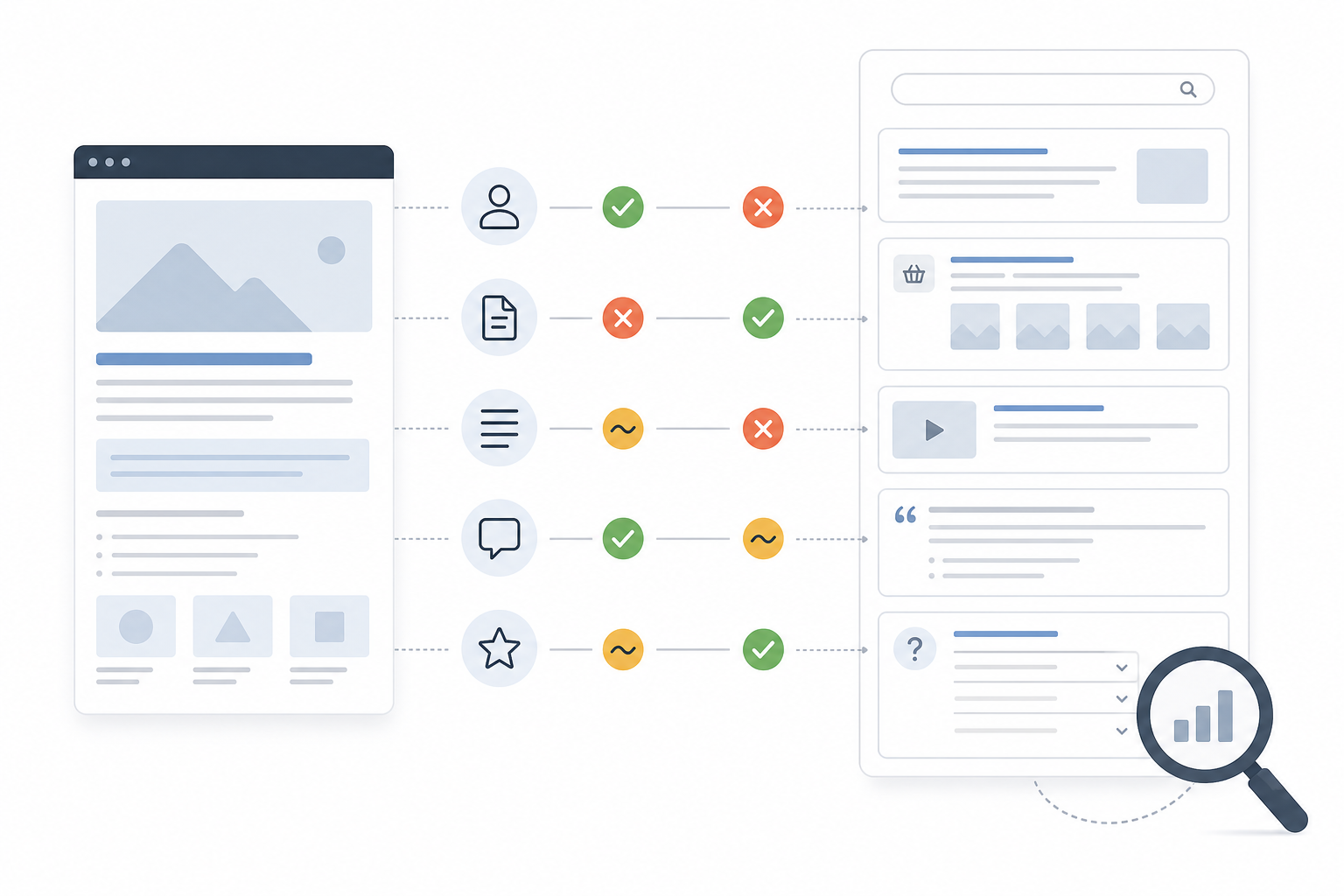
Review relevant search results.
Compare:
- Dominant search intent
- Page types
- Content requirements
- Answer formats
- SERP features
- Competitor strengths
Use competitor pages as diagnostic evidence rather than templates to copy.
5. Identify the Root Constraint
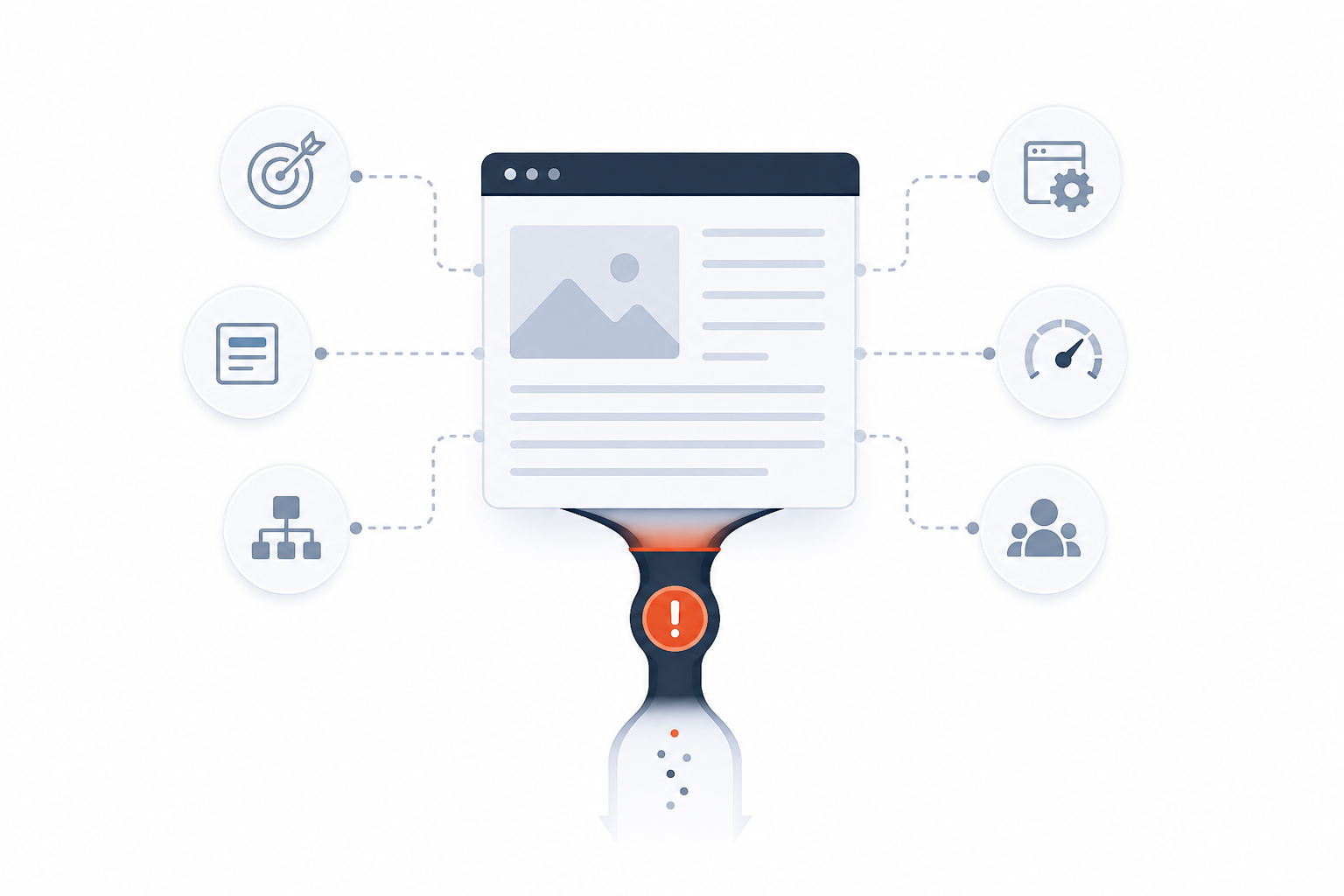
Determine the main issue affecting the page.
Possible constraints include:
- Search-intent mismatch
- Weak content
- Incomplete topical coverage
- Poor keyword mapping
- Unclear title or headings
- Weak internal relationships
- Poor page experience
- Indexability problems
- Stronger competitors
- Limited authority
Separate the primary limitation from minor imperfections.
A page does not require every possible optimization simply because a tool detects several small issues.
6. Evaluate Performance Impact
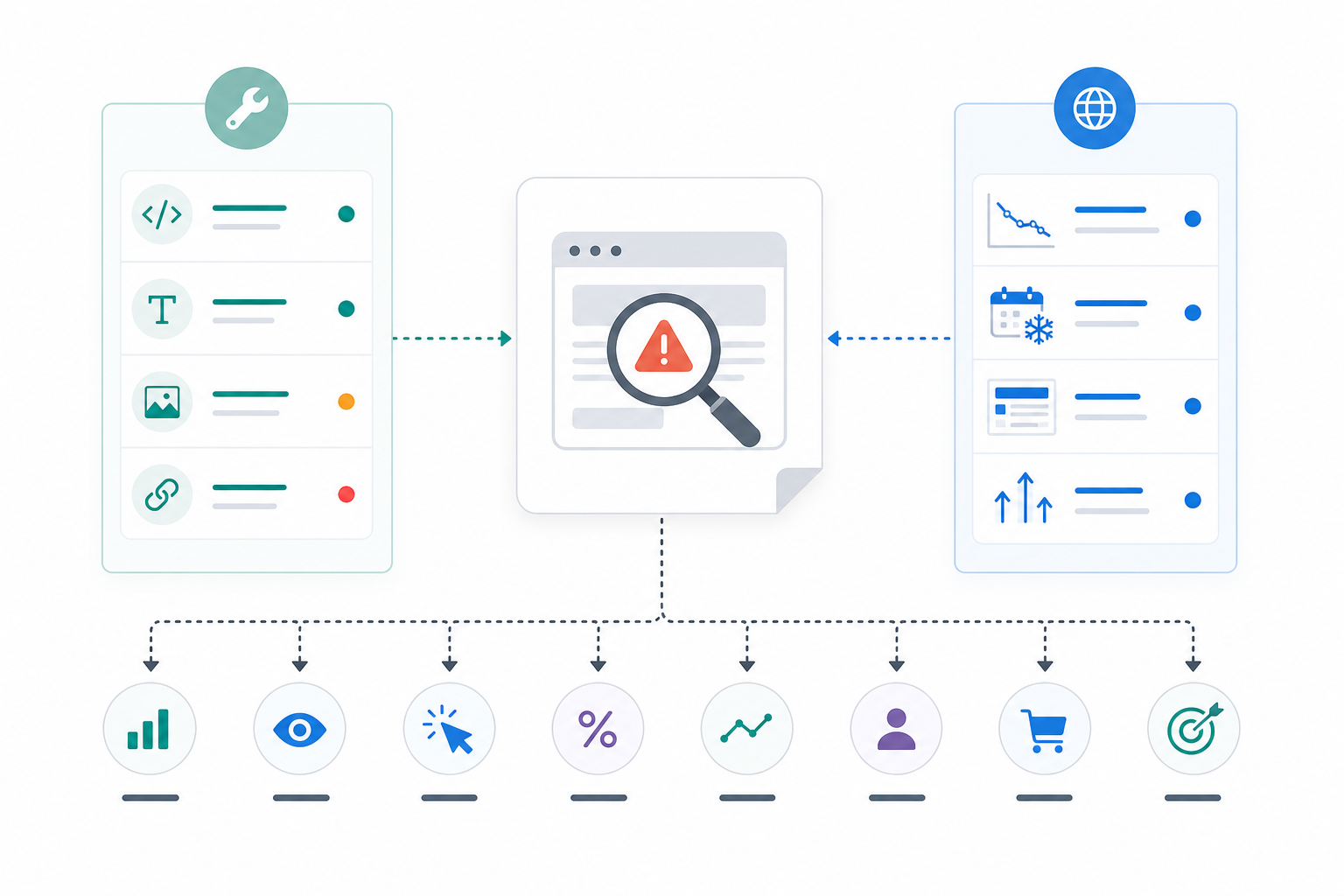
Connect the diagnosed issue with outcomes such as:
- Rankings
- Impressions
- Clicks
- CTR
- Organic traffic
- Leads
- Sales
- Other conversions
Also consider external causes.
Weak performance can result from low search demand, seasonality, SERP changes, or increased competition rather than an on-page problem.
7. Prioritize the Required Action
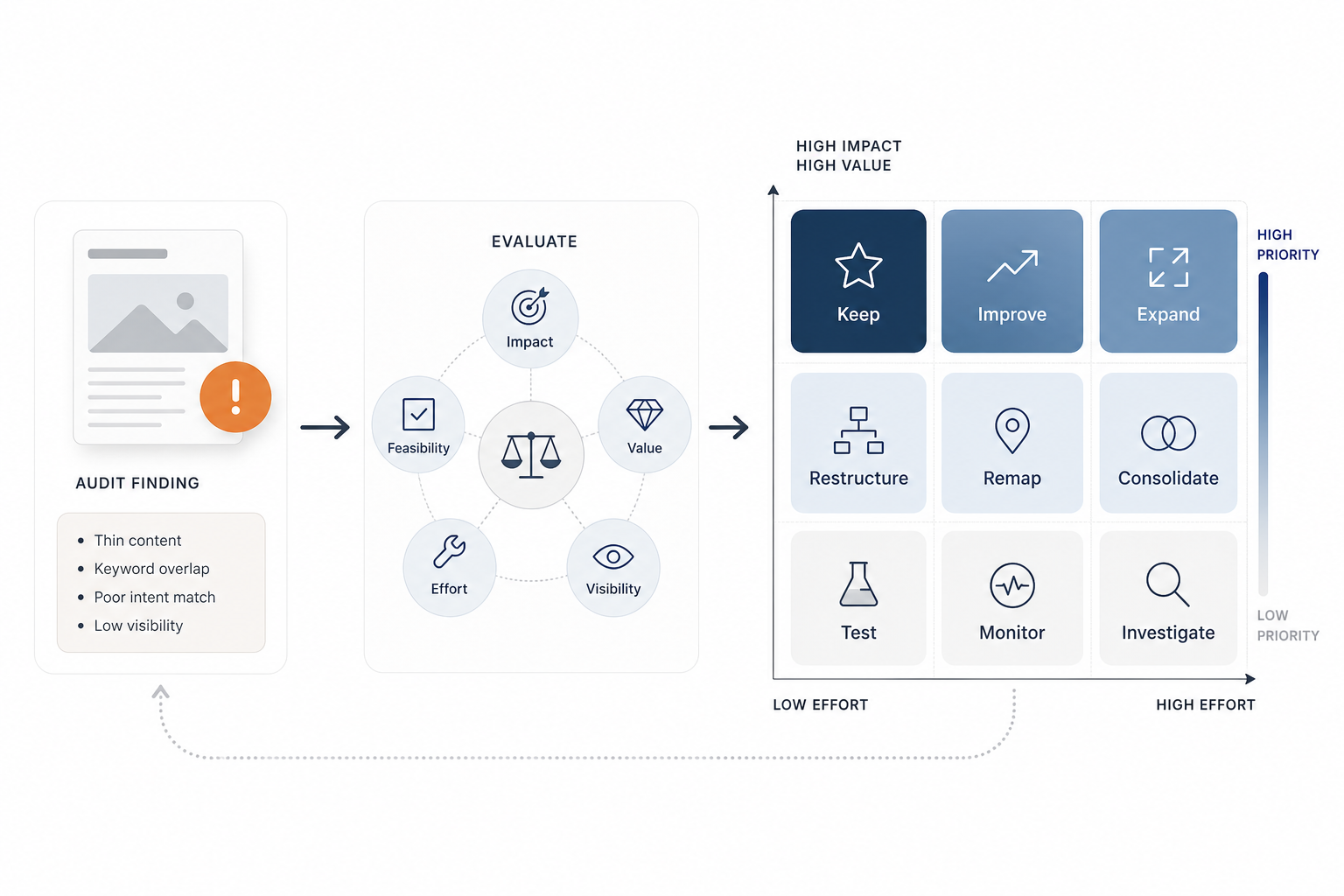
Translate the diagnosis into a clear decision.
Possible actions include:
- Keep
- Improve
- Expand
- Restructure
- Remap
- Consolidate
- Test
- Monitor
- Investigate further
Prioritize according to:
- SEO impact
- Business value
- Existing visibility
- Effort
- Feasibility
8. Monitor the Result
After making material changes, compare new performance with the previous baseline.
Determine whether the original problem improved.
Avoid repeatedly modifying the page before enough evidence exists to judge the previous change.
Effective on-page analysis identifies why a page is constrained and what decision follows rather than generating another generic optimization checklist.
What On-Page SEO Tools Can You Use?
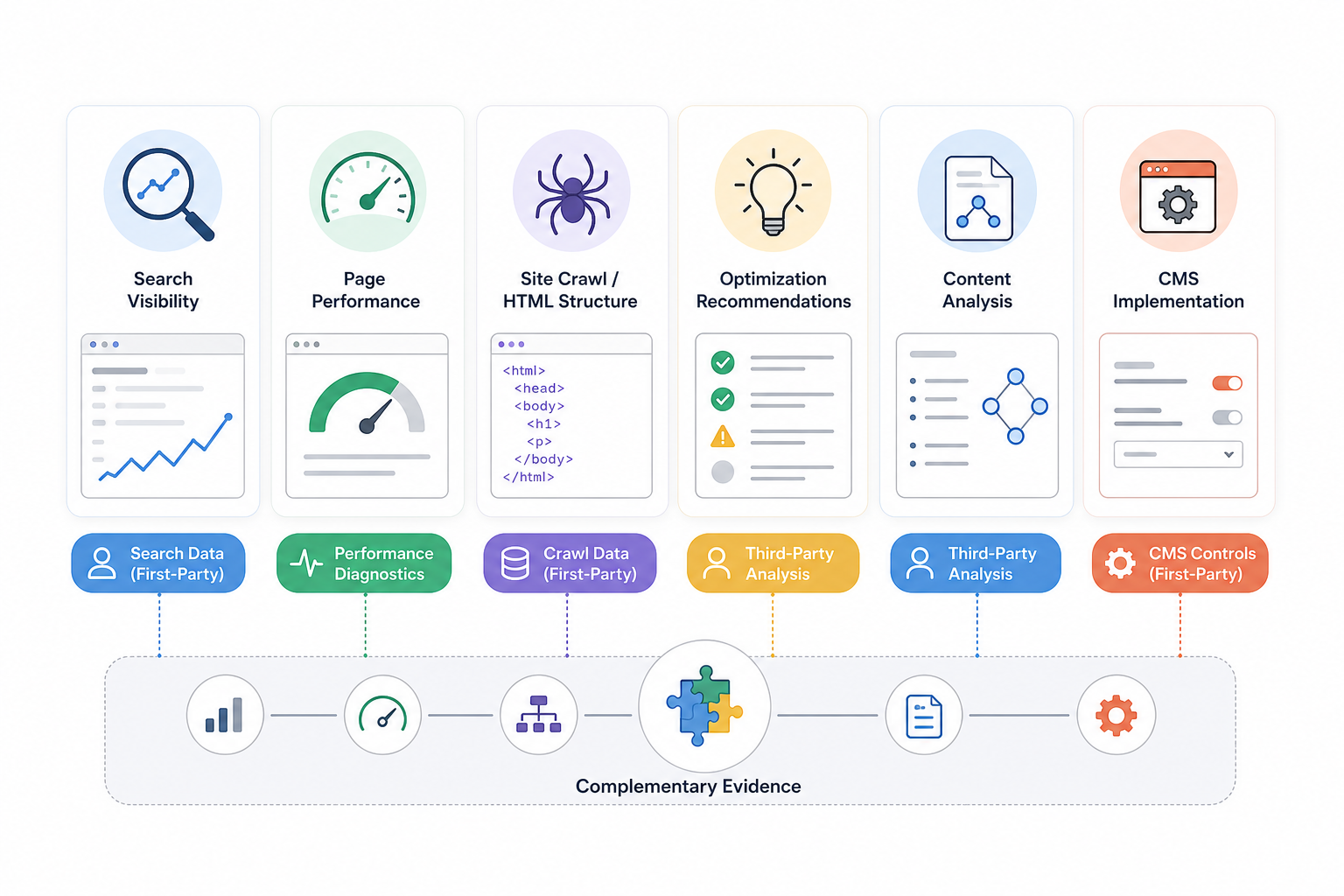
On-page SEO tools provide different forms of evidence for analyzing search visibility, page structure, content, performance, and implementation.
No single on page SEO tool evaluates every factor equally well.
The right combination usually comes from the wider range of SEO tools, with different platforms covering search performance, crawling, content, implementation, and page experience.
| Tool | Best For | Main On-Page Capability | Data Type | When to Use It |
|---|---|---|---|---|
| Google Search Console | Search visibility | Queries, impressions, clicks, average position, indexing | First-party Google Search data | Evaluate whether the page appears for intended searches |
| Google PageSpeed Insights | Page performance | Core Web Vitals and performance diagnostics | Google / lab and field performance data | Investigate page-experience and loading issues |
| Screaming Frog SEO Spider | HTML and page structure | Titles, descriptions, headings, canonicals, links, status codes, indexability | Crawl data | Analyze page elements at scale |
| Semrush On-Page SEO Checker | Optimization recommendations | Competitive and page-level recommendations | Third-party data | Generate additional diagnostic ideas |
| Clearscope or similar tools | Content analysis | Topical coverage and ranking-page comparison | Third-party content analysis | Evaluate content coverage |
| Yoast, Rank Math, AIOSEO | CMS implementation | Metadata, page settings, schema controls | CMS implementation | Implement on-page settings in WordPress |
Google Search Console
Use Search Console to evaluate:
- Queries
- Impressions
- Clicks
- CTR
- Average position
- Page-level visibility
- Indexing information
It provides direct Google Search data and helps determine whether a page appears for the search demand it was designed to satisfy.
Google PageSpeed Insights
Use PageSpeed Insights for:
- Core Web Vitals
- Loading performance
- Rendering-related performance issues
- Page-experience diagnostics
It does not evaluate whether the content matches search intent or provides enough topical depth.
Screaming Frog SEO Spider
Use Screaming Frog to review page-level elements at scale.
It can collect:
- Titles
- Meta descriptions
- H1 headings
- H2 headings
- Status codes
- Canonicals
- Internal links
- Indexability signals
- Redirects
- Other HTML elements
Crawler findings require interpretation before becoming optimization decisions.
Semrush On-Page SEO Checker
Use Semrush for additional page recommendations involving:
- Keywords
- Content
- Competing pages
- Selected optimization factors
Treat its recommendations as diagnostic inputs rather than instructions that automatically improve rankings.
Content Analysis Platforms
Platforms such as Clearscope can help evaluate:
- Topic coverage
- Related terminology
- Competitor content
- Missing concepts
These tools support editorial analysis but do not replace understanding search intent or the subject itself.
WordPress SEO Plugins
Yoast SEO, Rank Math, and AIOSEO provide controls for:
- Title tags
- Meta descriptions
- Canonicals
- Robots settings
- Structured data
- Other page configuration
Plugin scores are not ranking factors.
The strongest analysis combines complementary evidence instead of relying on one optimization score.
What Do On-Page SEO Services Include?
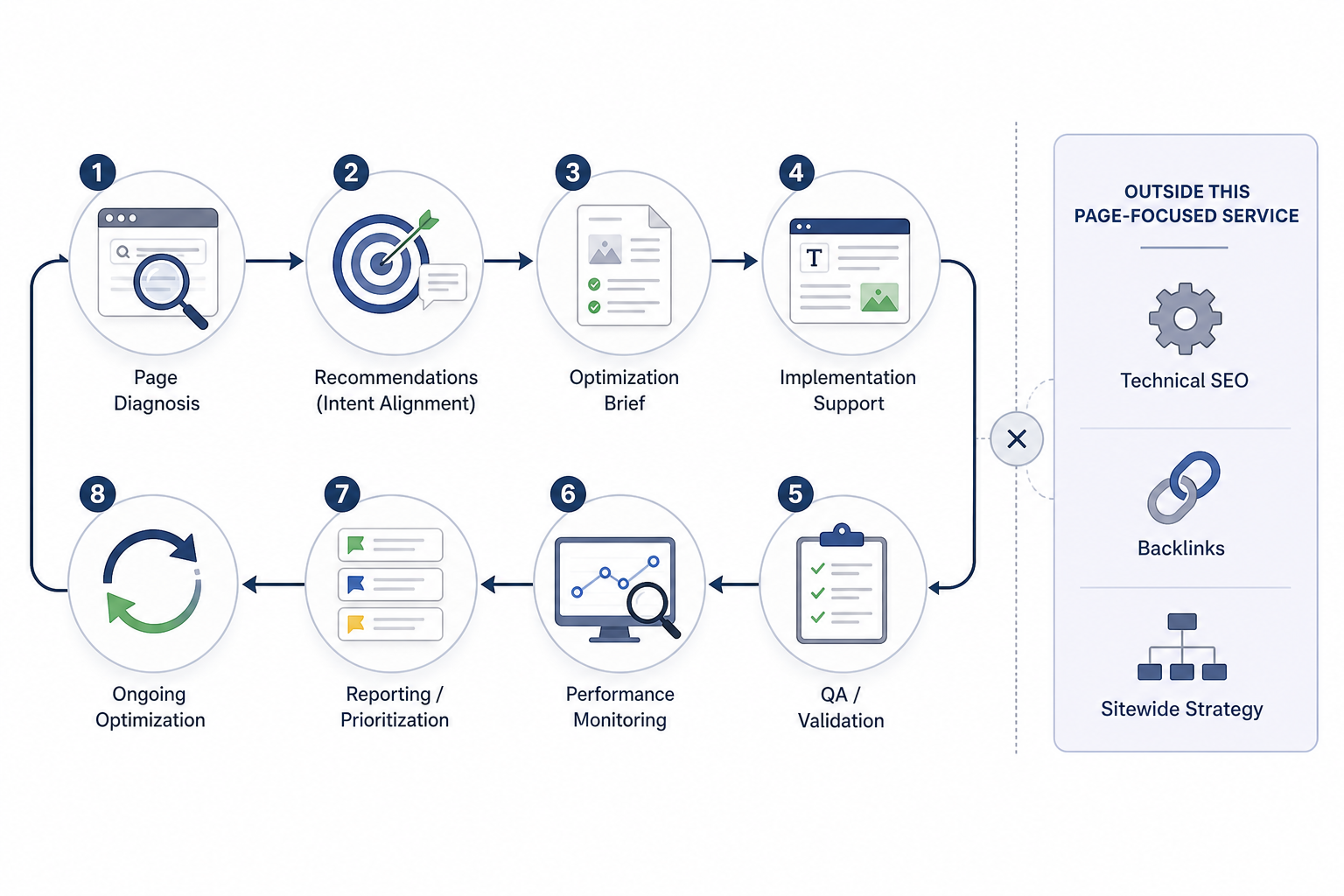
On page SEO services provide structured page-level diagnosis, recommendations, implementation support, validation, and ongoing optimization connected with organic-search objectives.
The exact scope varies by provider, website, business need, and engagement model.
Common deliverables include:
- Page diagnostic deliverables
- Page-level assessment
- Search-intent diagnosis
- Keyword-targeting review
- Priority issue identification
- Affected-page inventory where multiple URLs are reviewed
- Optimization recommendations
- Page-specific recommendations
- Content improvements
- Targeting corrections
- Page-signal improvements
- Contextual-link recommendations
- Page-experience improvements where relevant
- Prioritized actions rather than generic checklists
- Optimization briefs
- Instructions for writers
- Editor requirements
- Designer requirements
- Developer requirements
- Expected objective
- Relevant page context
- Implementation notes
- Implementation support
- CMS changes
- Content revisions
- Metadata updates
- Heading changes
- Internal-link improvements
- Media updates
- Page-level configuration where required
- Quality assurance and validation
- Review the live implementation.
- Confirm that intended changes appear correctly.
- Check that optimization has not created new indexing, usability, clarity, or page-structure problems.
- Performance monitoring
- Track search visibility after implementation.
- Review impressions and clicks.
- Monitor relevant ranking changes.
- Evaluate traffic or conversion impact where data is available.
- Determine whether further refinement is necessary.
- Reporting and prioritization
- Summarize completed changes.
- Document unresolved issues.
- Record performance observations.
- Identify the next highest-priority pages or actions.
- Ongoing optimization
- Revisit important pages when search intent changes.
- Respond to stronger competition.
- Refresh content where information becomes outdated.
- Adjust targeting when business priorities change.
- Investigate meaningful performance changes.
On-page SEO services remain page-focused. Full technical SEO, sitewide keyword strategy, backlink acquisition, and broader authority building belong to wider SEO engagements unless explicitly included in the service scope.
Strong on-page SEO services produce clear page-level decisions, implemented improvements, validation, and measurable follow-up rather than another generic SEO checklist.
Need links on real SaaS and business websites?
Links are placed after your approval, on sites with guaranteed DR and traffic, with a 1-year replacement guarantee.

