
Internal Linking: Benefits, Types, Strategy, Structure, Audits & Services
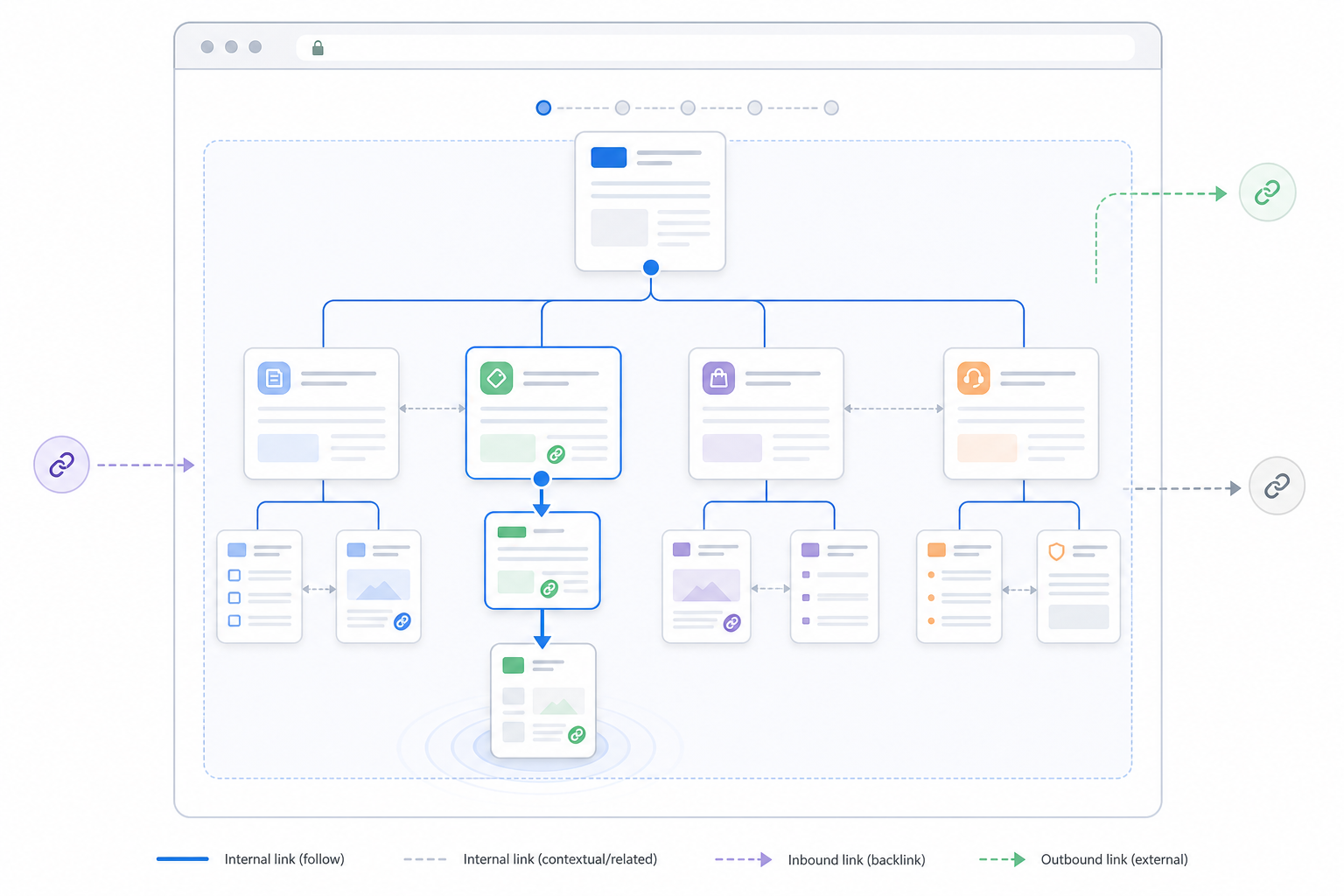
Internal links for SEO are hyperlinks that connect one page of a website to another page on the same website. They help users and search engines move between related URLs while also supporting page discovery, website structure, contextual relationships, and the distribution of internal PageRank.
An internal link begins on one page and points toward another destination within the same site. For example, a blog article about SEO can link to a separate guide about keyword research, or a product-category page can link to individual product pages.
Internal linking serves both navigational and SEO functions. Users rely on internal links to move toward related information, products, services, categories, or next steps. Search engines can follow crawlable internal links to discover URLs and understand how pages relate within the broader website.
Internal links can also help indicate which pages hold greater structural importance. Pages that receive meaningful links from prominent or well-connected areas of the website can become more visible within the internal architecture and receive internal PageRank from those source pages.
Internal linking is not limited to links placed inside blog paragraphs. Menus, breadcrumbs, category navigation, sidebars, footers, calls to action, related-content modules, and clickable images can all create internal connections when they point to another URL on the same website.
The value of an internal link depends on the relationship between the source and destination. Effective internal linking connects pages because the destination provides useful information, supports the user journey, or belongs logically within the site architecture.
Understanding internal linking begins with distinguishing it from external links and backlinks.
How Are Internal Links Different From External Links and Backlinks?
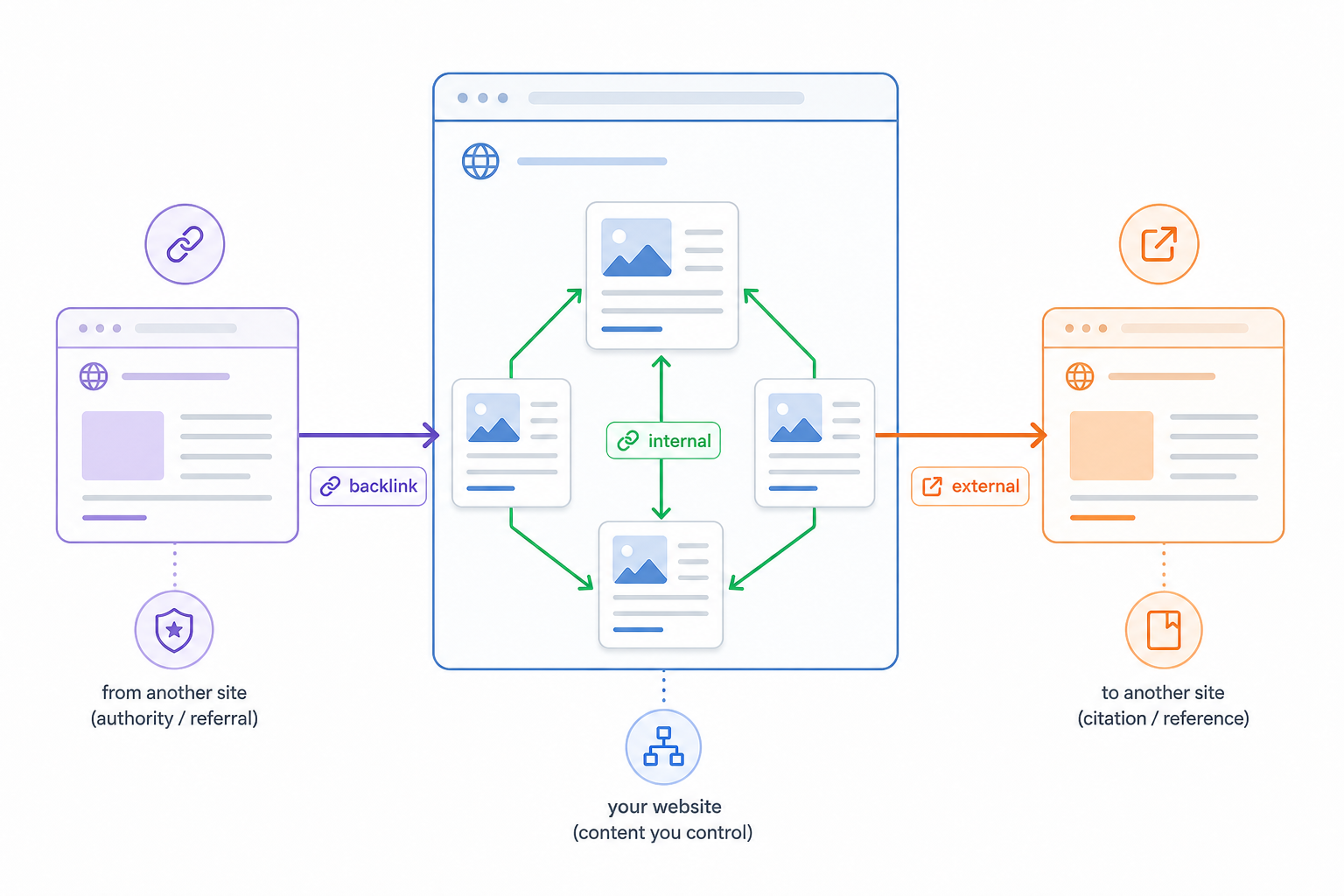
Internal links connect pages within the same website, external links point from your website to another domain, and backlinks point from another website to your website. The primary difference is the direction and destination of the link.
| Dimension | Internal Link | External Link | Backlink |
|---|---|---|---|
| Source | Your website | Your website | Another website |
| Destination | Another URL on your website | Another domain | A URL on your website |
| Direction | Within the same site | Outbound | Inbound |
| Level of Control | Directly controlled by the website owner | Directly controlled by the website owner | Largely controlled by external publishers |
| Primary Purpose | Navigation, discovery, structure, contextual relationships | Citation, attribution, evidence, additional resources | External reference, referral traffic, authority support |
| SEO Role | Helps distribute internal PageRank and communicate page relationships | Can improve usefulness and sourcing | Relevant editorial links can support authority and competitiveness |
| Referral Traffic | Moves users within the website | Sends users to another website | Can send users from another site to yours |
| Typical Example | Blog post to related guide | Blog post to external research | External publication to your blog post |
A simple example makes the distinction clear:
- Page A on your website linking to Page B on your website is an internal link.
- Page A on your website linking to an external research source is an external link.
- An external publisher linking to Page A on your website creates a backlink for your site.
The same hyperlink can also be classified differently depending on perspective.
If Website A links to Website B, that hyperlink is an external link from Website A’s perspective and a backlink from Website B’s perspective.
Internal links remain different because both the source and destination stay within the same website.
These distinctions separate three different SEO functions: internal architecture, outbound referencing, and external authority. SEO backlinks belong to that external-authority layer because their source exists on another website rather than within the site’s own architecture.
How Do Internal Links Work?
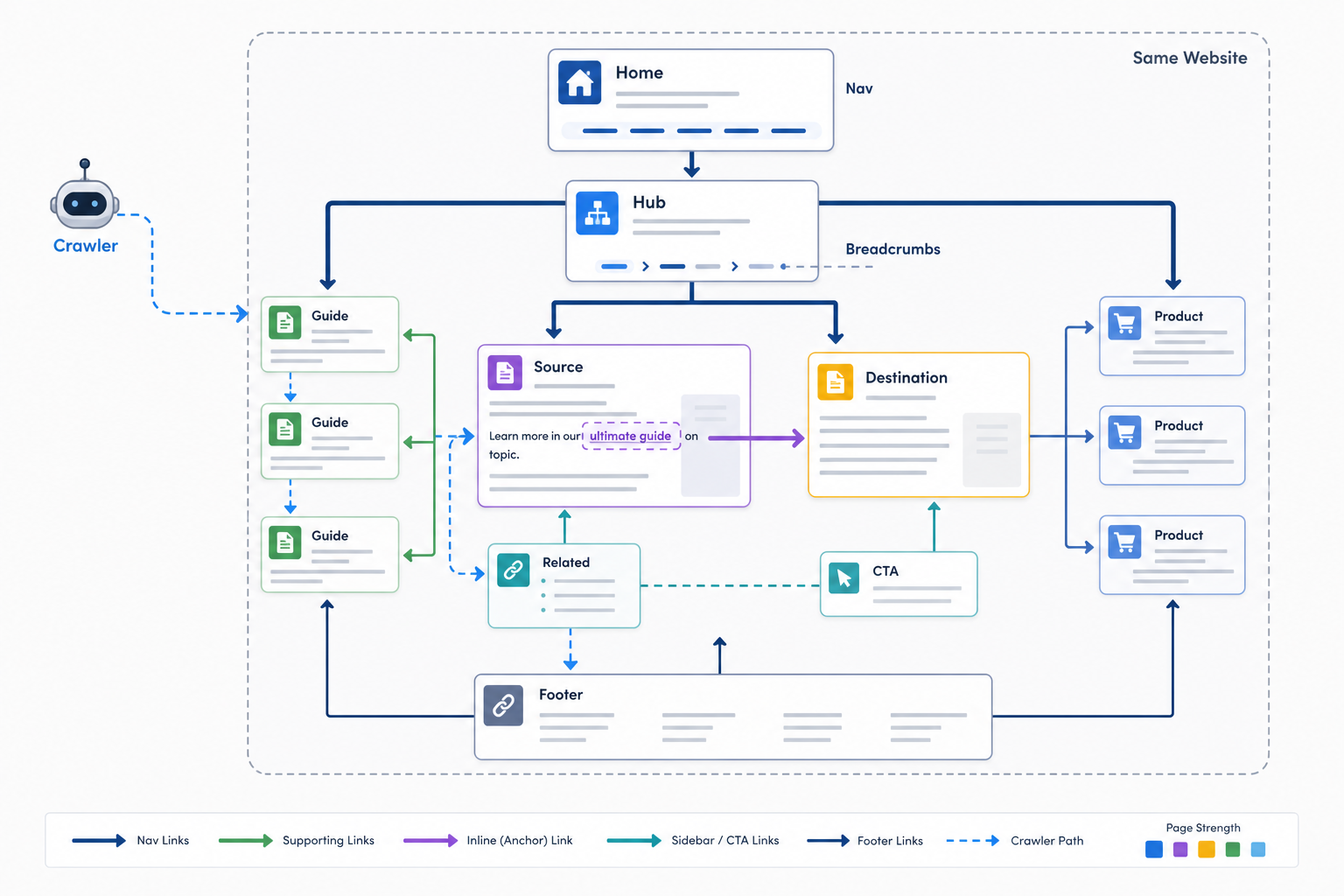
Internal links work by creating crawlable pathways between pages on the same website so users and search engines can move from a source page to a related destination page. They also provide contextual information about how those pages relate.
Several mechanisms operate together.
Source and Destination Pages
Every internal link has:
- A source page where the link appears
- A clickable hyperlink
- A destination page the link points toward
The destination must exist within the same website.
For example, a page about “SEO strategy” can link to another internal page explaining “keyword research.”
Anchor Text and Surrounding Context
Anchor text is the clickable wording of the hyperlink.
A descriptive anchor helps users understand what they can expect after clicking.
For example:
- Less descriptive: “learn more”
- More descriptive: “keyword research process”
The surrounding sentence also contributes context.
Anchor text alone does not determine what the destination ranks for, but clear wording can make the source-to-destination relationship easier to understand.
User Navigation
Internal links help visitors continue naturally through the website.
They can guide users toward:
- Related articles
- Product categories
- Product pages
- Services
- Pricing
- Definitions
- Supporting resources
- Contact or booking pages
The appropriate destination depends on what the user is likely to need next.
Search-Engine Discovery
Search-engine crawlers can follow accessible internal hyperlinks to find additional URLs.
A page that is linked from existing crawlable pages has a normal internal discovery path.
Discovery does not guarantee that a URL will be crawled, indexed, or ranked. Those remain separate stages of search processing.
Page Relationships and Hierarchy
Internal-link patterns help communicate how website sections fit together.
For example:
- A category can link to its products.
- A broad guide can link to supporting articles.
- A service overview can link to individual service pages.
- Supporting pages can link back to broader resources where useful.
Repeated relationships can make the site architecture more understandable to both users and search systems.
Internal PageRank Distribution
Internal links also create paths through which PageRank can move between URLs within the website.
The practical effect depends on several factors, including:
- The source page
- How well connected the source is
- The wider linking structure
- Other outgoing links
- The destination URL
- The destination’s crawl and index status
A link from a strong internal page does not guarantee ranking improvement, but internal links can influence how PageRank is distributed across the site.
Relative Page Importance
Pages receiving relevant links from important parts of the website can become more prominent within the internal architecture.
For example, a strategic product category linked from the homepage, navigation, related guides, and supporting commercial pages has stronger internal prominence than a page with only one obscure incoming link.
This does not mean every priority page needs the same number of internal links.
Relative importance should reflect the role of the page within the website.
Search Accessibility and Navigation
A coherent internal-link system creates clearer routes through the website.
Search engines gain crawl paths toward important pages, while users gain useful routes toward related information.
These mechanisms can operate through contextual links, navigation menus, breadcrumbs, sidebars, CTAs, images, footers, and other internal placements.
Internal links therefore do more than connect two URLs. They help establish discoverability, context, internal PageRank flow, and structural relationships across the website.
Why Do Internal Links Matter for SEO?
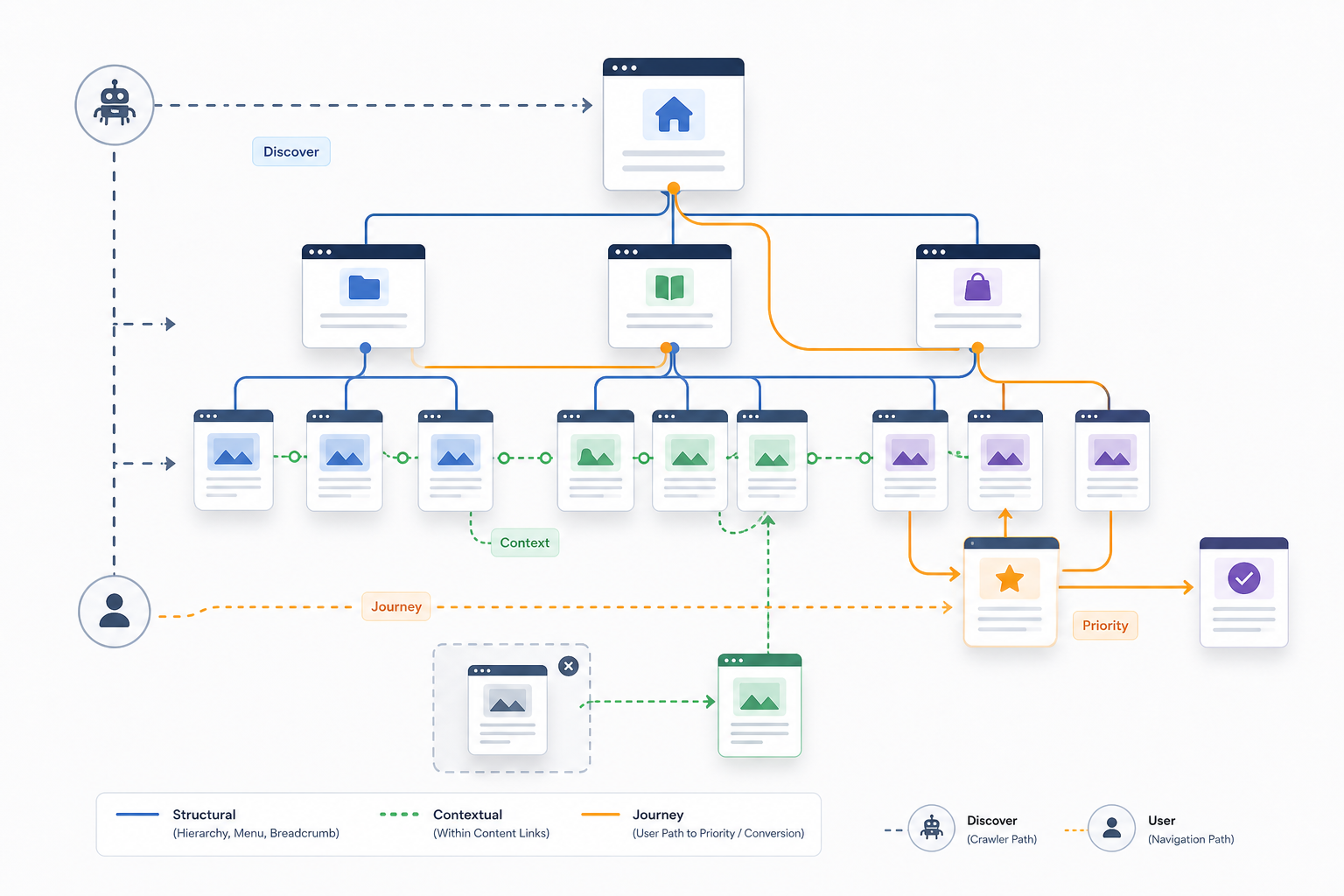
Internal links matter for SEO because they create crawlable relationships between pages, support page discovery, communicate contextual and structural relationships, distribute internal PageRank, and help users navigate toward relevant content.
Their main benefits include:
- Support page discovery
- Internal links create paths toward other pages on the website.
- Search engines can follow these links to discover additional URLs.
- Discovery still does not guarantee crawling or indexing.
- Strengthen crawl paths
- Well-connected pages are easier to reach through ordinary website navigation.
- Important sections do not have to depend entirely on XML sitemaps or external links for discovery.
- Distribute internal PageRank
- Internal links create pathways through which PageRank can move across the site.
- Relevant links from important and well-connected pages can provide stronger internal support to destination pages.
- This does not guarantee rankings.
- Clarify page relationships
- Internal links help show how articles, categories, products, services, definitions, and other pages relate.
- These relationships make the site easier to interpret as a connected information system.
- Reinforce site architecture
- Menus, breadcrumbs, categories, contextual links, and other recurring structures collectively communicate website hierarchy.
- Provide contextual signals
- Anchor text and surrounding content help explain why the destination is related to the source page.
- Support topic connections
- Relevant links between connected subjects make broader topical relationships easier to navigate and understand.
- Internal links alone do not create topical authority.
- Reduce orphan-page risk
- Important pages generally benefit from useful incoming links from relevant parts of the website.
- A page without ordinary internal links can still be discovered through sitemaps, external links, feeds, or other sources, but it remains poorly integrated into the normal site architecture.
- Signal relative importance
- Priority pages can receive greater internal prominence through meaningful links from relevant website sections.
- This prominence does not require distributing links equally across every page.
- Improve user navigation
- Users can move directly toward supporting information rather than repeatedly returning to navigation menus or search features.
- Support conversion journeys
- Internal links can connect informational pages with comparisons, products, services, pricing, demos, booking pages, or other logical next steps.
- The destination needs to fit the user’s current journey.
- Surface deeper content
- Newer or better-connected pages can create useful routes toward valuable older pages that sit deeper in the architecture.
- Support content organization
- Reviewing internal relationships can expose isolated content, weak topic connections, and pages that no longer fit the website structure clearly.
The benefits of internal linking come from the quality and usefulness of the connections, not from maximizing the number of links.
Different link types deliver these benefits in different parts of the website.
Which Types of Internal Links Can a Website Use?
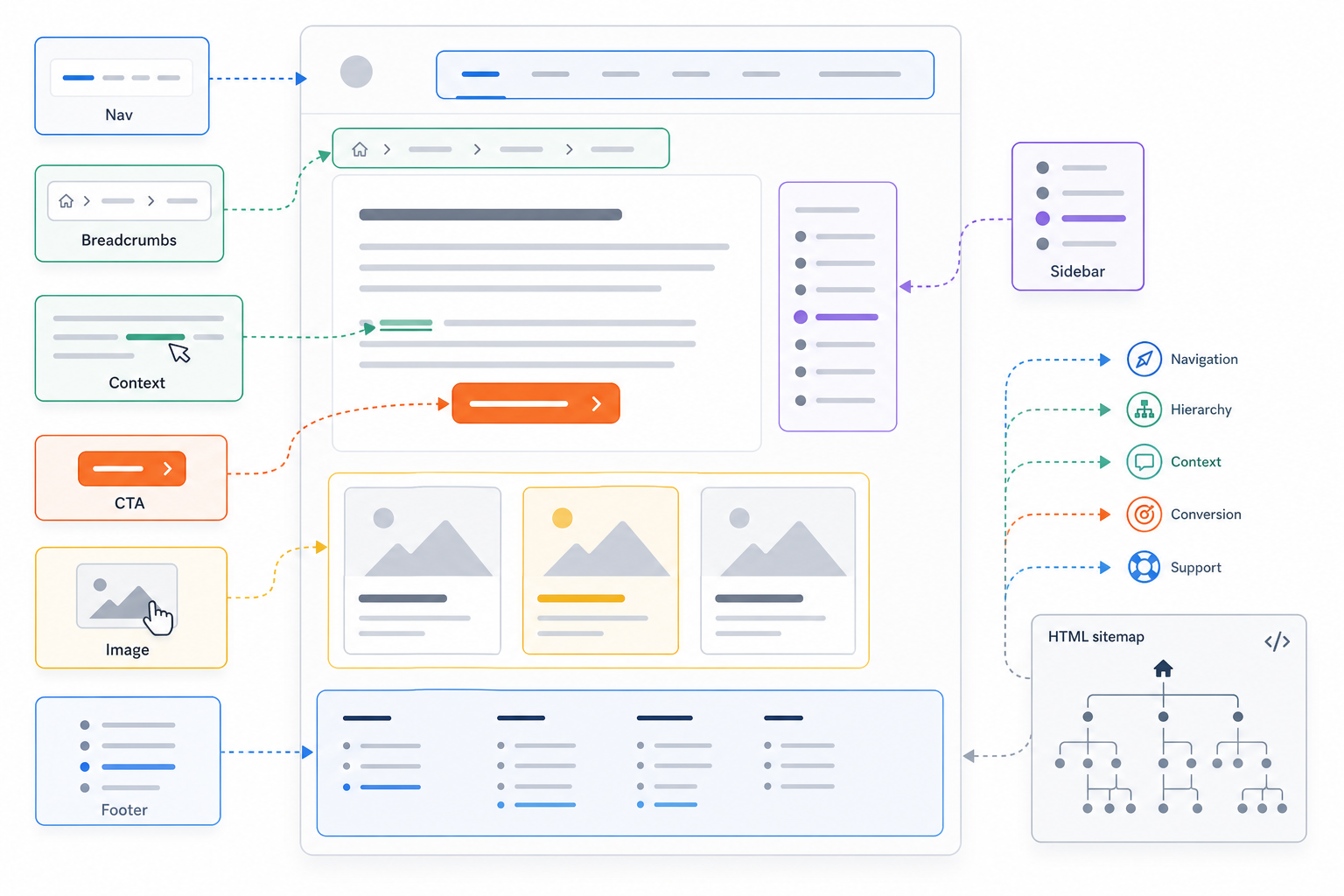
Websites can use navigational, contextual, breadcrumb, sidebar, footer, CTA, image, and other internal links depending on the placement and purpose of the connection.
Navigational Links
Navigational links appear in recurring website navigation.
Common placements include:
- Main menus
- Header navigation
- Mobile menus
- Category navigation
They typically connect users with important areas such as:
- Products
- Services
- Categories
- Resources
- Account pages
- Company information
Because they appear across many pages, navigational links contribute strongly to the recurring structure of the site.
Contextual Links
Contextual links appear within the main body content.
For example:
Internal linking can support broader SEO site architecture by connecting important pages through meaningful contextual pathways.
These links can connect:
- Related articles
- Supporting guides
- Products
- Services
- Definitions
- Commercial pages
- Research
- Examples
Contextual links often communicate specific relationships particularly clearly because their surrounding text explains why the destination matters.
Breadcrumb Links
Breadcrumbs show the user’s position within a hierarchical structure.
For example:
Home > SEO > Internal Linking > Internal Linking Audit
They can help users move toward broader categories or parent sections.
Breadcrumbs work best when the website already has a meaningful hierarchical structure.
Sidebar Links
Sidebar links can connect users with:
- Related content
- Categories
- Popular resources
- Filters
- Secondary navigation
Their role depends on the website type and page layout.
Footer Links
Footer links commonly point toward:
- Company information
- Legal pages
- Support
- Contact pages
- Important recurring destinations
Avoid large keyword-focused footer link blocks created primarily to manipulate internal linking.
CTA Links
Calls to action guide users toward a logical next step.
Examples include links to:
- Pricing
- Booking
- Contact
- Sign-up
- Product pages
- Free trials
- Demos
A CTA link is internal when the destination remains on the same website.
Image Links
Images can also function as internal links.
Examples include:
- Product cards
- Category images
- Article thumbnails
- Logo links
The destination and accessible context should remain understandable.
HTML Sitemap Links
An HTML sitemap can provide users with a browsable list of internal website pages or sections.
This differs from an XML sitemap, which primarily supports search-engine URL discovery.
Internal-link classifications can overlap.
A product image inside a category grid can function both as an image link and as navigational linking. A sidebar category link can have both structural and navigational roles.
No single type of internal link is universally best. Each placement performs a different structural, contextual, navigational, or conversion function.
The goal is to combine these link types deliberately rather than insert them independently.
How Do You Build an Internal Linking Strategy?
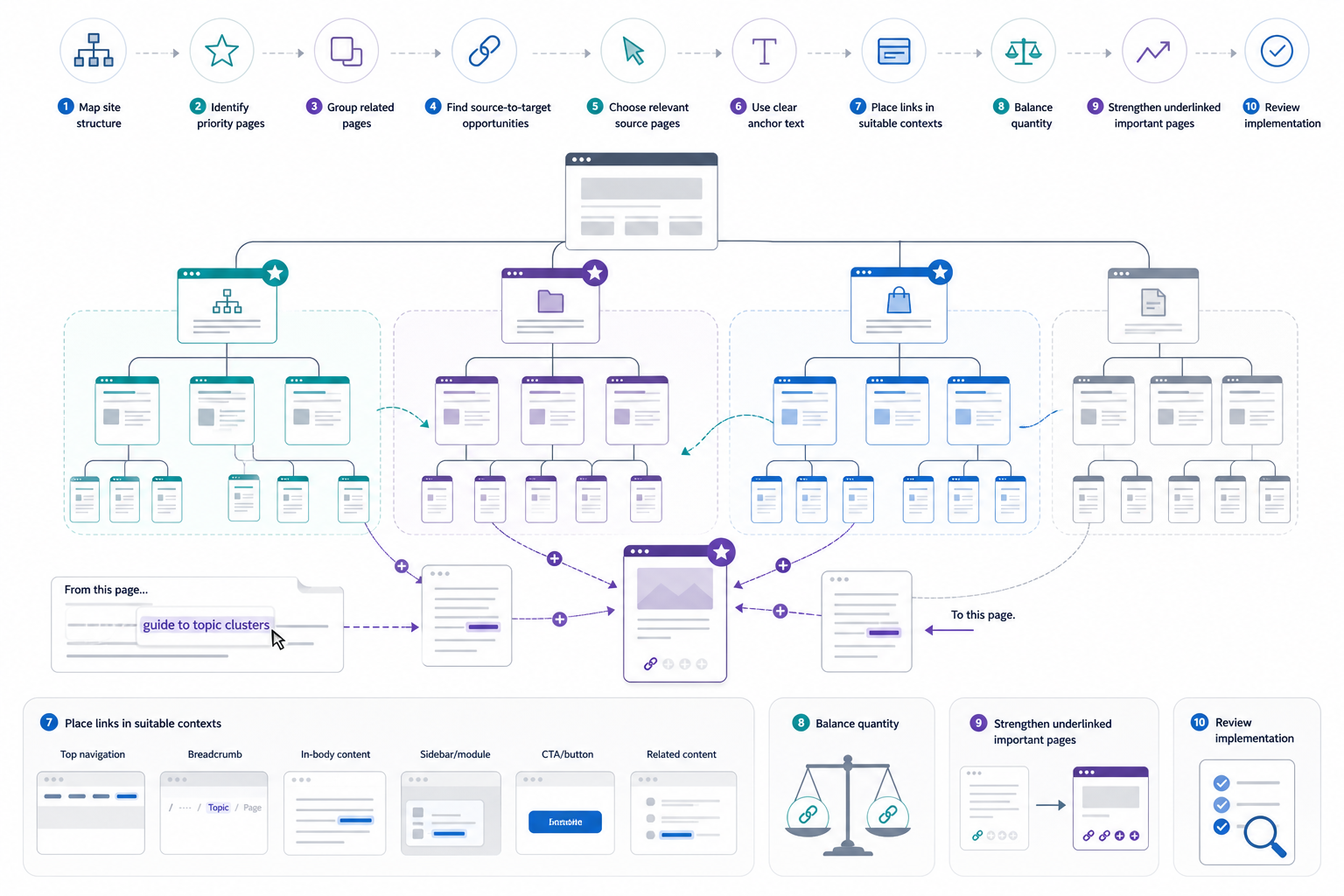
An internal linking strategy is built by organizing the site architecture, identifying important pages, connecting genuinely related content, finding useful source-to-target opportunities, selecting clear anchors, and placing links according to page purpose and user need.
1. Map the Website Structure
Identify the main parts of the website.
These can include:
- Main categories
- Subcategories
- Content hubs
- Products
- Services
- Features
- Locations
- Resources
- Supporting articles
Determine how important pages fit within the wider architecture.
Avoid forcing every website into one universal pyramid, silo, or click-depth model.
2. Identify Priority Pages
Determine which pages have greater strategic importance.
Priorities can be based on:
- Business value
- Conversion importance
- Search opportunity
- Product importance
- Commercial relevance
- Topical significance
A high-volume keyword alone does not automatically make a page strategically important.
3. Group Genuinely Related Pages
Identify pages with meaningful relationships.
Pages can:
- Support one another
- Expand a subject
- Define a concept
- Compare alternatives
- Lead into a commercial next step
- Answer related questions
Broader pages can function as hubs where appropriate, while narrower pages provide more specific information.
Useful cross-topic links are also valid when they help the reader. Internal linking does not require completely isolated silos.
4. Find Internal Linking Opportunities
Review existing pages for places where another internal page would naturally provide:
- More detail
- A definition
- An example
- A related product
- A commercial next step
- Supporting evidence
- A useful comparison
Pay particular attention to:
- Newly published pages
- Older content
- Priority pages with few incoming links
- Orphaned strategic pages
- High-traffic pages
- Externally linked pages
Relevance remains more important than the strength or traffic of the source page.
5. Choose Appropriate Source Pages
A source page should have a genuine relationship with the destination.
For example, an article about keyword research can logically link to a keyword clustering guide. A random high-authority blog post about website security may not be an appropriate source simply because it has many backlinks.
Use strategically important source pages when relevance exists.
6. Choose Descriptive Anchor Text
Use anchor wording that explains the destination clearly.
Good anchor text:
- Fits naturally into the sentence
- Describes the destination accurately
- Reflects the actual page topic
- Helps users know what they will reach
Avoid mechanical exact-match repetition.
7. Place Links in the Appropriate Context
Use contextual body links where another page expands the discussion naturally.
Use:
- Navigation
- Breadcrumbs
- Sidebars
- Categories
- CTAs
- Images
- Related-content modules
where their structural or navigational purpose makes sense.
Different placements serve different functions.
8. Balance Link Quantity With Page Purpose
Add enough links to create useful relationships without making the page repetitive or distracting.
The appropriate quantity depends on:
- Page type
- Content depth
- Number of relevant destinations
- User needs
- Website architecture
Avoid fixed links-per-page formulas.
9. Strengthen Important Underlinked Pages
Priority pages deserve useful incoming links from relevant parts of the site.
Look for destinations such as:
- Product categories
- Commercial services
- Important features
- Key guides
- Strategic resources
Do not add links merely to remove an “underlinked” label if the destination itself has limited value.
10. Review the Implementation
Confirm that:
- Source pages are relevant.
- Destinations are useful.
- Anchor text is clear.
- Links appear in appropriate locations.
- Links point to live URLs.
- The resulting relationships make sense to users.
This validates the initial implementation without replacing a full sitewide audit.
A strong internal linking strategy connects pages according to their relevance, importance, architecture, and user journey rather than distributing links equally across the website.
What Makes a Strong Internal Link Structure?
A strong internal link structure connects important and related pages through a logical hierarchy, useful contextual relationships, clear navigation, and appropriate internal prominence.
Important characteristics include:
- Clear hierarchy
- Organize broader and narrower pages in understandable relationships where the website naturally supports hierarchy.
- Strong priority-page connections
- Make important commercial, category, product, service, or pillar pages meaningfully accessible from relevant website areas.
- Relevant topic relationships
- Connect pages that genuinely support, define, compare, expand, or continue the same subject.
- Contextual linking
- Use body links where the destination adds useful depth to the current information.
- Clear anchor context
- Make each destination understandable through the anchor and surrounding sentence.
- Appropriate internal PageRank distribution
- Allow important pages to receive stronger internal support where their strategic role justifies it.
- Avoid trying to distribute PageRank evenly across all URLs.
- Reasonable accessibility
- Keep strategically important pages reachable through sensible internal pathways.
- Do not impose one universal three-click rule.
- Limited orphaning of important pages
- Integrate valuable pages into normal site pathways where they logically belong.
- Consistent navigation
- Use menus, breadcrumbs, categories, and other structural systems consistently.
- Useful cross-linking
- Allow related pages across neighboring website sections to connect when the relationship benefits users.
- Clean destination paths
- Link directly to intended live destinations instead of unnecessarily routing users through redirects.
- Maintainable architecture
- Build relationships that remain understandable as pages are created, updated, consolidated, redirected, or reprioritized.
Hierarchy and contextual relationships are not identical.
Hierarchy describes the broader structural placement of pages. Contextual linking can connect related pages across different branches when the relationship makes sense.
A strong internal link architecture defines which relationships need to exist. The next step is finding where those relationships can be created naturally.
Where Can You Find Internal Linking Opportunities?
Internal linking opportunities can be found by reviewing existing content, identifying relevant topic mentions, locating orphan or underlinked pages, analyzing crawl data, and using tools to surface potential source-to-target relationships.
A valid opportunity exists when a relevant source page can naturally direct the reader toward another useful internal destination.
Common methods include:
- Search existing content manually
- Find pages already discussing the destination topic, product, service, entity, or concept.
- Look for passages where the destination would add useful depth.
- Use site-search operators
- Search Google for:
site:example.com "topic" - This can surface pages that mention a relevant term.
- Keyword presence identifies candidates, not automatic link placements.
- Search Google for:
- Review newly published pages
- Find older relevant pages that can link into the new URL.
- Add relevant links from the new page toward established resources.
- Review older content after publishing new assets
- New products, services, categories, guides, and tools often create opportunities inside older pages.
- Identify orphan pages
- Find important pages without normal incoming internal links.
- Determine where they genuinely belong before adding links.
- Identify underlinked priority pages
- Look for strategically important URLs receiving little meaningful internal support.
- Review high-traffic pages
- Strong traffic can create opportunities to guide users toward related deeper pages or commercial destinations.
- Relevance remains more important than traffic volume.
- Review externally linked pages
- Pages with backlinks can sometimes create useful internal pathways toward related strategic destinations.
- Do not force links solely because the source page has external authority.
- Use content audits
- Identify missing relationships between:
- Topics
- Search intents
- Hubs
- Supporting content
- Commercial pages
- Identify missing relationships between:
- Use crawl data
- Review:
- Incoming internal links
- Crawl depth
- Weakly connected pages
- Broken paths
- Structural gaps
- Treat these metrics as evidence, not universal targets.
- Review:
- Search for relevant anchor concepts
- Look for phrases or sentences that naturally introduce the destination page.
- Use CMS or SEO suggestions
- Automated systems can identify candidate relationships.
- Every suggestion still requires relevance review.
- Use semantic or AI-assisted discovery
- Similarity systems can surface possible relationships at scale.
- Semantic similarity alone does not prove that a link belongs on the page.
- Review search-performance data
- Pages gaining search visibility or approaching strategic ranking positions can deserve additional review where internal support is weak.
- Review competitor structures
- Competitor websites can reveal useful relationship patterns your architecture may have overlooked.
- Do not copy their links mechanically.
Before adding a link, validate three things:
- Is the source page relevant?
- Does the destination genuinely help?
- Does the relationship fit naturally within the context?
Finding the right source-to-target relationship establishes where the link belongs. Anchor text then determines how that destination is communicated.
How Should Anchor Text Be Used for Internal Links?
Internal link anchor text should clearly describe the destination page, fit naturally within the surrounding sentence, and help users understand why the destination is relevant.
Good internal link anchor text follows several principles:
- Make the destination understandable.
- Keep the wording relevant to the destination’s actual topic.
- Write the anchor naturally within the sentence.
- Use concise wording where it remains descriptive.
- Include relevant terminology naturally when it accurately describes the destination.
- Vary wording according to the surrounding editorial context.
- Keep different anchors pointing to the same page consistent with that page’s underlying topic.
- Prefer descriptive wording over vague labels where a clearer option exists.
- Use surrounding context to support anchor meaning.
- Link according to the user’s next likely information need.
- Distinguish similar destination pages clearly.
For example:
Weak:
Learn more here.
Clearer:
Review our internal linking audit guide to identify broken and underlinked pages.
Generic anchors are not automatically harmful. If the surrounding sentence already makes the destination obvious, a phrase such as “learn more” can still be understandable.
Exact-match anchors are also not inherently problematic when they occur naturally.
The problem comes from mechanical repetition or artificial optimization.
Avoid:
- Fixed exact-match percentages
- Mandatory branded-anchor ratios
- Requiring keywords in every link
- Artificial anchor variation
- Universal anchor-length rules
Anchor relevance is more important than exact keyword matching.
Once each link communicates the destination clearly, quantity becomes the remaining page-level implementation question.
How Many Internal Links Should a Page Have?
There is no fixed number of internal links that every page should contain. The appropriate number depends on the page’s purpose, content depth, available relevant destinations, site architecture, and user needs.
Relevance and usefulness determine link quantity rather than a universal SEO formula.
Different page types naturally contain different numbers of links.
Short or Narrow Pages
A short page covering one focused subject often has fewer natural internal-link opportunities.
Adding unnecessary links simply to reach a numeric target can reduce clarity.
Long-Form Guides
Comprehensive articles can naturally contain more contextual links because they discuss:
- More subtopics
- More entities
- More questions
- More related resources
The additional links make sense when they help users explore those areas.
Hub and Category Pages
Hubs and categories often contain many internal links because connecting users with multiple destinations is part of their core purpose.
Examples include:
- Blog categories
- Product categories
- Resource hubs
- Documentation indexes
Commercial Pages
Commercial pages can use fewer and more deliberate links when excessive navigation would distract from the primary conversion purpose.
Useful links can still connect to:
- Supporting features
- Pricing
- Comparisons
- Proof
- FAQs
- Related solutions
Ecommerce and Directory Pages
Large ecommerce and directory templates can contain substantial numbers of internal links through:
- Categories
- Products
- Breadcrumbs
- Filters
- Pagination
- Navigation
Article-style recommendations should not automatically be applied to these templates.
Content length can affect the number of opportunities, but rules such as “X links per 1,000 words” are not search-engine requirements.
The practical principle is simple: add an internal link when the destination is relevant, useful, and logically connected. Stop when additional links become repetitive, distracting, or structurally unnecessary.
Also distinguish contextual body links from the total links on the page. Menus, breadcrumbs, CTAs, products, related-content blocks, and footers can substantially increase total link count.
Many links do not automatically indicate over-optimization, and few links do not automatically indicate under-optimization.
Internal links per page need to reflect the page’s actual role.
What Does Effective Internal Linking Look Like?
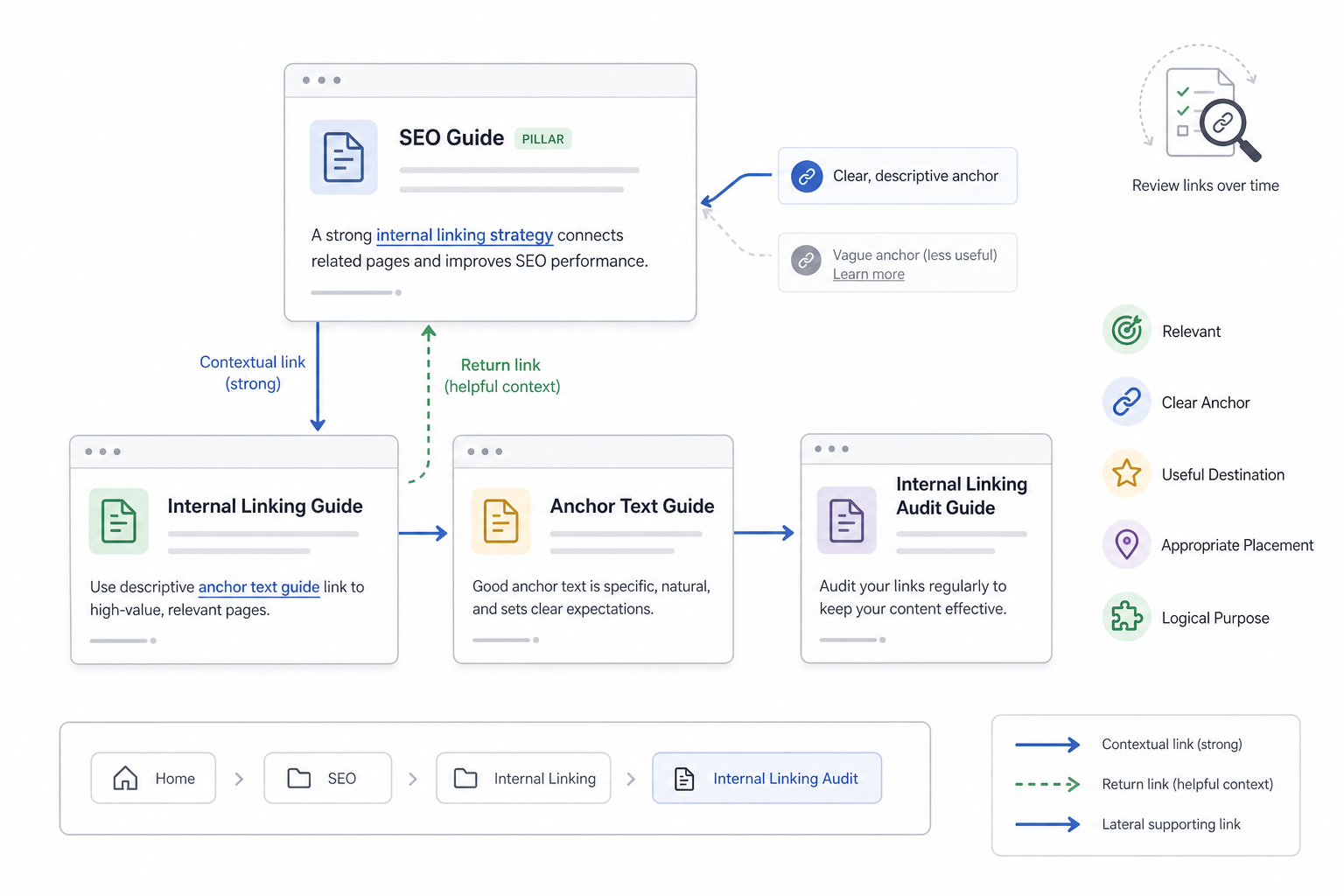
Effective internal linking creates clear, useful connections between related pages so users can continue naturally through the website and search engines can understand how the content fits together.
Consider a hypothetical SEO website with these pages:
- SEO Guide
- Internal Linking Guide
- Anchor Text Guide
- Internal Linking Audit Guide
These page names are illustrative.
Broader Page to Supporting Page
An SEO Guide can mention the role of website architecture and include a contextual link such as:
A clear internal linking strategy helps connect important pages across a website.
The source is relevant, the anchor describes the destination, and the linked guide provides deeper information.
Supporting Page to Broader Page
The Internal Linking Guide can link back to the broader SEO Guide where the reader needs context about how internal linking fits into SEO overall.
Bidirectional linking can be useful when both directions help users, but it does not need to be forced between every parent and child page.
Lateral Supporting Links
The Internal Linking Guide can link to the Anchor Text Guide when discussing anchor wording.
The Anchor Text Guide can link to the Internal Linking Audit Guide when explaining how anchor quality is reviewed at scale.
Internal linking therefore does not operate only from parent to child. Related supporting pages can connect laterally when the relationship is useful.
Navigation and Breadcrumb Support
The same relationships can also be reinforced structurally.
For example:
Home > SEO > Internal Linking > Internal Linking Audit
Breadcrumbs support hierarchy, while contextual links communicate more specific relationships inside the content itself.
Clear Anchor Context
Compare:
For more information, click here.
with:
Run an internal linking audit to identify broken, redirected, orphaned, and underlinked pages.
The second anchor communicates the destination more clearly.
Effective implementation does not depend on a fixed number of links, an exact-match formula, or one mandatory site structure.
It depends on whether the relationship makes sense:
- Relevant source
- Clear anchor
- Useful destination
- Appropriate placement
- Logical user or structural purpose
Even a well-designed internal-link system can deteriorate over time as pages are deleted, redirected, migrated, consolidated, or reorganized. Regular auditing checks whether those relationships still work.
How Do You Audit Internal Links?
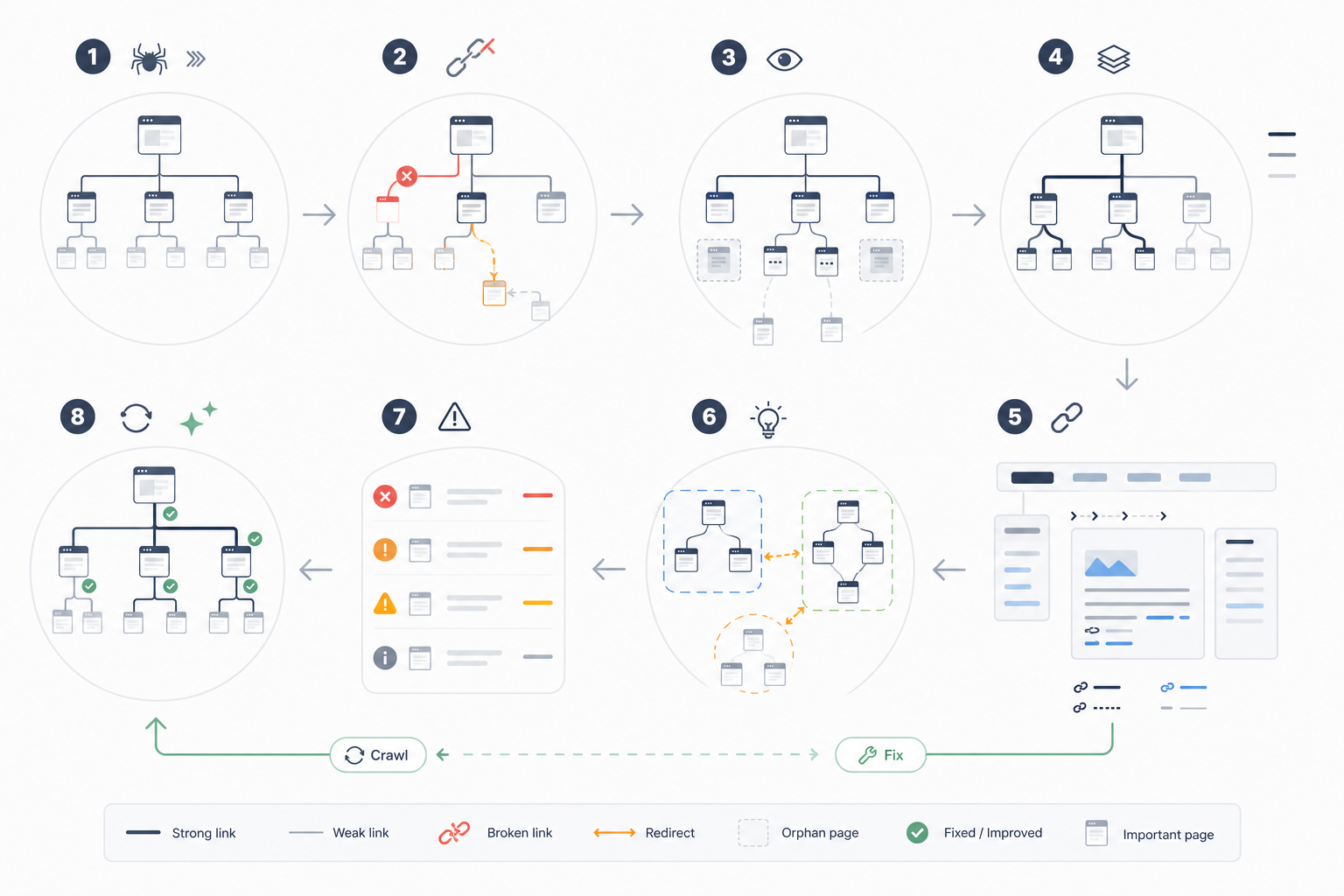
An internal linking audit evaluates how pages are connected across the website, identifies broken or weak pathways, and checks whether important URLs receive clear, relevant, and crawlable internal support. Internal-link evaluation can also form one component of a wider SEO audit when the objective is to assess technical, on-page, content, targeting, and authority issues across the website.
1. Crawl the Website
Collect information such as:
- Internal URLs
- Source URLs
- Destination URLs
- Status codes
- Anchor text
- Crawl depth
- Incoming link counts
Use the crawl as the baseline representation of the internal-link environment.
2. Identify Broken Internal Links
Find links pointing to:
- 404 pages
- Removed content
- Invalid URLs
- Other non-functional destinations
Update or remove broken pathways according to the appropriate destination.
3. Review Redirected Internal Links
Identify links pointing through:
- Redirects
- Redirect chains
- Old URLs
Where appropriate, update the internal link so it points directly to the final intended destination.
4. Find Orphan and Weakly Connected Pages
Compare crawl data with:
- XML sitemaps
- CMS inventories
- Analytics
- Known URL lists
Identify valuable pages receiving little or no useful incoming internal support.
Do not assume every orphan page deserves integration. Some URLs have little strategic purpose.
5. Review Crawl Depth and Accessibility
Evaluate whether strategically important pages remain reasonably easy to reach.
Avoid using one universal click-depth limit.
A deeper URL can still be appropriately placed depending on the website architecture.
6. Review Incoming Internal-Link Distribution
Compare internal support across pages.
Look for:
- Important pages with weak support
- Low-value pages receiving disproportionate prominence
- Sections with uneven connectivity
Treat counts as diagnostic information rather than link targets.
7. Review Outgoing Internal Links
Identify:
- Irrelevant destinations
- Outdated links
- Repetitive links
- Missing useful connections
- Obsolete pages
8. Review Anchor Text
Check whether anchors:
- Describe the destination accurately
- Fit naturally
- Avoid misleading wording
- Avoid unnecessary repetition
- Distinguish similar destinations clearly
9. Review Contextual Relevance
Confirm that source and destination pages have a meaningful relationship.
The relationship can be:
- Topical
- Navigational
- Structural
- Commercial
- User-journey based
10. Review Internal PageRank Distribution
Identify well-connected or externally linked pages that can logically support important related destinations.
Do not attempt to distribute internal authority evenly.
11. Review Architecture and Topic Relationships
Evaluate relationships between:
- Categories
- Hubs
- Supporting articles
- Products
- Services
- Commercial pages
Find disconnected sections and missing cross-links.
12. Review Navigation Elements
Check:
- Menus
- Breadcrumbs
- Sidebars
- Related-content modules
- Footer links
Separate sitewide architecture issues from page-level contextual problems.
13. Find Missing Internal-Link Opportunities
Identify relevant source pages that can support important destinations.
Keep this focused on audit findings rather than repeating the entire opportunity-discovery process.
14. Check Excessive or Redundant Linking
Identify:
- Repeated links
- Obsolete links
- Irrelevant destinations
- Distracting placements
Do not remove useful links simply to reduce the total number.
15. Prioritize Audit Findings
Prioritize issues according to:
- Importance of affected pages
- Crawl impact
- User impact
- SEO relevance
- Implementation effort
16. Implement and Re-Crawl
Apply the required changes.
Then crawl the site again to confirm:
- Broken paths were corrected.
- Redirected links were cleaned where appropriate.
- Important destinations became connected.
- No new errors appeared.
17. Maintain Internal Links Over Time
Repeat relevant checks after:
- Website migrations
- Redesigns
- Large publishing cycles
- Content consolidation
- URL changes
- Architecture changes
Internal-link maintenance prevents previously strong structures from degrading as the website evolves.
Which Tools Help With Internal Linking?
Internal linking tools help map existing links, identify broken or weak relationships, surface possible opportunities, assist implementation, and monitor internal-link health at scale.
| Tool | Best For | Main Internal-Link Capability | Platform / Site Type | Automation Level | Main Limitation |
|---|---|---|---|---|---|
| Link Whisper | Contextual suggestions | Link suggestions, incoming-link visibility | Primarily supported CMS environments | High | Suggestions require editorial validation |
| Linkilo | Link analysis | Relationship monitoring and opportunity discovery | Supported website environments | Medium to High | Platform compatibility varies |
| LinkStorm | Sitewide opportunity discovery | Contextual relationship analysis | Broader website use | High | Candidate relationships still require review |
| SEOJuice | Scaled implementation support | Opportunity discovery and automation | Supported environments | High | Automation requires quality control |
| Yoast SEO Premium | WordPress assistance | Related-content and internal-link suggestions | WordPress | Medium | Limited to CMS workflow |
| AIOSEO | WordPress link management | Link reports and Link Assistant suggestions | WordPress | Medium | Suggestions are not final editorial decisions |
| Rank Math | Lightweight CMS assistance | Internal-link suggestions | WordPress | Medium | Less suited to large-scale architecture analysis |
| Screaming Frog | Crawling and auditing | Source-target mapping, anchors, status codes, crawl depth, orphan analysis | Most crawlable websites | Low to Medium | Primarily diagnostic |
| Semrush Site Audit | Structural monitoring | Broken links, crawl depth, weakly linked pages | Most websites | Medium | Third-party audit interpretation required |
Tool categories serve different purposes.
Crawlers and Audit Tools
Tools such as Screaming Frog help:
- Map source-to-destination relationships
- Find broken links
- Measure crawl depth
- Extract anchors
- Identify redirects
- Compare incoming internal links
- Support orphan analysis
They are primarily diagnostic.
Opportunity Tools
Dedicated internal-linking platforms can surface candidate relationships based on:
- Content similarity
- Keyword mentions
- Existing link patterns
- Page relationships
These suggestions require editorial validation.
CMS Tools
WordPress plugins such as Yoast, AIOSEO, and Rank Math can support editors while they create or update pages.
They provide convenience rather than replacing an internal-link strategy.
Automation Platforms
Automation can support large-scale discovery or implementation.
Automation is useful when:
- The website is large.
- Content production is frequent.
- Manual opportunity discovery becomes impractical.
Automated placement still requires quality control.
Monitoring and Re-Crawling
After changes are implemented, crawling tools can verify:
- New links
- Broken destinations
- Redirects
- Incoming-link changes
- Crawl paths
Software can improve efficiency, but similarity scores and automated suggestions do not determine whether two pages genuinely belong together. Internal-linking platforms therefore sit within the wider ecosystem of SEO tools, alongside software for crawling, keyword research, technical analysis, rankings, backlinks, analytics, and reporting.
When Should You Use an Internal Linking Service?
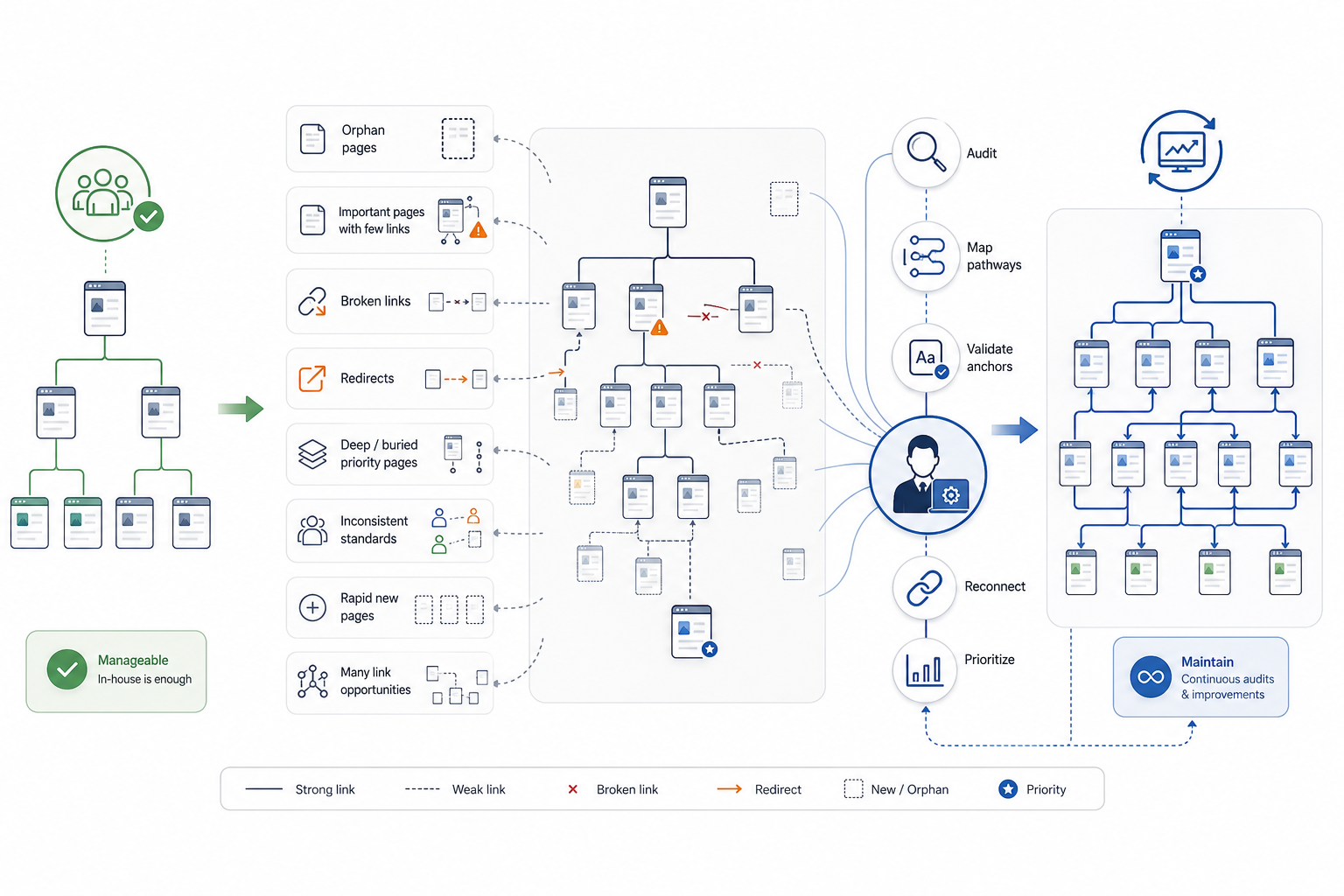
An internal linking service becomes useful when the website is too large, structurally complex, or content-heavy to manage reliably in-house, or when recurring audits reveal problems the internal team cannot diagnose and resolve consistently.
Smaller websites with clear architecture and capable SEO teams can often manage internal linking without external support.
Specialist help becomes more useful in several situations.
- Use a service when the website becomes large
- Ecommerce stores, SaaS platforms, publishing websites, marketplaces, and large resource libraries can contain thousands or millions of internal relationships.
- Specialist support can help map and prioritize those relationships at scale.
- Use a service when important pages are poorly connected
- Audits can expose:
- Orphan pages
- Underlinked commercial pages
- Disconnected sections
- Weak priority-page support
- The objective is to create the right relationships rather than simply increase link counts.
- Audits can expose:
- Use a service after migrations or redesigns
- Structural changes can create:
- Broken links
- Redirected internal paths
- Lost navigation
- Changed categories
- Weakened internal relationships
- A specialist can compare old and new structures and repair priority pathways.
- Structural changes can create:
- Use a service when content production scales
- Rapid publication can cause new pages to become isolated from older relevant content.
- Ongoing mapping can integrate new URLs more consistently.
- Use a service when internal linking is inconsistent across teams
- Different editors, SEO teams, ecommerce managers, and content teams can apply different linking standards.
- External support can establish governance around mapping, anchor use, page priorities, and maintenance.
- Use a service when internal resources are limited
- Teams can lack:
- Time
- Crawling expertise
- Content-mapping capacity
- Editorial resources
- Implementation bandwidth
- Teams can lack:
- Use a service when audits repeatedly show structural problems
- Persistent issues can include:
- Broken links
- Orphan pages
- Important pages buried too deeply
- Redirect-heavy paths
- Irrelevant links
- Uneven internal support
- Persistent issues can include:
- Use a service when priority pages require stronger internal support
- Important products, services, categories, features, or commercial pages can require more relevant incoming pathways.
- Weak rankings alone do not prove that internal linking is the cause.
- Use a service when multiple topic groups require mapping
- Large content libraries can need deeper analysis of:
- Hubs
- Supporting pages
- Overlap
- Cross-links
- This does not require forcing rigid topic silos.
- Large content libraries can need deeper analysis of:
- Use a service when automation requires human validation
- Automated tools can surface thousands of candidate links.
- Specialists can review:
- Relevance
- Destination quality
- User usefulness
- Anchor context
- Strategic value
- Use a service when maintenance must be continuous
- Large websites can require recurring:
- Crawls
- Link monitoring
- Orphan detection
- New-page integration
- Structural updates
- Large websites can require recurring:
A strong internal linking service can include:
- Site crawl and structural analysis
- Priority-page identification
- Internal-link opportunity mapping
- Anchor-text review
- Orphan-page remediation
- Underlinked-page remediation
- Implementation support
- Source-to-target recommendations
- Validation
- Re-crawling
- Ongoing maintenance
Recommendations are most useful when they remain transparent.
For example, a service can document:
- Source URL
- Relevant surrounding context
- Suggested anchor
- Destination URL
- Reason for the link
This allows every recommendation to be reviewed before implementation.
Avoid evaluating internal-linking services by the number of links they promise to add.
A strong service improves whether important pages are logically connected, discoverable through normal site pathways, useful to navigate, and appropriately integrated into the website architecture.
Need links on real SaaS and business websites?
Links are placed after your approval, on sites with guaranteed DR and traffic, with a 1-year replacement guarantee.

